Product teams face hurdles due to a lack of efficient tools. Meanwhile, the demand for fast product launches has grown considerably.
The purpose of this guide is to present the top tool solutions available for product management. Also, we will provide effective ways to prioritize product requirements based on the capabilities to integrate with engineering and work together on product development by creating synergy within product teams.
The tools reviewed in this guide will allow product managers to develop products faster and maximize the productivity of product teams while delivering maximum value to their customers.
What Is Product Management Software?
Product management software is a tool specifically designed to centralize and maximize the efficiency of all stages of the product development lifecycle.
Product managers and the entire team of associates working on this development effort use structured workflows to perform essential functions. Throughout the entire process, from ideation and customer input through prioritization, assignment of resources, and visualizing a product development roadmap.
The effectiveness of the modern product management team is directly measured by its capacity to translate high-level product strategy into a detailed, executable product roadmap.
Evaluation Methodology for Product Management Software
Our methodology for determining the best tools for product management is firmly based on how these tools will affect a company’s daily operations.
To ensure transparency throughout the review process, each review is divided into four sections that cover how the tool meets the above criteria:
- Why I Picked It: The strategic rationale and the specific “problem-solver” status of the tool.
- Key Features: A technical breakdown of functionalities that provide a data-driven operational advantage.
- Tool’s Integrations: How the tool achieves system integration within a professional product stack.
- Pros and Cons: A candid assessment of operational strengths and potential scaling limitations.
20 Best Product Management Tools For Faster Time-to-Market in 2026
Plan Comparison Table for Product Management Software
|
Tool | Best For | Primary Price (Standard) |
Strategic Focus |
|
Epicflow |
Multi-Project Resource Management | €22.5/month |
Predictive Flow & Portfolio |
|
Jira |
Agile Execution & Dev Teams | $9.05/month /user |
Task Execution |
|
monday dev |
Customizable Work OS | €12 seat/month |
Workflow Management |
|
Canny |
User Feedback & Prioritization | $19/month |
Customer Discovery |
|
airfocus |
Portfolio Roadmapping |
Contributor Seat Models |
Strategic Prioritization |
|
Amplitude |
Behavioral Product Analytics | $49/month |
Data Measurement |
|
Miro |
Collaborative Whiteboarding | $8/seat/month |
Visual Ideation |
|
Figma |
UI/UX & Prototyping | $55/month |
Product Design |
|
ProdPad |
Outcome-Based Roadmaps | $24/seat/month |
Discovery & Ideation |
|
Confluence |
Knowledge Management | $6.70/month |
Documentation & Truth |
1. Epicflow (Best for Multi-Project Resource Management)
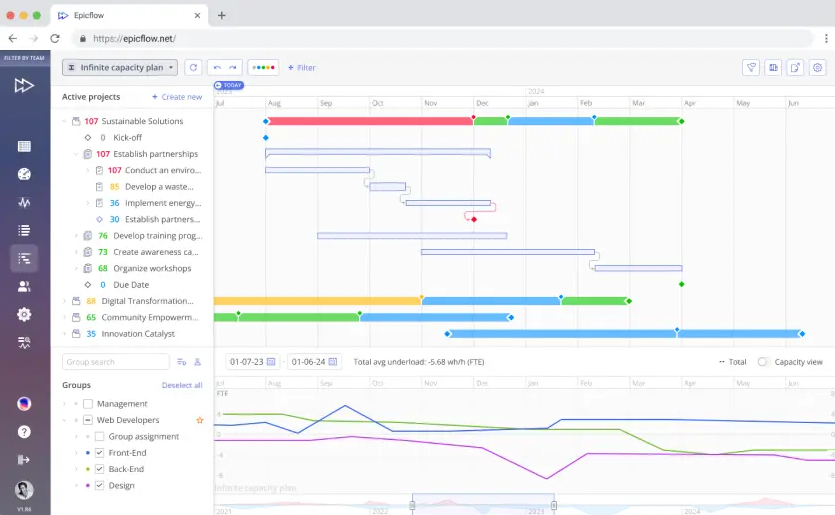
Epicflow is an innovative solution that offers enterprises the best possible tools to deal with the resource contention inherent in the multiple parallel projects on which they operate. It stands as a premier multi-project resource management platform, providing clients with the insight necessary to use a strategic approach to optimize task assignments and better anticipate various points of limitation.
If you want to see how this works in practice, don’t hesitate to book a call with our experts and discover the benefits of Epicflow.
Why I Picked Epicflow
When evaluating product management software for large-scale operations, many product management solutions fail to accurately model shared resource capacity, resulting in delays along critical paths for product development.
Epicflow addresses this key challenge by pulling together data from existing project management solutions, which allows businesses to synthesize their data into a single predictive flow map.
This capability makes Epicflow a critical product management solution for product managers who require enterprise-level stability and the timely launch of their products.
Epicflow Key Features
- Epicflow’s Predictive Flow Analysis is a main resource conflict indicator that helps visualize capacity planning well in advance and assists in risk alleviation. The algorithms use predictive analytics to forecast the workflow and thus are able to indicate bottlenecks even 12 months ahead.
- Epicflow provides multi-portfolio management that allows managers to have one central, panoramic view of all ongoing product development projects.This enables them to make informed, rapid decisions regarding any necessary shifts in priority—part of the broader product strategy.
- Critical Chain project management principles are used by Epicflow through Buffer Management methods, allowing for the incorporation of time-saving aspects of the CCPM methodology and focusing execution on the most severely constrained resources, thereby improving total lead time across all projects.
- System Integration: A core process of combining several products into one system with the purpose of increasing their efficiency and enhancing their inventory functionality. This allows Epicflow to act as the master controller for your entire product stack.
Epicflow Integrations
This software is an overlay solution that derives its strength from integrating directly with your current product stack. Epicflow includes integrations with Jira, Microsoft Project, Primavera P6, and Azure DevOps, and the ability to synchronize with the databases of many project management tools via an application programming interface (API). This integration does not disrupt your current development processes and provides you with additional strategic resource optimization benefits.
Pros:
- The best and most reliable resource conflict predictor, along with the resolver, in a multi-project environment.
- Provides a significant increase in time-to-market reliability by optimizing for critical chain scheduling.
- Provides a way to manage a portfolio from an overall perspective and links execution to the overall product strategy.
Cons:
- A steeper learning curve than task-oriented product management software.
To get more information about how Epicflow can drive your project to success, please contact Epicflow’s experts who will demonstrate the benefits of using our system.
2. Jira
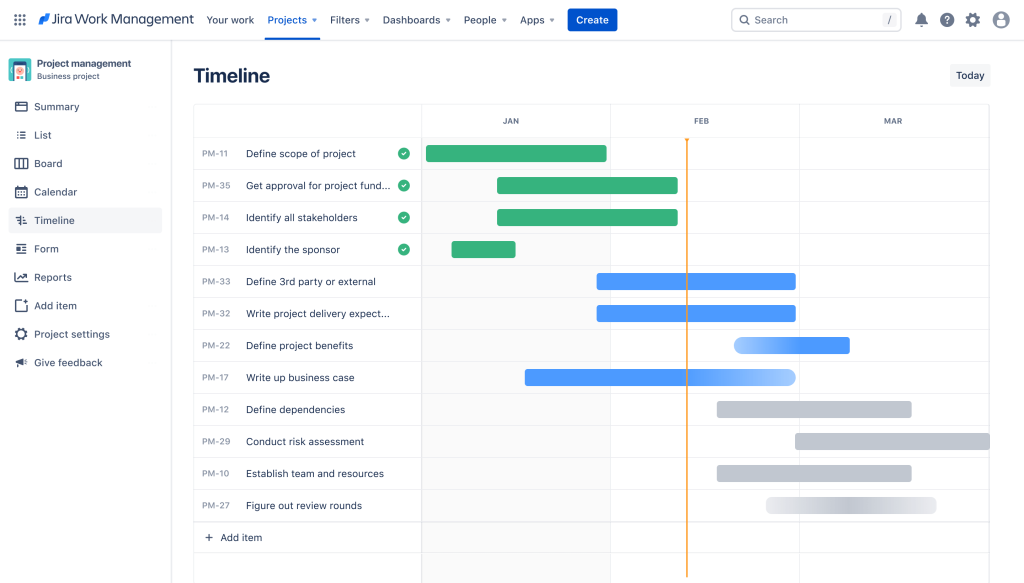
Why I Picked Jira
Jira is a foundational project management tool used to define the software development lifecycle, as opposed to being considered primarily as a product management solution. Being the ultimate source of truth for how engineering will execute against its plan is critical to being successful at developing products.
This tool also released Jira Product Discovery, which has further defined the boundary between product management and product development by providing product managers with direct access from ideation to prioritization of work that can be pulled into the development backlog, thus purposefully removing a lot of the friction associated with synchronizing these two areas of focus.
Jira Key Features
- Configurable Workflows: Helps product managers to design a custom, intricate workflow that reflects their straightforward method of working (Scrum, Kanban, or hybrid).
- Integrated Backlog & Sprints: Gives the product team a method to handle their roadmap via their backlog and the sprints they can employ to carry it out (tasks, velocity, plans) in their setting.
- Jira Product Discovery (JPD): A layer that captures insights and helps in prioritizing strategic roadmapping before issues go into the backlog.
- Robust Reporting: Provides detailed metrics on cycle time, lead time, burn-down time, and velocity that help to hold product teams accountable and continually improve.
Jira Integrations
This software is the glue that holds together the entire product stack for the product team.It has deep and built-in connections to the core product development tools of today (Confluence for documentation; Bitbucket/GitHub for source code management; Slack for communication) and has dozens of built-in connections to third-party analytic tools (Amplitude, Mixpanel) and user feedback collection (Canny).
Pros:
- The dominant platform in the industry for successful recruitment and onboarding, as virtually all software developers have had exposure to it.
- Supports unlimited growth in both the number of users and the number of projects, thus making it appropriate for enterprise-class customers/companies that are growing very rapidly.
Cons:
- Complexity and configuration options: for smaller/non-technical teams to be able to manage effectively, thus creating much more effort to maintain the platform.
- Steep learning curve: many different configurations and customization options that can be confusing for new product managers and users who are not technical.
- Poor user experience (UX): Compared to other product management tools, Jira is not nearly as intuitive to use, which creates tension between business and engineering users.
- Price: Jira can be very expensive, particularly for growing teams. In addition to the subscription fees, teams need to purchase additional capabilities (or third-party add-on products) to fill in areas where the core Jira does not meet their needs.
Learn how leading product teams solve 2026’s toughest challenges. Subscribe to Digest.pro and implement best practices into your workflow today.
3. monday dev
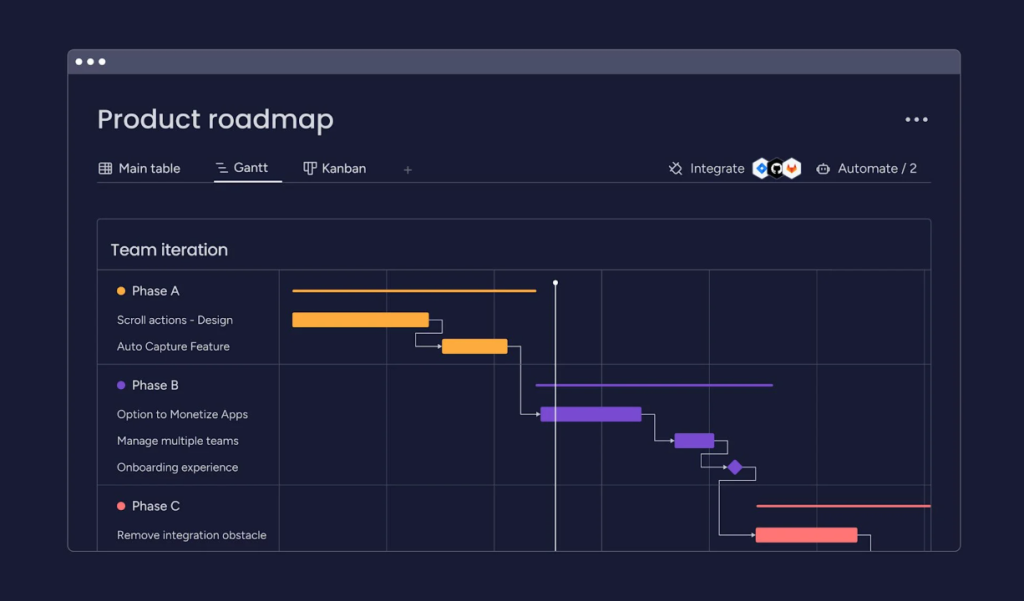
Why I Picked monday dev
The flexible and visually appealing monday dev has a great deal of flexibility compared to the rigid traditional methods of project management. It is beneficial to product managers who can create custom boards that are specific to a product development phase while maintaining full control over cross-functional visibility.
This provides product teams with a single point of contact for managing multiple workflows—for example, discovery tracking through sprint management, without being restricted by a rigid methodology.
monday dev Key Features
- Flexibility of Work OS:Provides product teams with the ability to create custom boards, create custom dashboards, and create views that are connected to data from a number of different sources (tasks, budgets, and timelines); therefore, providing a single visual representation of all data in one centralized location.
- Automate Low Code:Contains a large collection of automated recipes that allow product managers to automate repetitive project management tasks(status changes, notifications, etc.) so that the workflow of product development will be shortened.
- Roadmaps Visually: There are several different ways to view work boards on a visual roadmap, including Gantt, Kanban, and Timeline. This is necessary for communicating the status of the product roadmap and monitoring how multiple pieces of the product roadmap are going to impact stakeholders.
- Dashboards Visualize Data: Real-time visual dashboards allow product managers to use various types of reporting methods for KPI, status reporting, and data synthesis for any project.
monday dev Integrations
This service provides integrations with essential components of a modern product stack, collaboration tools, and a variety of CRM and analytics tools. Its API allows for easy integration of other product management tools.
Pros:
- Better visual user experience: The highly engaging and easy-to-use interface encourages buy-in from non-technical as well as technical users.
- Customizable workflows: With its unique ability to let you configure both your boards and your workflow, monday dev offers a level of flexibility that is unmatched in the marketplace.
Cons:
- Cost scalability: The pricing structure of monday dev can quickly get very high relative to the number of users within a larger organization, and it may require tiered pricing plans as companies scale.
- Governance and sprawl: Because of the immense flexibility that monday dev offers, it can become easy to create too many boards, have inconsistent board usage, and create data silos if adequate internal governance is not established early.
- Native product management capabilities:Even though there is flexibility in how users can use the native product managementfeatures, many of them will require either custom column configurations or the aid of third-party applications.
4. Canny
Why I Picked Canny
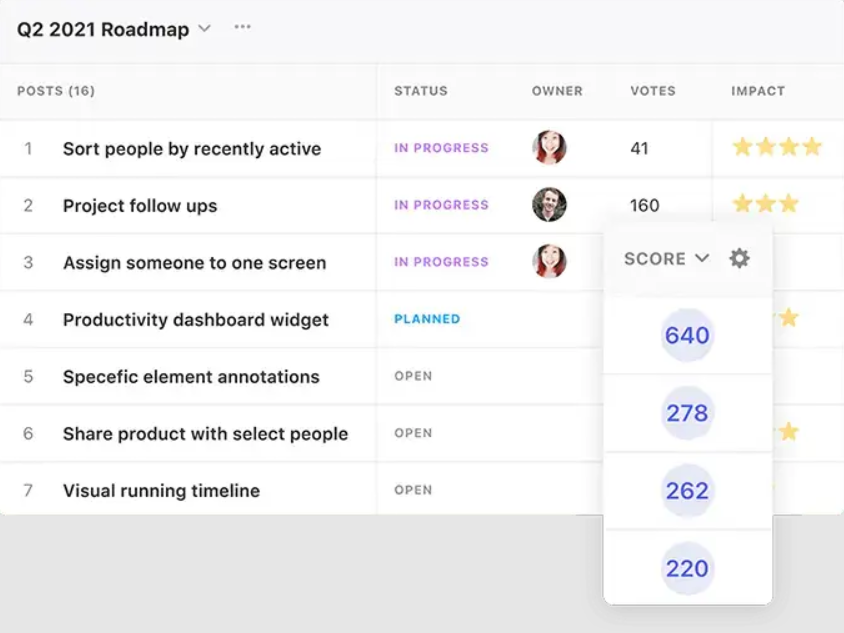
Canny is a tool that provides dedicated focus on how to structure raw user feedback to build a solid product strategy with actionable products. The app serves as a unified reference for all customer insights and imparts to product managers the power to measure product demand and decide in an unbiased manner the most logical ordering of feature development. As a result of this supplementary facilitation, Canny is now an instrument for any product team that is committed to data-driven product discovery in creating a successful product.
Canny Key Features
- Feedback collection in one place: Canny provides customers with a central portal to input their ideas, vote on others’ ideas, and leave comments, which provides a complete repository of customer insights in one place.
- Automated prioritization of feedback: As a product manager, you can quickly link subjective customer feedback with a variety of objective customer attributes (e.g., plan, revenue) so that you can choose what attributes you want to include or exclude when applying data-driven prioritization frameworks.
- Public status communication:Canny allows product teams to publicly share the progress of the ideas submitted to their products and customers, thus improving customer retention rates and increasing transparency.
- Product roadmap view generation:Canny automatically generates a shareable product roadmap view from their parts, developed from feedback received from customers through the voting process and from customer experiences captured through a feedback collection tool.
Canny Integrations
The purpose of Canny is to link the feedback we receive during the initial stages of product development and how that feedback flows to develop new features in the final stages of product design. Some examples of how Canny has been integrated with other platforms include being able to receive feedback in real-time from customers using Slack and Intercom, and being able to track which requests have the most urgency for development.
These kinds of connections allow Canny to effectively connect both phases of product development,the execution of which requires capturing the correct product stack through discussions that occur in the discovery phase and during actual development.
Pros:
- Laser focus: A very specialized tool that eases the administrative burden of handling significant amounts of raw customer input.
- Demand metrics: It offers measurable and objective references for demand by presenting valid, quantifiable metrics to increase the degree of objectivity of prioritization.
Cons:
- Narrow functionality: It cannot replace most parts of the entire project/task management process, as it does not have a full suite of functionalities in the PM category and needs to be integrated with a separate PM system.
- Price constraints: Pricing for utilizing the functionality of Canny is generally a function of either user count or customer revenue, which may pose a financial barrier to high-volume/populated companies.
- Customization options are limited for growing companies in comparison to the larger PM platforms for advanced reporting capabilities and ways of categorizing feedback.
Do not let everyday activities hinder your professional growth. Take the first step to become a better leader and join the Digest.pro community right now.
5. airfocus (Best for Portfolio Roadmapping)
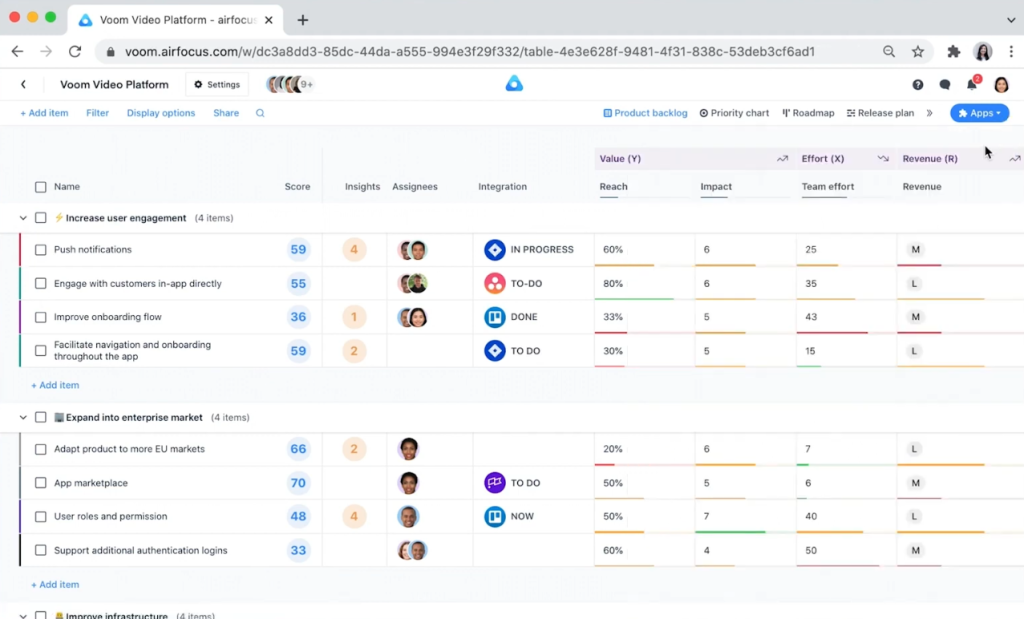
Why I Picked airfocus
Airfocus was selected for its specialized degree of focus on portfolio management and advanced prioritization logic, which is unique compared with general roadmapping tools and is used by product leaders to apply multiple scoring models to initiatives on various product roadmaps.
The use of multiple scoring models helps product leaders match their resources to the highest strategic value for their organization. This ability to apply multiple scoring models to multiple roadmaps is critical to optimal product strategy in complex multi-product organizations.
airfocus Key Features
- The Modular Prioritization Engine enables product managers to define their own scoring methods and to create matrices or charts for making objective decisions about which features to prioritize according to their value, effort, and risk.
- Portfolio management gives executives an aggregate view of product roadmaps from multiple products as a means of facilitating decision-making regarding investments in all product lines.
- Prioritization templates provide predefined methods for prioritizing between products and/or teams, thereby standardizing the way prioritization is completed by different product teams.
- Two-way synchronization automatically synchronizes strategic roadmaps and execution backlogs across integrated systems in real time.
airfocus Integrations
The airfocus product uses deep integration to connect effectively with all major components of a company’s product stack. This deep integration helps to ensure that strategic prioritization decisions are always accurately represented within the engineering backlog, reducing the likelihood of data drift and providing a faster route to the production of a product.
Pros:
- A significant degree of depth and flexibility in the development of a customizable prioritization framework.
- Currently unmatched transparency and visibility across complex portfolios/multi-product product roadmaps.
Cons:
- Small product teams/single-product use cases may find airfocus to be overwhelming.
- airfocus is a heavily strategic product with no core project execution functionality, so companies will need a separate project management tool.
- The pricing structure reflects an enterprise solution as far as portfolio management is concerned.
6. Amplitude (Best for Product Analytics)
Why I Picked Amplitude
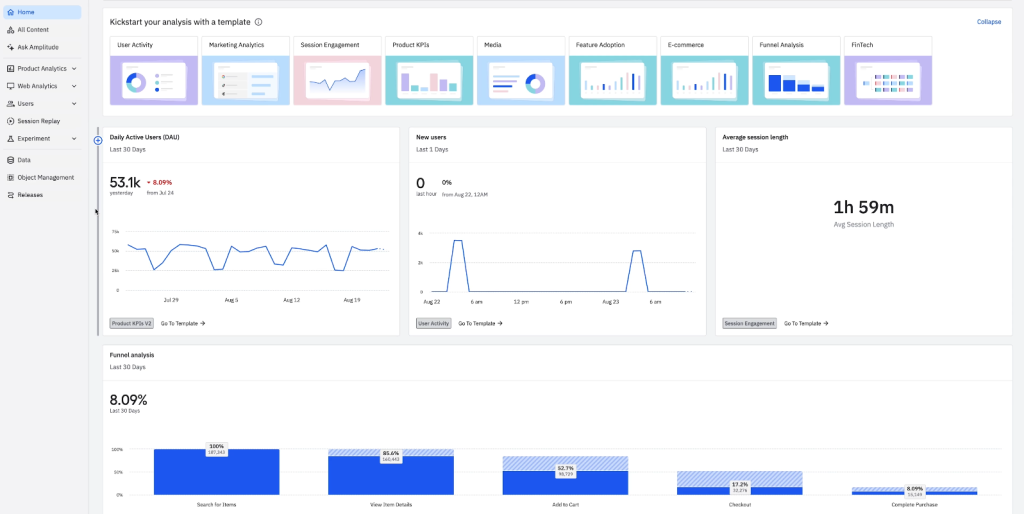
Amplitude is the go-to behavioral product analytics tool that data-driven product managers rely on. It maps out the user’s journey with precise detail, highlighting the conversion funnel and retention cohorts, thus enabling product managers to validate their hypotheses quantitatively and gauge the impact of product features.
Amplitude Key Features
- Behavioral cohorts: As a product manager, using behavioral cohorts provides you with the ability to segment your users according to specific in-app actions that allow for focused, targeted analysis of both feature adoption and retention.
- Conversion funnels: Provides flexible and rapid analyses of complex multi-step user flows, with immediate access to data showing where users drop off in the funnel and where they encounter friction to maximize their experience and utilize features.
- User journey mapping: Visual displays clearly show what users do when using the product, with potential opportunities to view unusual behaviors and to create a hypothesis to perform product discovery.
- Governance and data quality: Provides many tools that will help product managers enforce data schemas to help ensure data continuity and reliability of data across the entire data pipeline, one of the key components of the product system.
Amplitude Integrations
This tool is built to be the centerpiece of your product stack, connecting with platforms for executing work and platforms for communicating, and shining brightest in connecting to your data sources and your customer data platforms. Amplitude also integrates with feedback tools to provide qualitative insights along with the quantitative data it provides, completing the measurement loop for product teams.
Pros:
- Industry-leading flexibility and depth of access for true behavioral product analytics through event-based.
Cons:
- Engineers must do an extraordinary job of instrumenting (setting up) all of the data, which can be a long and complex process.
- To fully utilize all of Amplitude’s capabilities, product managers will have to invest a substantial amount of time learning the system.
- Pricing is based on the event volume you generate from your customers, so Amplitude can become very expensive for high-traffic products.
7. Miro
Why I Picked Miro
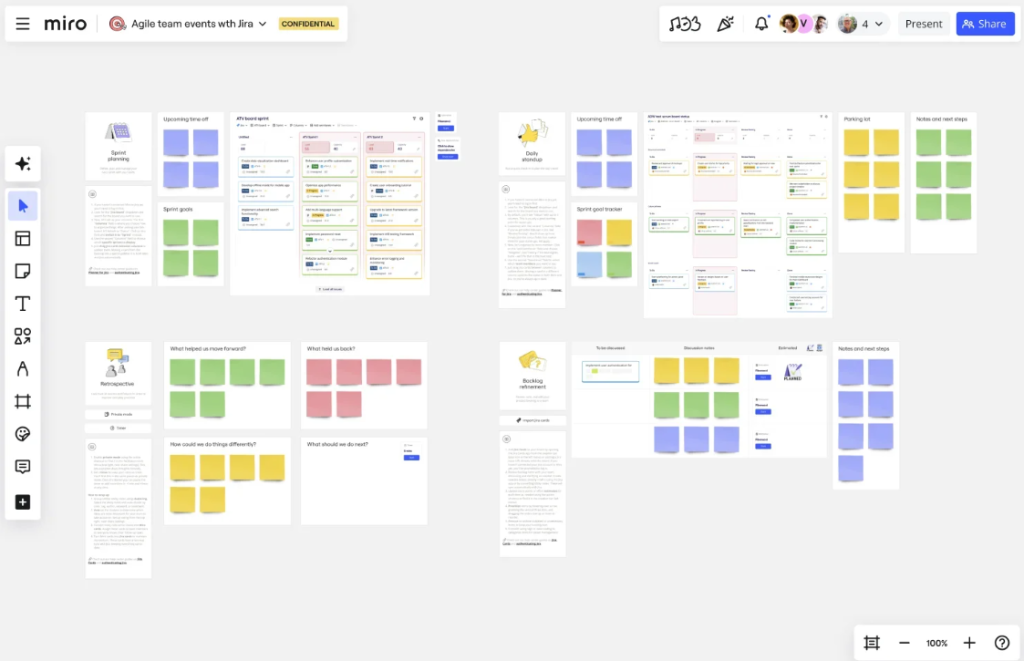
Miro is a digital whiteboard that allows product teams to collaborate visually and collaboratively on a high level. This collaborative tool is primarily used during the initial product discovery and planning process.
Miro Key Features
- Miro represents an ideal canvas whose size is not limited, so it is suitable for user journeys, ecosystem diagrams, and product roadmaps.
- Miro supports real-time collaborative editing, comments, and voting by product teams as well as other stakeholders.
Miro Integrations
This tool has two-way integration capabilities with core project management tools and also allows for content to be integrated with documentation platforms and communication tools. Visual artifacts created within Miro will be accessible throughout the entire product development ecosystem.
Pros:
- Exceptionally high levels of visual flexibility and usability were achieved for the purpose of creating, developing, and conceptualizing new product ideas via ideation sessions.
Cons:
- Miro lacks features that would typically be found in structured database product management software, such as advanced prioritization and release planning capabilities.
- Without proper internal governance, teams can quickly become unorganized, leading to “board sprawl.”
- As boards become larger or contain many different types of content added within them, the performance of Miro may decline due to the volume and/or number of items embedded within each board.
8. Figma
Why I Picked Figma
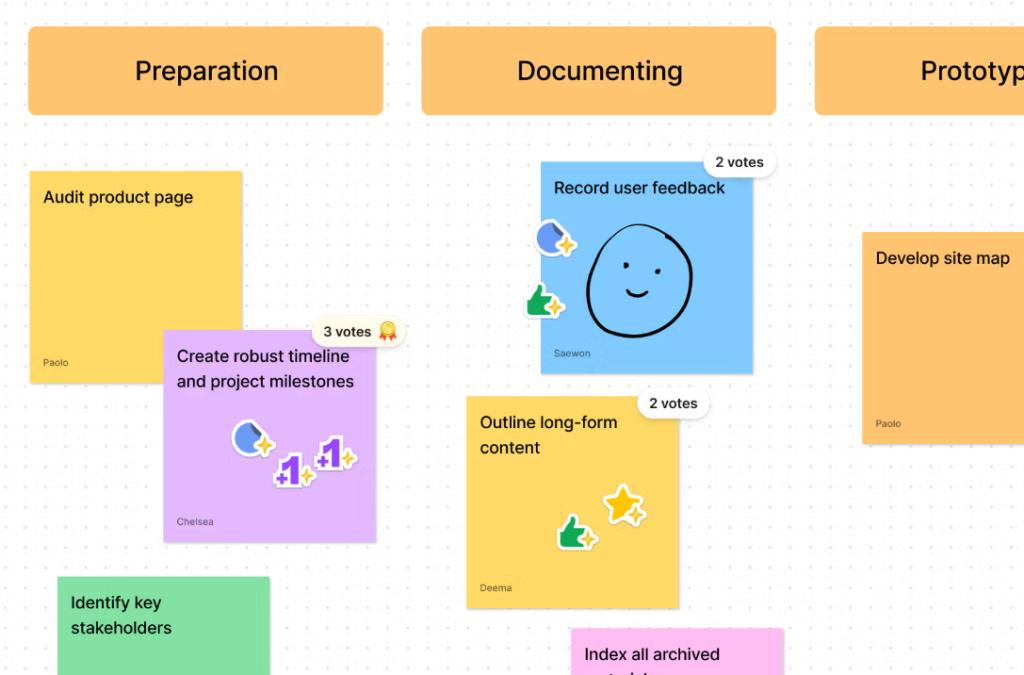
As the staple of collaborative design in the creative industry, Figma’s presence is a must for any product manager who is keen on having a smooth product development workflow between design and engineering. Being entirely online, the product teams have the liberty to reach out to the prototypes, leave feedback that is in their context, and even check out the design specifications with a snap of a finger. It transforms the design file from a static deliverable into an active part of the product stack.
Figma Key Features
- Collaborative prototyping: Users are enabled to build interactive prototypes and perform usability testing right in the same file as the design.
- Dev mode (Inspect): By far, this feature helps to speed up the product development process. It comes with very few implementation errors, as it automatically creates snippets of code (CSS, iOS, Android) and design tokens; thereby, design handoffs are greatly accelerated.
- Figma widgets (Figma community): Product managers are empowered with this feature to add more specialized tools (e.g., estimation widgets, prioritization matrices) directly to the design work area.
- Component library (design systems): The main purpose is to keep design consistent when it is done on a large scale. At the same time, more rapid and reliable feature iterations become possible.
Figma Integrations
This service integrates deeply with project management tools for linking design files to execution tasks, as well as documentation platforms (Confluence, Notion). Plugins allow connection to feedback tools and user research platforms, completing the design segment of the product stack.
Pros:
- Real-time collaboration from anywhere in the world.
- Cloud-based product design.
Cons:
- Requires a longer learning period than expected for product managers without a background in graphic design or UX.
- To achieve the best results, users should always be connected to a strong and fast Internet connection.
Professionals in this sector are characterized by a dynamic adaptation to changing work patterns. Keep your working skills up to date by being a part of our community, which is accessible through Digest.pro.
9. ProdPad
Why I Picked ProdPad
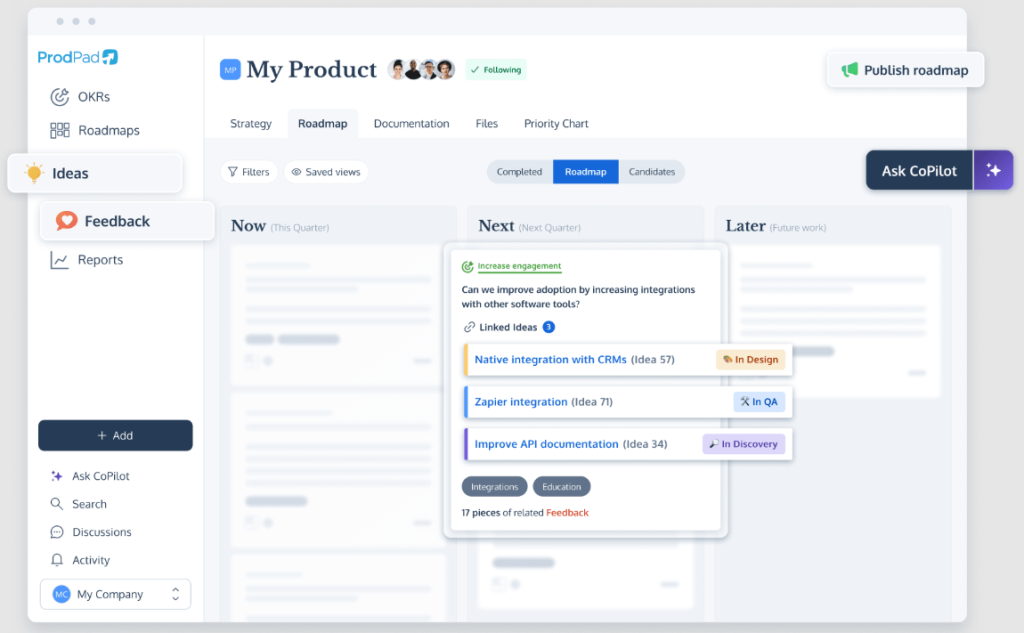
ProdPad is a product management tool that’s great because it links your product strategy to your roadmap, mainly focusing on always finding out what works. It is a great tool for brainstorming new ideas and testing them out. Furthermore, it provides product managers with attractive, flexible roadmap templates—such as the Now/Next/Later idea—which helps you to not be overly fixated on dates.
ProdPad Key Features
- Idea management: It puts all your ideas in one spot, scores them, and helps you work on them using facts, which keeps your product strategy going.
- Customer feedback:It hooks up what customers say to certain ideas, so product managers can prove why each feature matters.
- Bendable roadmaps: It pushes roadmaps that fix issues instead of being all about release dates, which means you can move faster when making your product.
- Tests: It has tools for watching product guesses and tests, so you can keep finding out what’s what and checking if it’s true.
ProdPad Integrations
This software links what you plan to do with what you’re really doing by working with. It is also compatible with feedback points; therefore, customer work is directly sent to the people who are making the product, which is a great way to keep the whole thing running smoothly.
Pros:
- Turning customer feedback into a real product plan.
Cons:
- It doesn’t have project management stuff built in, so you need to link it up with another tool for the tech team.
- Time for adaptation: The way it plans things based on results might be a change for people who are used to seeing timelines, and you may need to give them a chance to get used to it.
10. Confluence
Why I Picked Confluence
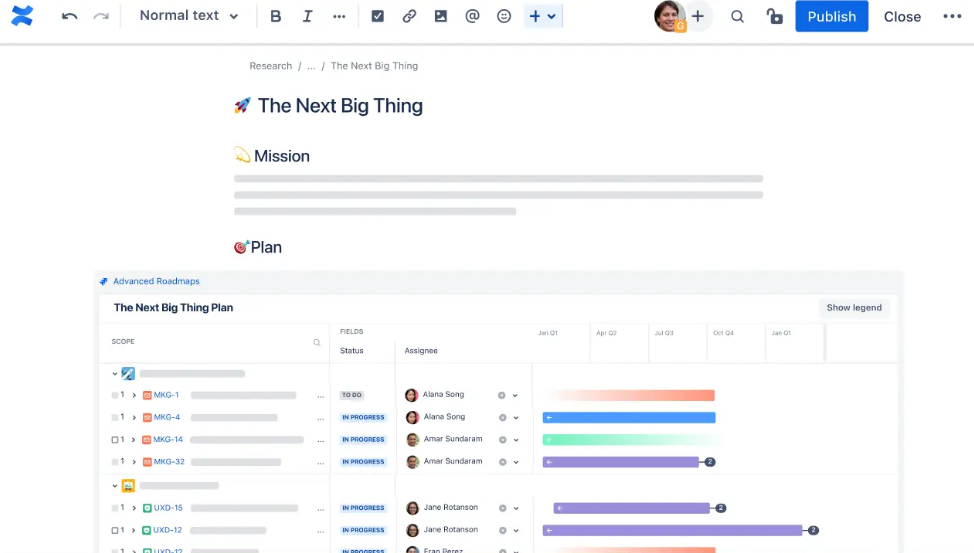
I’ve included Confluence because having a solid knowledge base is key to growing product development and getting new folks on board. It’s not just for product management, but it works as a central wiki. This is where all the important stuff lives and stays current—things like product requirement documents, tech specs, meeting notes, and product strategy.
Confluence Key Features
- PRD templates:It has templates and macros to help you write product specs and strategy documents.
- Collaborative whiteboarding:Real-time co-authoring capabilities which help to reach a rapid consensus during the product discoveryprocess.
- Content hierarchy & Spaces:Organized way for product managers to partition their contents per project/dept while keeping them search-engine-accessible.
Confluence Integrations
This tool is designed to work harmoniously with the whole family of Atlassian products. However, it also allows connections through APIs and plugins with other tools such as Slack, Figma, and Miro. So, it can be the headquarters where all product teamsneed to share information.
Pros:
- Confluence handles detailed technical documentation, which is necessary for the continuation of the engineering teams’ unity.
Cons:
- It’s not as easy to use or as nice-looking as some other tools like Notion, especially for those who aren’t techy.
- The cost can go up as more people start using it outside the main product teams.
- Searching can be a pain if you have a lot of info or if things aren’t organized well.
Strategic Product Management Tools: Concise Reviews
Productboard
Productboard is awesome because it connects what customers want right to your product plan. It collects all the user feedback in one place, the so-called Insights Board. This way, product managers can easily spot what is trendy and what is not, and then decide feature priorities based on what matters and who cares. It really makes your product plan better. Plus, Productboard gives you cool-looking roadmaps that are ready to show off and works with other tools you use.
ProductPlan
ProductPlan is great at making product roadmaps that are easy to read and look good. As easy as can be, with drag-and-drop. It is great in case you want to discuss your future plans without the necessity of dealing with task management. It’s an excellent tool for product managers to use if they want to keep everyone informed, and it can be combined with other product management tools for the less exciting parts of the work.
Aha! Roadmaps
Aha! Roadmaps is product management software that helps you manage your product strategy and big projects. It connects your big company goals (OKRs) to what you’re doing on the product roadmap. So, there’s a structure of the product strategy to follow here. It can handle ideas and work with what the engineers are doing, so it’s a solid pick for bigger companies.
ClickUp
ClickUp is like a work OS that can be set up to do almost anything. Product managers can use it to replace a bunch of other tools since it has tons of ways to view data, built-in docs, and OKR tracking. It can bring all product stuff together. It can be a bit much, so stay consistent when using it.
UserVoice
UserVoice is all about understanding what customers think; it’s really good at handling lots of feedback, especially from customer support. It sorts feedback by customer type (like how much they spend), which helps product teams see which features are worth it. Great for product leaders who like to make decisions based on solid data.
Pendo
Pendo is for both understanding how people use your product and guiding them along the way. It lets product managers see how people are using features and then encourages them with tips and polls. This helps people use the features more and stick around, and that’s what product development is all about. Pendo makes it easy to track feature use without needing to mess with code.
Linear
Linear is an option for old-school project management tools. It’s speedy and straightforward and can be done without the necessity of a mouse-intensive UI. It speeds up getting things done for product teams that care about efficiency. It has issue tracking and tells you how long things take. It’s focused on the engineering part of the workflow.
Notion
Notion is a workspace that’s super adaptable. It can be used for product management since it has wikis, databases, notes, and task lists. Product managers can make their own PRD templates and knowledge bases. It shines when it comes to sharing knowledge easily and getting things set up quickly, which makes it a good tool to add to your arsenal.
Trello
Trello is a good place to start for new product managers or small teams who need a project management tool that’s easy to see and use for basic product stuff. Its Kanban style barely needs any explanation. It’s really good for managing small lists of features or simple roadmaps. Trello is easy, but it might not work for big projects with lots of moving parts or fancy strategic needs.
Of course, the landscape of modern management extends far beyond these individual tools. To get the full picture of industry shifts and expert perspectives, subscribe to Digest.pro.
How to Choose Product Management Software
There are multiple approaches to choosing the best software to provide support for product management activities. However, choosing the appropriate software for your organization represents the most crucial decision an organization will make regarding a product management team and its ability to operate with maximum efficiency.
Organizations should evaluate any software they consider using to support their product management activities based on the following comprehensive criteria:
- The degree to which the selected tool will enhance operational velocity and efficiency:The software selected to support product management activities will greatly increase the operational output of the product management team if the software performs as a force multiplier for the team’s productivity.
- Synergies and the integration within the ecosystem: When selecting the appropriate tool for a product, product managers should evaluate how the tools integrate with other tools already used (i.e., the integration with the company’s technology stack).
- Strategic ranking and alignment with the value proposition: Within the organization, the organization should identify what features of potential tools are valuable. The software should enable the organization to utilize their preferred prioritization frameworks (RICE, WSJF, etc.) and provide the ability to objectively and quantitatively rank.
Trends in Product Management Software for 2026
The game is changing fast in product management software because of tech mixing and teams working in fresh ways. Keep up with all this if you want to plan ahead and stay ahead.
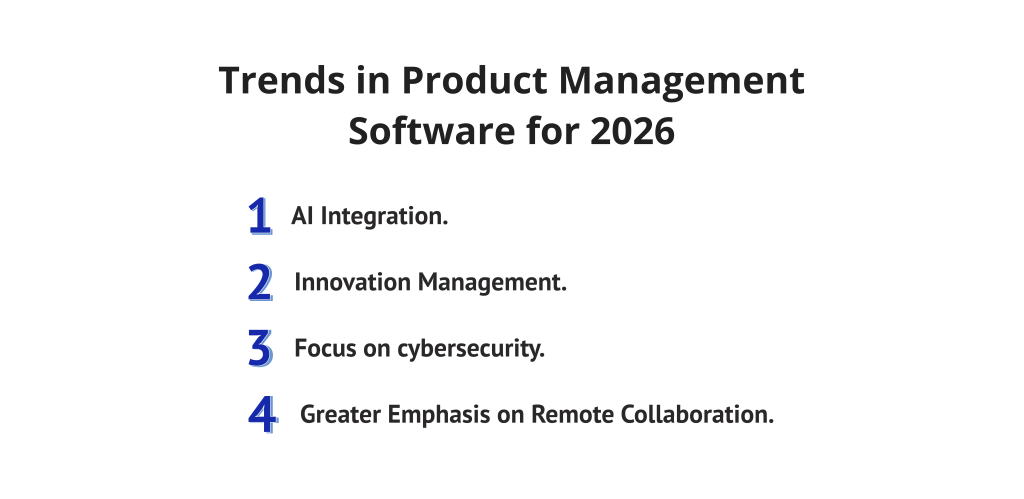
1. AI Integration.
AI-powered features have gone from being a cool extra to something folks really need, especially when it comes to helping make smarter choices. It helps you make smarter choices. Software now uses AI to do boring stuff like sorting feedback or guessing how resources should be split. This helps product managers think big instead of getting lost in the small stuff.
2. Innovation management.
It isn’t just about assigning tasks anymore; it is about keeping that innovative spark alive. Now, product management tools are adding ways to test ideas, check if they are sound, and keep tabs on new features being tested. This can help create a culture where it’s ok to try new things and make smart changes as you go.
3. Focus on cybersecurity.
Product management software is filled with quite a bit of essential data, such as customer feedback, financial plans, and product roadmaps. Hence, security should be very strong (for instance, SOC 2 or ISO 27001). Product managers must opt for tools that facilitate the management of visibility of information and that keep records in case of legal or security issues.
4. Greater Emphasis on Remote Collaboration.
Since a lot of teams are spread out, the software needs to play nice with that. There must be tools available for users that promote easy collaboration from almost any location. They should include capabilities such as whiteboards, video calls, or clear documentation to ensure all are aware of the same information and to allow workflows to continue without interruption, regardless of where team members are or their respective time zones.
Features of Product Management Tools
- Roadmap Views: Understand your product plan in a manner that is clear to all stakeholders.
- Prioritization: Use the internal scoring systems to select the next task to work on.
- Feedback in one place :Store all customer feedback in one place to facilitate the decision of what to build next.
- Analytics ready: Establish direct connections with data to understand how users interact with your product.
- Project management sync: Collaborate with tools to keep everyone updated.
- See the big picture: Oversee several different projects simultaneously via user-friendly dashboards.
- AI help: Use automation to accomplish tasks such as feedback tagging and estimation of resource needs.
Why Use Product Management Software?
The product management team is the core unit that coordinates and communicates uninterruptedly with all the specialized product teams throughout the product development lifecycle.
- Faster delivery: Deliver products to market more quickly by making workflows more efficient.
- Better plans:Make choices based on data about product use and customer needs.
- Teams on the same page:Reveal the plan and goals to everyone in one place.
- Less guesswork:Decide on features from data rather than just by hunches.
- Less waste: Concentrate on what is most important in order to save time.
- Grow with you:Handle more products and work as you grow.
We filter out hundreds of updates every day so you just receive what you need. Join Digest.pro and devote no more than 10 minutes of your week to staying up-to-date on important news.
Costs & Pricing for Product Management Software
Product management tool costs can be all over the place, mainly because the software is made for very specific things. Product managers need to look past just the price per person and think about what really drives up the costs:
- Per-User Fees: A lot of tools for getting things done and planning ahead charge this way. The price often depends on the type of user, like whether they’re adding info or just looking at it.
- Usage-Based Cost: Usually seen with product analytics platforms, where how much you pay depends on how many people use it each month or how much you’re tracking.
- Feature Limits: Many platforms keep important features, like managing all your projects, connecting to other tools, or special AI features, only for those who pay for the most expensive plans.
- Integration headaches: Having a bunch of different tools is useful, but it can also make the overall cost higher. You might run into extra fees for keeping everything in sync. You will need to decide if you want to invest more in specialized tools or if you want to save money by using an all-in-one platform that can do a little bit of everything.
Conclusion
- Advantageous Features and Returns: Businesses looking to manage all aspects of their companies’ projects and products in a cost-effective manner should look to modern tools for product portfolio management.
- Critical Toolsets & Technologies: Cutting-edge tools that enable companies to manage product portfolios generate many mission-critical capabilities that contribute to their overall success.
- Tool Selection Process:For product management teams to choose the appropriate tool for their organization, it is important that they completely assess both their own needs and the features available within each of the tool’s offerings. They should pay close attention to specific capabilities such as advanced analytics ability and flexibility for scalability as the organization continues to grow.
If you want to gain exclusive access to the latest research on Eastern Europe’s thriving startup ecosystem, subscribe to Digest.pro.
Product Management Tools: Frequently Asked Questions (FAQs)
1. What is a product management tool?
A product management tool is software designed to bring together the workflows, information, and communications necessary for the rapid development of products. As opposed to traditional task management programs, product management tools offer specialized features that support tasks such as developing roadmaps, facilitating feedback loops, and helping product teams prioritize objectives strategically.
2. What is the best tool for product management?
The best tool is really just whatever fixes your biggest problems. If you’re on a team that’s growing fast or at a big company, you need product management software that’s great at lining up your plans and predicting how to use your resources. Epicflow can be super helpful because they zoom in on how to guess the right way to use your resources the right way. Making your product faster and ensuring that you launch on time is something that your decision is going to be super important for. Anyway, whatever tool you choose, I would recommend you make sure that it is compatible with the things you are already using and that it runs smoothly.
3. What is the 80/20 rule in product management?
In product management, the 80/20 rule (also known as Pareto principle) allows product managers to determine which of their efforts and features provide the most value to customers. The 80/20 rule indicates that 80% of the positive results (dollars, users, etc.) generated by a product come from only 20% of the features/efforts of that product. Thus, product managers must focus their efforts on identifying the features that provide the greatest return on investment. Employees who do not focus on this area will ultimately waste time and money, as it will take longer to create products.
4. Which software is essential for a product manager?
A product manager’s toolkit consists of three primary functional pillars that constitute the current tech stack for product managers.
These three pillars are:
- strategy and discovery, which includes tools such as Productboard and ProdPad;
- execution and development, which includes tools such as Jira and Linear;
- measurement and analytics, which includes tools such as Amplitude and Pendo.
Additionally, today’s tech stacks need to include some kind of specialized resource optimization software such as Epicflow. This will allow product managers to keep track of multi-project bottlenecks and deliver reliably.
The modern product manager should be proficient in this integrated ecosystem rather than thinking of a single, all-in-one system.
5. What is the most used PM software?
Today’s PM Stack consists of three primary functional categories:
- Strategy and Discovery, which can be represented by Productboard;
- Execution and Development, which can be represented by Jira, Asana, or Linear;
- Measurement & Analytics, which can be represented by Amplitude or Pendo.
Epicflow serves as the comprehensive foundation that unifies these three pillars, acting as a robust multi-project management platform. It provides the advanced resource optimization necessary to synchronize the entire product stack. This integration ensures that delivery remains consistently predictable and efficient across every functional area of the development lifecycle.
6. What are the 5 C’s of product management?
Commonly referred to as the 5 C’s (Company, Customers, Competitors, Collaborators, and Climate), a situational analysis framework is important to achieving success in today’s competitive business environment. Most existing product management systems place importance on two key areas, customers and competitors; however, elite systems focus on providing the most value to companies and collaborators. Providing predictive insight into available company resources, elite systems allow product managers to implement their defined product strategy without being impacted by changing external factors.
7. What are the 7 new management tools?
In quality and product planning, these are used to map complex relationships:
1. Affinity diagram,
2. Interrelationship digraph,
3. Tree diagram,
4. Prioritization matrix,
5. Matrix diagram,
6. Process Decision Program Chart (PDPC),
7. Activity network diagram.
8. What are L1, L2, and L3 in product management?
This structural hierarchy defines the granularity of visibility and decision-making across the organization:
L1 (Strategic): High-level business vision and portfolio goals.
L2 (Managerial): Features and Epics—the primary PM layer.
L3 (Operational): User stories and daily activities for the engineering teams.
9. How do product strategy and product roadmaps differ in purpose and scope?
A product strategy is the strategy that defines at a high level the manner in which a product will meet the goals of a business by solving a set of problems. The product roadmap is the graphical representation of the strategy that acts as a communication vehicle to depict the release sequence.
10. How do product teams handle resource contention in multi-project environments?
Resource contention is managed within product teams using multi-project resource management tools, such as Epicflow, which provide a consolidated view of all projects within an organisation (also known as a “Single Source of Truth”). This allows managers to gain an understanding of how delays on any particular project will affect resource allocations for all projects within the portfolio, as well as being able to identify months in advance if the resource pool will be limited or have excess availability due to other project delays. Through the application of data-driven decision making processes, the team will have advantages from scheduling a predictable workload and determining whether additional requests have been added in order to avoid further technical debt.