Product lifecycle management software helps you manage product data, decisions and changes from concept through engineering, production and service. The wider market is large and still growing: CIMdata, which counts design, simulation and digital manufacturing tools inside its PLM market definition, puts 2025 spending at $88.3 billion, up 9.9% on 2024 [1].
That breadth is the buyer’s problem. PLM overlaps with product data management (PDM), ERP, application lifecycle management (ALM) and manufacturing systems, so a feature checklist alone can mislead.
This guide explains the boundaries, maps core capabilities to real workflows and gives you a practical way to judge deployment fit, integrations, implementation effort and long-term ownership. It names no winner. The right system depends on your products, your data and how your teams make changes.
Key takeaways
- PLM software is the system of record for product definition: parts, BOMs, documents, requirements and the changes that connect them.
- PDM controls design files and revisions. PLM extends control to change, quality, suppliers and downstream handoffs. Vendor labels vary, so test scope, not names.
- PLM does not replace ERP, MES or ALM. Decide which system owns each record and budget for the integrations.
- Evaluate with scripted demos that use your own BOMs and a real engineering change, scored against weights you set in advance.
- Start with one product line, clean data and baselines for change cycle time, BOM accuracy and adoption.
What does product lifecycle management software do?
Product lifecycle management (PLM) software manages the information that defines a product and the decisions that change it. CIMdata, an independent PLM research firm, describes PLM as a strategic business approach that supports the collaborative creation, management, dissemination and use of product definition information, from concept to end of life [2]. The software is the tool layer that makes that approach workable.
In practice, a PLM system holds parts, assemblies, bills of materials (BOMs), CAD references, specifications, requirements, test results, supplier data and compliance records. It links them, so a change to one part shows every assembly, document and supplier it touches.
Users span the business. Engineers create and revise designs. Manufacturing engineers turn engineering BOMs into manufacturing BOMs. Quality teams manage nonconformances and corrective actions. Procurement and suppliers work from approved parts and drawings. Service teams need the configuration of what actually shipped.
Lifecycle scope varies by vendor and by deployment. CIMdata’s definition runs from requirements through design, manufacturing, operation and disposal [2], but few organizations run every stage in one system. Most start with engineering data and change control, then extend to quality, suppliers and service once the core works. Treat full lifecycle coverage as a direction, not a promise from any single platform.
PLM vs. PDM, ALM, ERP and project management software
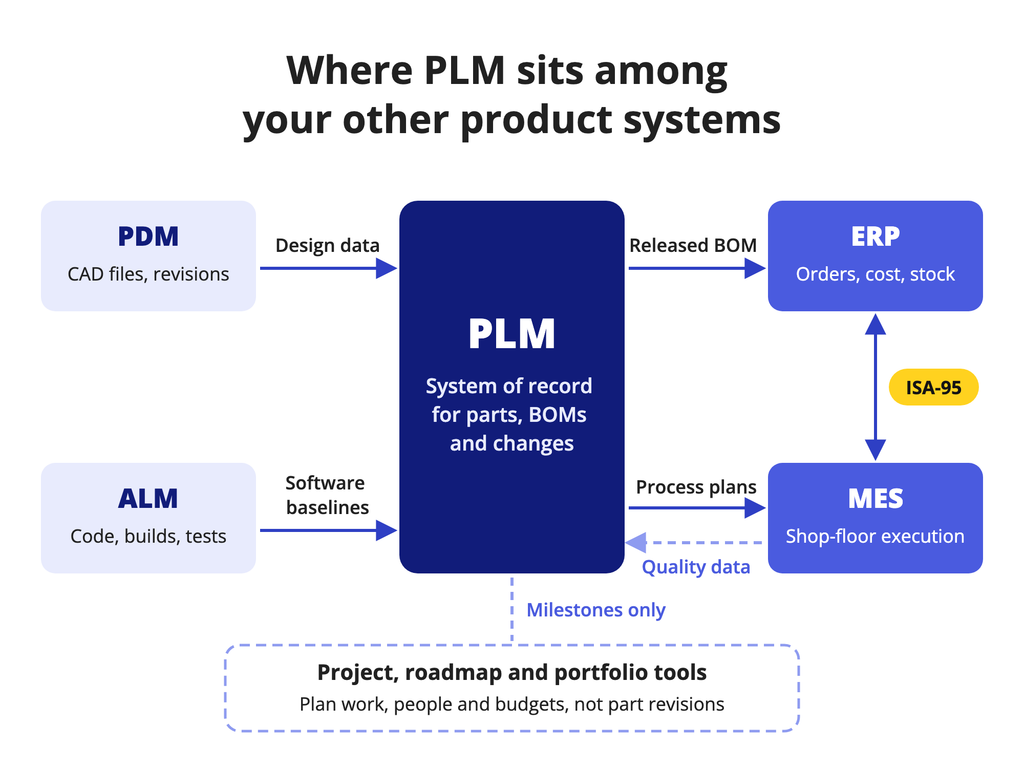
The fastest way to scope a PLM project is to decide which system owns which record. The overlap is real, and vendor labels blur it.
PLM vs. PDM
PDM controls design data: CAD models, drawings, versions, check-in and check-out, and release status. PTC, for example, describes PDM as managing design data that originates in product development, while PLM extends to processes across the lifecycle and to collaboration with partners [3]. Many vendors sell PDM as the entry module of a PLM suite, so the line is about scope, not brand names.
PLM vs. ALM
ALM governs software requirements, code, builds and tests. If your products contain embedded software, you need traceability between hardware and software baselines, usually through an integration rather than one shared tool.
PLM vs. ERP and MES
ERP runs transactions: orders, inventory, costs, procurement and production planning. MES executes and records work on the shop floor. The ISA-95 standard focuses on the interface between business systems such as ERP and manufacturing operations systems such as MES [4]. PLM sits upstream of both. It releases approved BOMs and changes into ERP and sends process plans and work instructions toward MES. Quality and as-built data flow back.
PLM vs. project and portfolio tools
Project, roadmap and portfolio tools plan work, people and investment. They do not control part revisions or BOMs. If you are choosing software to plan features, compare the best product management tools or the best product roadmap tools instead. For enterprise investment planning across products, see our guide to product portfolio management tools. Those systems can link to PLM milestones, but they do not substitute for it.
Core PLM capabilities and workflows
Capabilities matter only when they map to a workflow someone owns. Use this table to connect each feature to the person who will live in it.
| Capability | Workflow it supports | Accountable user |
|---|---|---|
| Product structure and BOM | Build and revise engineering BOMs, derive manufacturing BOMs, compare revisions | Design and manufacturing engineers |
| Configuration and variants | Define options and rules, record which configuration shipped | Product or systems engineer |
| Engineering change | Problem report, change request, impact analysis, change order, release | Change analyst and change board |
| Requirements | Link requirements to parts, tests and verification evidence | Systems engineer |
| Quality | Nonconformances and corrective actions tied to parts and changes | Quality engineer |
| Supplier collaboration | Share drawings and BOMs, manage approved manufacturer lists | Supplier quality and procurement |
| Compliance traceability | Design records, material data and audit trails | Regulatory or compliance lead |
| Analytics | Change cycle time, open changes, part reuse | Engineering operations |
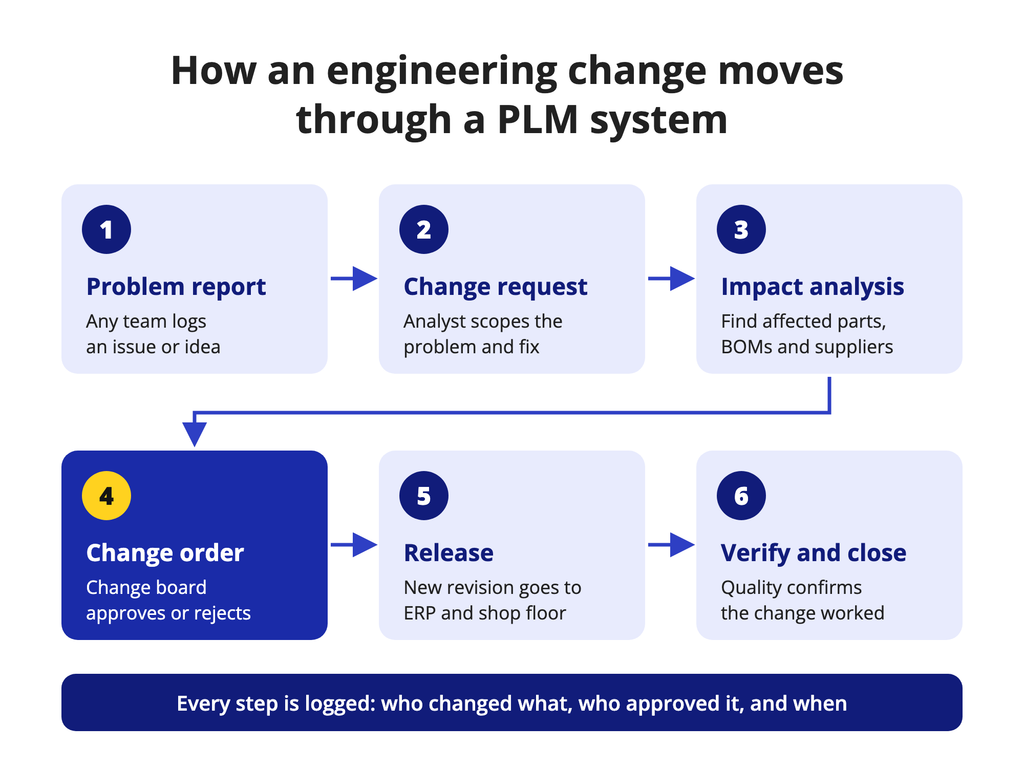
Change control is the core of most PLM systems. A typical flow starts with a problem report, becomes a change request, gets an impact analysis across affected parts, documents and suppliers, then moves to a change order that a board approves. Release pushes the new revision to ERP and the shop floor, and verification closes the loop.
Scope differs by vendor, so read capability claims as vendor-reported. PTC says Windchill aligns engineering, manufacturing and software BOMs and supports closed-loop quality processes, including CAPA [6]. Propel says its PLM shares one platform with its quality and product information products and manages approved vendor and manufacturer lists [7]. Oracle lists product management, innovation management, quality management and configuration modeling within Fusion Cloud PLM [8]. Confirm each one in a demo with your own data.
Regulated industries raise the bar. In the US, the FDA’s Quality Management System Regulation, which incorporates ISO 13485:2016 by reference, took effect on February 2, 2026, and it covers design and development as well as records [9]. If you build medical devices, your PLM system will likely hold the design and change records an inspector asks for. Test audit trails and approval records before you look at dashboards.
Deployment and integration considerations
Your deployment model decides who runs upgrades, how quickly you get new features and how you control data.
- SaaS: the vendor runs the application and ships continuous updates, and configuration replaces custom code. Siemens says its Teamcenter X SaaS offering includes operation, maintenance and upgrades [5]. PTC offers Windchill+ as SaaS and says it is FedRAMP authorized [6].
- Customer-managed cloud or hosted: you or your provider run the software, so you control upgrade timing and carry the work. Siemens lists on-premises and customer-chosen cloud options alongside SaaS for Teamcenter [5].
- On-premises: the most control and the highest internal effort, often chosen where data residency or export-control rules are strict.
Then check integrations against your actual systems: identity and single sign-on for staff and suppliers, the CAD tools you use (one or many), the ERP item master and BOM release, MES and process plans, and ALM if software is part of the product.
Data migration is where schedules slip. Duplicate parts, legacy numbering, missing attributes and orphaned drawings all surface during migration. Decide what moves (released data only or full history), who owns cleanup and how folder permissions map to roles. Plan for change management too: engineers will change daily habits, and adoption fails quietly when the old shared drive stays open.
PLM software categories
| Category | Typical fit | Example (vendor-sourced) | Check during evaluation |
|---|---|---|---|
| Enterprise PLM suite | Complex, multi-site, multi-CAD engineering | Siemens Teamcenter, PTC Windchill [5][6] | Which modules you will license and use |
| ERP-suite PLM | Firms standardizing on one vendor’s ERP and supply chain apps | Oracle Fusion Cloud PLM [8] | Depth of CAD integration and engineering BOM handling |
| Cloud-native PLM on a business platform | Teams that share BOMs widely with partners | Propel, built on Salesforce [7] | CAD connectors and data model limits |
| CAD-centric PDM | Design teams that mainly need vaulting and revision control | PDM modules from CAD and PLM vendors [3] | Path to change control and BOM release |
Categories overlap, and vendors move between them. Use them to frame a shortlist, not to rank it.
How to evaluate product lifecycle management software
Start with workflows, not features. List the five to eight workflows that cause the most pain today: a late engineering change, a BOM mismatch between engineering and ERP, a supplier building from an old drawing. Those become your demo scripts.
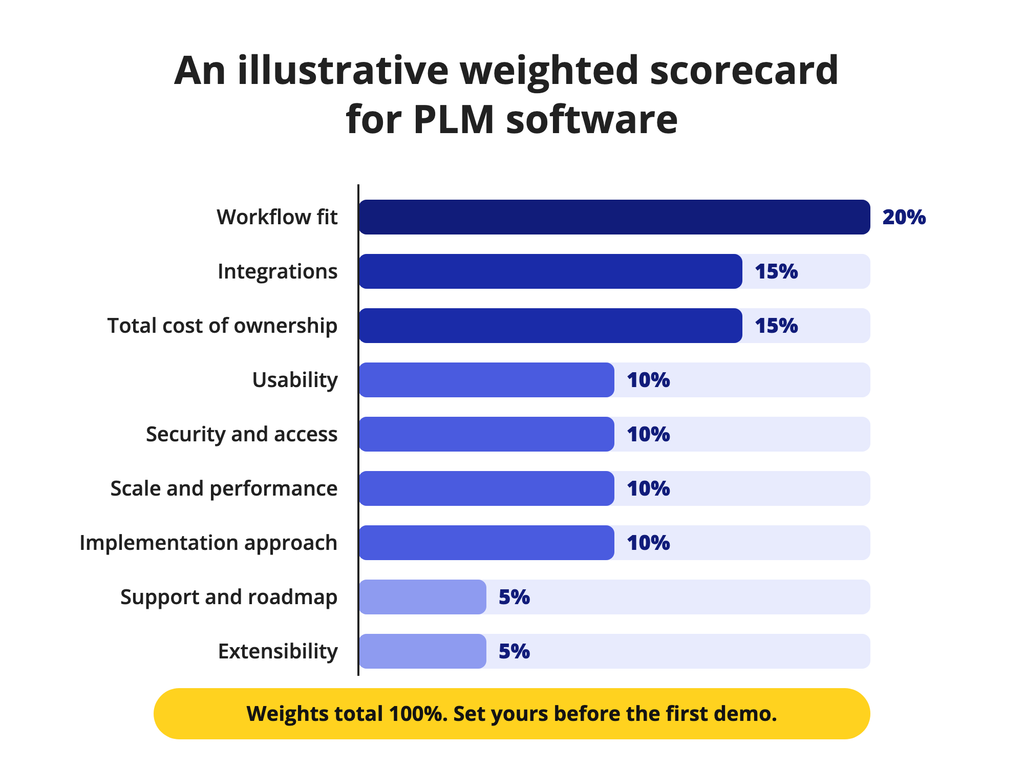
Weight the criteria before you see demos, so a polished interface does not reset your priorities. The weights below are illustrative. Adjust them to your products and risks.
| Criterion | Example weight | Workflow test |
|---|---|---|
| Workflow fit | 20% | Run your top change scenario end to end with your own parts |
| Integrations | 15% | Release a BOM change to a test ERP and inspect what arrives |
| Total cost of ownership | 15% | Price licenses, implementation, integration, hosting and admin over five years |
| Usability | 10% | Have an occasional user from purchasing or quality find and approve a record |
| Security and access | 10% | Give a supplier access to one assembly and nothing else |
| Scale and performance | 10% | Load a large multi-level BOM and run a where-used search |
| Implementation approach | 10% | Review the partner’s plan, staffing and migration method |
| Support and roadmap | 5% | Ask how configurations survive upgrades |
| Extensibility | 5% | Add an attribute and a workflow step without custom code |
Score each vendor from 1 to 5 per criterion, multiply by the weight and compare totals. Then read the gaps. A vendor that wins on total but fails your top workflow test is not a fit.
Send every shortlisted vendor the same data pack: a sanitized multi-level BOM, a few CAD files, a change request and a supplier scenario. Ask them to perform the change live, not on slides. Bring the people who will use the system daily, not only the sponsor.
Verify every claim. Product names, packaging and features change often, so check capabilities on current official documentation and date your notes.
Implementation roadmap and success measures
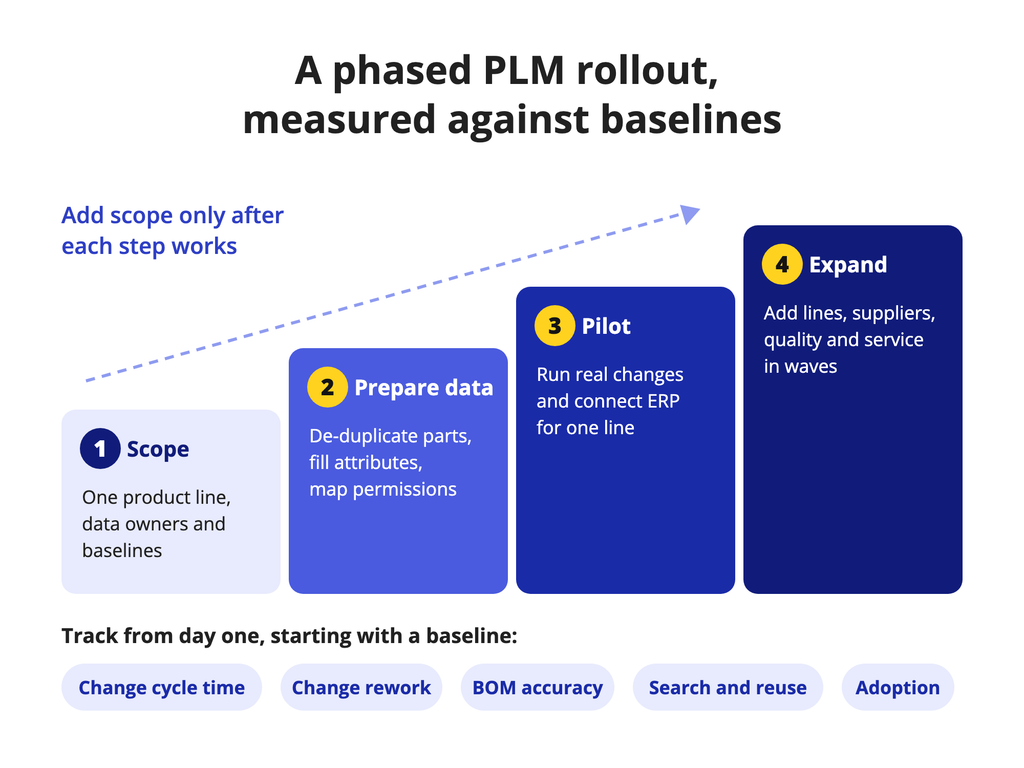
Roll out in waves. Each step should leave you with working processes and measured results before you add scope.
- Scope: pick one product line or one painful workflow, name data owners for parts, BOMs and documents, and record baselines.
- Prepare data: de-duplicate parts, fill required attributes, agree migration scope and map permissions to roles.
- Pilot: run real changes in the new system with a small team and connect ERP for that line. Fix the process before you scale it.
- Expand: add product lines, suppliers, quality processes and service data in planned waves.
Track a short set of measures against the baselines you captured:
- Change cycle time: days from change request to release.
- Change rework: changes reopened or followed by a corrective change.
- BOM accuracy: mismatches between PLM and ERP, and build issues traced to BOM data.
- Search and reuse: time to find a part and the share of new designs that reuse existing parts.
- Adoption: active users by role and the share of changes processed inside the system.
Capture baselines before go-live. Without them, you cannot prove value or see where adoption stalls.
Summary
Product lifecycle management software controls product definition and change across functions. It overlaps with PDM, ALM, ERP, MES and project tools, so decide which system owns which record before you build a shortlist. Pick the category that fits your products and IT model, weight your criteria in advance and test vendors on your own data. Your next step: write three demo scripts from your most painful change workflows, attach a sample BOM pack and send them to every shortlisted vendor with the same deadline.
FAQs
What is product lifecycle management?
Product lifecycle management is a business approach and a software category for managing product definition information from concept to end of life. PLM software stores parts, BOMs, documents, requirements and quality records, and links them so teams can see the impact of a change. It connects engineering with manufacturing, suppliers, quality and service through controlled product data.
Is PDM the same as PLM software?
Not quite. PDM controls design data such as CAD files, revisions and release status, mainly for engineering teams. PLM extends that control to change processes, BOMs, quality, suppliers and handoffs to ERP and manufacturing. Many vendors sell PDM as the entry module of a PLM suite, and labels vary, so compare the workflows a product supports rather than its name.
What should a PLM software demo include?
Ask each vendor to run a realistic workflow on your representative data: a multi-level BOM, a few CAD files, a change request that touches several parts and a supplier who needs limited access. Watch impact analysis, approval and release into a test ERP. Include daily users in the session and score it against weights you set beforehand.
References
- CIMdata Publishes Executive PLM Market Report. CIMdata, June 4, 2026. Accessed 28 Oct 2026.
- About PLM (CIMdata free resources). CIMdata, undated (page copyright 2026). Accessed 28 Oct 2026.
- What is Product Data Management? PDM Software. PTC (vendor), undated. Accessed 28 Oct 2026.
- ISA-95 Standard: Enterprise-Control System Integration. International Society of Automation, undated (latest part ANSI/ISA-95.00.01-2025). Accessed 28 Oct 2026.
- Teamcenter PLM. Siemens (vendor), undated. Accessed 28 Oct 2026.
- Windchill PLM Software: Enterprise PLM System. PTC (vendor), undated, describes Windchill 13.1.2. Accessed 28 Oct 2026.
- AI Cloud PLM Software. Propel Software (vendor), undated. Accessed 28 Oct 2026.
- Oracle Fusion Cloud Product Lifecycle Management. Oracle (vendor), undated. Accessed 28 Oct 2026.
- Quality Management System Regulation (QMSR). US Food and Drug Administration, updated February 2, 2026. Accessed 28 Oct 2026.