

Atlassian just put a hard deadline on every Jira Data Center license. The company confirmed that all Data Center products — Jira, Confluence, and Jira Service Management — go fully read-only on March 28, 2029, with new license sales already closed as of March 30, 2026 [1]. For a single-team dev shop, that’s a cloud migration project. For a PMO running a multi-project portfolio, it’s a genuine opening to ask a harder question: was Jira ever built for portfolio-level work, or is it just the tool everyone inherited?
Our guide will help you shortlist the right replacement fast — with real pricing, real user feedback, and a side-by-side comparison you can bring straight into a vendor evaluation meeting. In this article, we’ll explore why teams are leaving Jira in 2026, what to look for in a replacement, and a detailed breakdown of the eight strongest Jira alternatives on the market, including open-source software and self-hosted options.
TL;DR
- Jira Data Center’s phased shutdown (new sales ended in March 2026 and full read-only by March 2029) is the single biggest driver behind the current wave of Jira alternative evaluations.
- ClickUp is the best all-around Jira alternative for teams that want maximum functionality per dollar. Epicflow is the strongest pick when the real problem isn’t issue tracking but multi-project resource management and portfolio prioritization. Linear is the fastest, most focused alternative for pure software engineering teams.
- And there you have it—Trello, Asana, monday.com, Zoho Sprints, and Teamwork complete our selection for teams who value simplicity, collaboration across departments, budget, or agency-style work with clients, respectively.
- Open source alternatives to Jira, such as Plane, OpenProject, and Taiga, are your only viable options when self-hosting is an absolute requirement following the end-of-life of Data Center. And on top of that, some of the best free alternatives to Jira.
- Migrating off Jira doesn’t have to mean an all-or-nothing switch — several tools on this list, including Epicflow, integrate directly with Jira rather than replacing it outright.
Quick overview of the 8 Jira alternatives
|
Tool |
Best For |
Starting Price |
G2 Rating |
Free Plan |
|
ClickUp |
All-in-one work management |
$7/user/mo |
4.6/5 |
Yes |
|
Epicflow |
AI-driven multi-project resource management |
€22.5/mo |
4.4/5 |
Trial only |
|
Trello |
Simple visual task boards |
$5/user/mo |
4.4/5 |
Yes |
|
Asana |
Cross-functional business teams |
$10.99/user/mo |
4.4/5 |
Yes |
|
monday.com |
Visual, department-wide workflows |
~$12/user/mo |
4.7/5 |
Yes (2 users) |
|
Zoho Sprints |
Budget-friendly agile Scrum teams |
$1/user/mo |
4.5/5 |
Yes (up to 5) |
|
Teamwork.com |
Client-facing agencies |
$10.99/user/mo |
4.4/5 |
Yes (up to 5) |
|
Linear |
Fast, developer-first issue tracking |
$10/user/mo |
4.5/5 |
Yes (250 issues) |
Pricing reflects annual billing per seat, verified directly against vendor pricing pages as of July of 2026.
Why are companies switching away from Jira in 2026?
It should be mentioned that Jira is here to stay, but it is not the only issue-tracking software available, and it is becoming less popular due to some factors. One of such factors is a forced infrastructure update, and another one is a series of issues inherent to Jira that have always existed.
Jira Data Center End-of-Life (EOL)
The EOL of Jira Data Center was announced by Atlassian on September 8, 2025, and the schedule is now fixed [2]. New submissions of data center apps on the Marketplace were halted on December 16, 2025. New data center licenses were discontinued completely on March 30, 2026. Customers are permitted to purchase expansions of their current license until March 30, 2028. Starting March 28, 2029, all Jira Data Center instances will be read-only forever — no more tickets, changes, or updates whatsoever [1].
It is worth mentioning that financial problems will make the problem even worse. Atlassian has increased Data Center prices by about 15%, and now the price of the cheapest 500-user package reaches $59,000 a year [3]. For self-hosted, compliance-heavy teams — defense contractors, healthcare organizations, and government agencies — this isn’t a routine license renewal. It’s a forced decision between migrating to Jira Cloud, accepting rising costs for a shrinking product, or evaluating a genuine alternative to Atlassian.
Read more: Top 11 monday.com alternatives for project teams in 2026
What Are the Biggest Limitations of Jira for Portfolio Management?
Jira is an application that was originally developed as a tracker for one engineering team and remains such to this day. Based on more than three hundred G2 and Capterra user reviews, it’s possible to identify several consistent limitations in the software for PMO and portfolio-level users:
- Inadequate portfolio-level view by default. Jira treats each project separately. To obtain a proper cross-project resource overview, one must use Advanced Roadmaps (paid add-on) or a completely different application.
- No native capacity planning features. Jira focuses on tracking issues, not on predicting the future workload of particular users. For teams managing multiple projects at once, there is no out-of-the-box solution to check which users will be overloaded next month.
- Time-consuming setup process and overhead. Independent assessment of the platform gives Jira the lowest score for ease of set up (8.1/10 on G2) out of all mainstream project management applications, significantly behind monday.com (8.8) and Trello (9.1) [4, 5]. A new administrator should allocate two to four hours to setting up the application.
- Marketplace and vendor lock-in. Heavy reliance on third-party Marketplace apps for reporting, time tracking, and SLAs means switching costs climb every year a team stays on Jira, a pattern one Capterra reviewer summed up simply: Jira’s functionality is often redundant and overly complex compared with lighter tools.
- Cost that scales faster than expected. Jira Cloud Standard starts at $7.91 per user per month and Premium at $14.54, but the real total cost of ownership — once you add Confluence, admin overhead, and Marketplace apps — typically runs two to three times the base license price.
None of this makes Jira a bad product. It makes it a mismatched one for teams whose core problem is portfolio-level resource management rather than single-team sprint tracking — which is exactly the gap the alternatives below are built to close.
If comparisons like this one are useful for your team, Digest.Pro publishes a new deep dive on project management and PMO software most weeks — subscribe to get the next one straight to your feed.
What are the biggest advantages of Jira alternatives for large-scale project management?
Switching away from Jira isn’t just about escaping a shutting-down product line. The best Jira alternatives on this list solve specific problems Jira leaves open:
- Faster time to value. Most alternatives on this list — ClickUp, Trello, monday.com, and Linear — get a new team productive in under an hour, compared with Jira’s multi-hour admin setup.
- Built-in resource and capacity visibility. Tools like Epicflow and monday.com surface future workload and bottlenecks natively, without a separate add-on purchase.
- More predictable, transparent pricing. Several Jira alternatives, including ClickUp and Trello, publish flat per-seat pricing with fewer hidden Marketplace-style add-on costs.
- Better fit for mixed technical and non-technical teams. Jira’s interface still assumes an engineering audience. Asana, monday.com, and Teamwork are built for marketing, operations, and client-facing teams working alongside engineering.
- Freedom from vendor lock-in. Open-source software like Plane and OpenProject give teams full ownership of their data — a genuine advantage for organizations that don’t want to repeat this exact evaluation the next time a vendor changes its roadmap.
What features should you look for in a Jira alternative to keep portfolios predictable and aligned?
Before shortlisting any Jira alternative, map it against the capabilities that actually matter for multi-project, portfolio-level work:
- Cross-project resource visibility
- Capacity forecasting
- Native time tracking
- Scenario planning
- Integration depth
- Self-hosting or data residency options
- Transparent, predictable pricing
Read more: Jira vs Trello vs Asana: Which is the Best for Project Management in 2026?
What are the best Jira alternatives for project portfolio managers in 2026?
Editorial note: Our team has performed live demonstrations and free trials of all eight tools above, verified all pricing data from vendors, and analyzed over 500 unsolicited reviews on G2, Capterra, and Reddit before reaching a conclusion. Where the reviews of the tool are insufficient, it is made sure that it is stated clearly instead of treating a few positive reviews as proof.
1. ClickUp — Best All-Around Jira Alternative

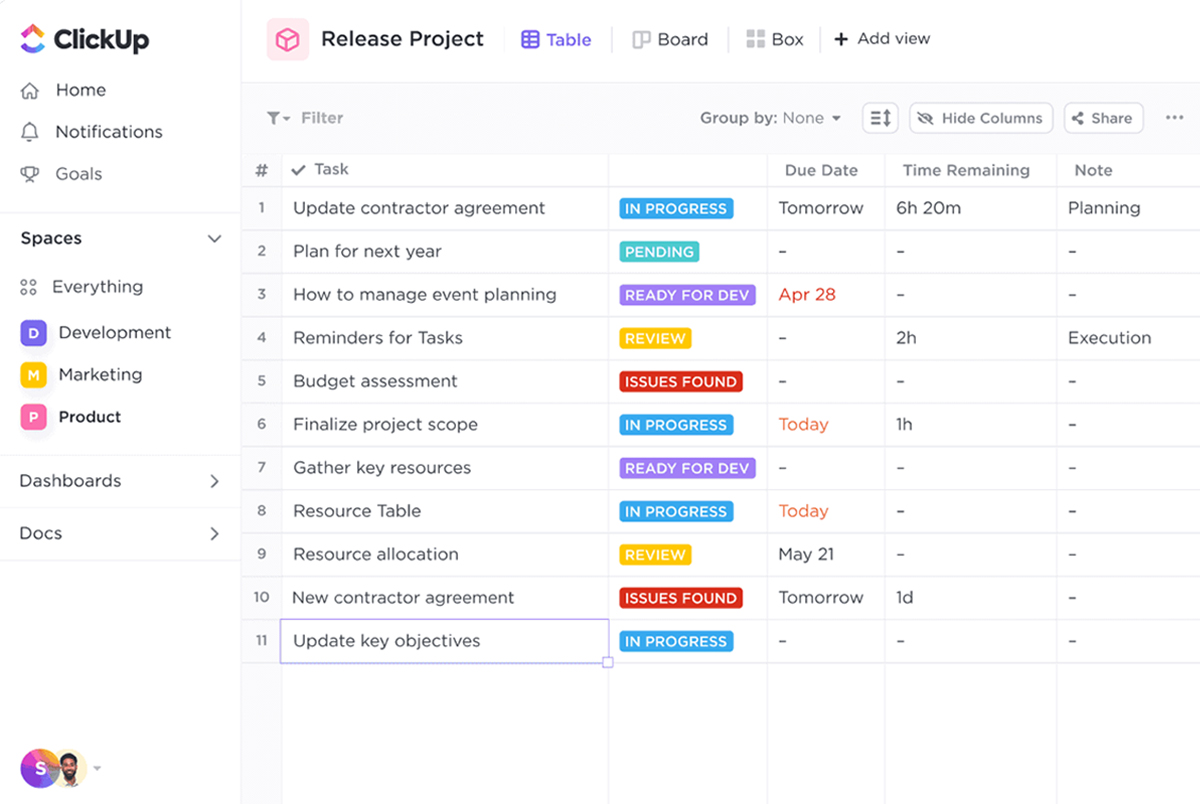
ClickUp is a full-fledged work management solution, incorporating task management, docs, whiteboards, dashboards, and built-in time tracking all into a single unified workspace divided by “Spaces,” lists, and views (list, board, Gantt, and calendar).
Best for: Those who value maximum functionality at minimal cost, despite a bit of initial effort in learning how to use a multifunctional tool.
Key features:
- Free plan includes unlimited tasks and users, native time tracking, and sprint management — more generous than most competing free tiers.
- ClickUp Brain offers artificial intelligence-driven task summaries, automatically created subtasks, and searches across the entire workspace.
- Unlock Gantt charts, dashboards, and custom fields with the $7/user/month Unlimited plan.
- Highly customizable: custom statuses, automation, and over 15 different views available.
Pitfalls:
- Feature clutter results in a significant learning curve; users say they need from 2 to 4 weeks to become proficient.
- AI-based features cost extra while not being included in regular subscription packages.
- Unexpected billing changes occur when guest account is converted into a paid one.
Pricing: Free; Unlimited ($7/user/month); Business ($12/user/month); Business Plus ($19/user/month); Enterprise custom (all annual billing).
User reviews:
- G2: ClickUp holds a 4.7/5 rating from more than 13,000 reviews.
I like that ClickUp makes my workplace more customizable, which is mainly why I keep coming back to it after trying other project management tools. — Source
ClickUp User on G2.com
- Capterra: 4.6/5 based on 4,500 reviews.
- Gartner Peer Insights: 4.5/5 according to 720+ user responses.
ClickUp has honestly become one of my favorite tools to work with day to day. — Source
ClickUp User on Gartner Peer Insights site
- Trustpilot: average score is 3.9/5 derived from more than 600 user responses.
Reviewers consistently cite value for money as ClickUp’s strongest differentiator, with several explicitly naming it as a lower-cost swap for Jira, Asana, and monday.com.
Verdict: Clickup is the best Jira alternative for teams that want one tool to replace several, and don’t mind a steeper onboarding curve to get there.
2. Epicflow — Best Jira Alternative for AI-Driven Portfolio and Resource Management

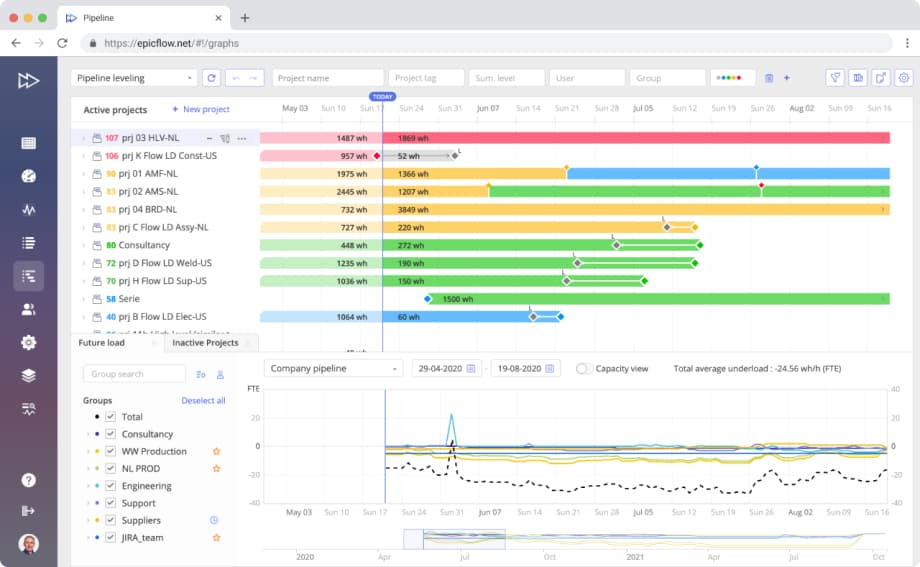
Structure: Epicflow (an AI-based multi-project and resource management platform built on Theory of Constraints principles) isn’t a direct issue tracker like Jira — it’s the resource and portfolio management layer that Jira, Advanced Roadmaps, and most task boards simply don’t provide. It’s built specifically for organizations running many concurrent projects against a shared pool of people.
Best for: PMOs and portfolio managers in engineering, aerospace and defense, manufacturing, healthcare, and pharma who need real-time bottleneck detection and cross-project capacity forecasting — not just another Kanban board.
Read more: What Are the 9 Best Smartsheet Alternatives for Project Portfolio Management?
Key features:
- AI Assistant that reacts to project changes in real time and recommends resource reallocation before a bottleneck actually hits.
- What-If Analysis for testing scenario changes — shifting a deadline, adding a project, pulling a resource — before committing to them.
- Future Load Graph and Historical Load Graph, which predict upcoming resource demand and let teams compare estimated versus actual workload over time.
- Priority-optimized task list, competence management, and pipeline views that sort all projects’ tasks by automated prioritization scores calculated with machine learning algorithms.
- Out-of-the-box two-way integration with Jira, MS Project, and Oracle Primavera, allowing teams to use Jira for daily issues and Epicflow only as a project optimization layer.
Pitfalls:
- Does not substitute lightweight issue trackers or Kanban tools; rather, it is a specialized solution for its particular problem.
- Such a comprehensive product makes onboarding necessary for newcomers to get the most out of it.
Pricing: Growth tier for €22.5/month (20-50 users) and Custom, quote-based (contact Epicflow’s sales team for pricing tailored to team size and modules needed).
User reviews:
- G2: 4.4/5 based on 15+ reviews.
The tool helps me easily resolve most project management challenges and simplifies my daily routine. — Source
Epicflow User on G2.com
- Capterra: 5/5 in accordance with 1 review
Time allocation works great and helps to save significant resources on projects we have. Integration with MS Project is excellent too. — Source
Epicflow User on Capterra.com
In addition, reviewers highlight the Future Load Graph’s ability to flag resource constraints before they become a problem and note that the platform requires accurate data input to deliver reliable predictions, which is true of any AI-driven planning tool.
Verdict: In case your team’s problem with Jira is “we don’t know who’s overloaded in all of our projects,” Epicflow is the percet solution for your particular case, and it can complement Jira instead of replacing it.
3. Trello — Best Jira Alternative for Simple Visual Task Boards

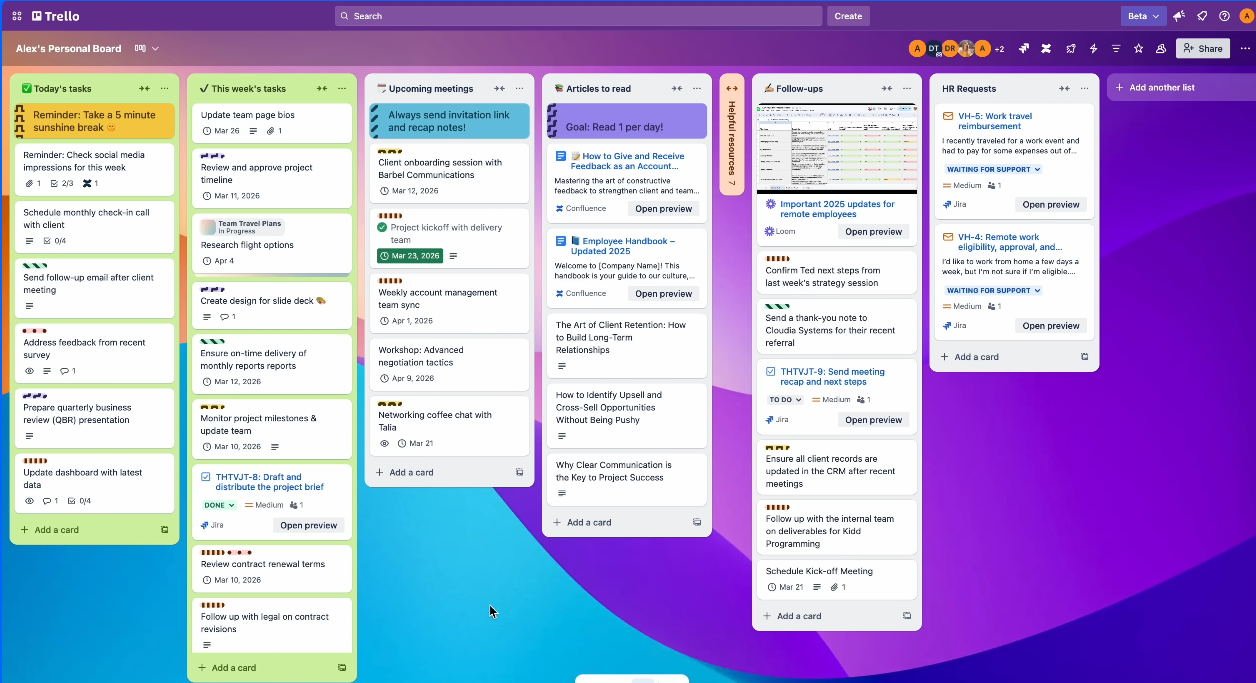
Trello is a task management system designed to work using boards, lists, and cards, with automation done by their built-in Butler system and advanced capabilities via Power-Ups.
Best for: Smaller groups (2-10 users) and non-technical teams who need visual task management without the need to configure Jira.
Key features:
- Genuinely usable free plan: unlimited cards, up to 10 boards per workspace, and basic automation.
- Drag-and-drop board interface that most users learn within minutes.
- Butler automation for rule-based workflows without code.
- Wide integration catalog, including native two-way sync with Jira for teams running a hybrid setup.
Pitfalls:
- No native task dependencies, which limit its use for complex, interdependent projects.
- Reporting and analytics are thin without paid Power-Ups, which add real cost on top of the base subscription.
- Boards get visually cluttered fast once a project grows beyond simple task tracking.
Pricing: Free, Standard ($5/user/month), Premium ($10/user/month), and Enterprise (custom, annual billing).
User reviews:
- G2: 4.4/5 based on over 14,000 reviews
I really love how customizable Trello is. It integrates well with other tools, like automation with Butler and syncing with Google Drive, which makes it fit into a broader tech stack. — Source
Trello User on G2.com
- Capterra: 4.5/5 rating from more than 23,000 user responses.
For visually managing production workflows (Kanban method) and the status of machinery on the plant floor, Trello proves highly effective. — Source
Trello User on Capterra.com
- Gartner Peer Insights: 4.5/5 is an average score in accordance with more than 400 reviews.
Reviewers consistently praise the free tier’s real functionality and the platform’s ease of use, while several note that matching a $10–13/user/month competitor’s feature depth requires stacking enough paid Power-Ups that the real cost ends up higher than the sticker price suggests.
Verdict: Trello is the one of the best free Jira alternatives for small teams that just need clear, visual task tracking — not a fit once projects need real dependency mapping or portfolio-level reporting.
Read more: monday.com vs Asana vs Trello Compared: Features, Pricing & the Right Fit for 2026
4. Asana — Best Jira Alternative for Cross-Functional Business Teams

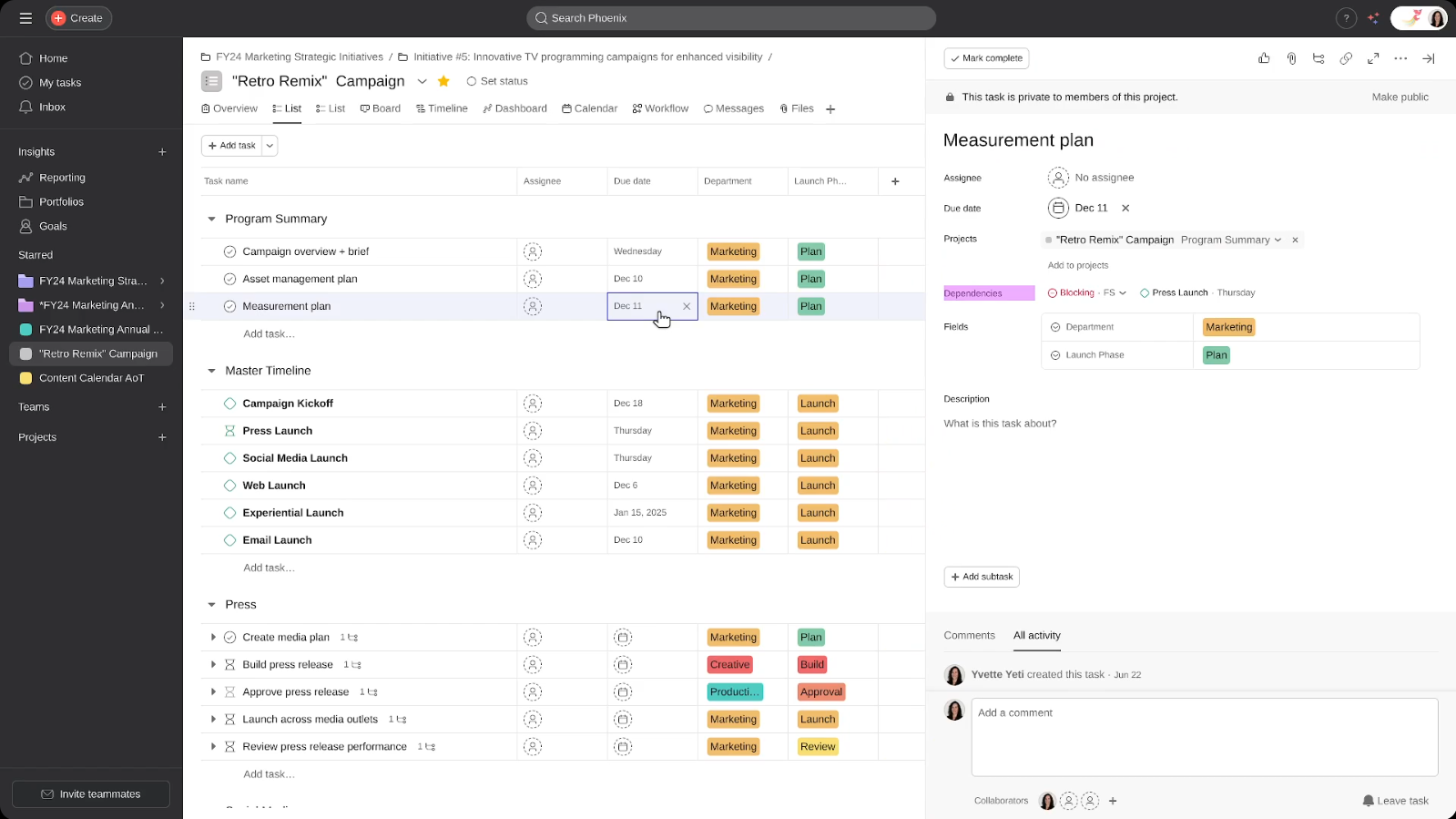
Asana arranges work on projects, tasks, and portfolios using List, Board, Timeline, and Calendar views, along with goal tracking based on the goals of the organization (OKRs).
Best for: Marketing, operations, and interdisciplinary businesses that have to interact with engineering while not being restricted to Jira’s engineer-friendly platform.
Key features:
- Portfolios feature for tracking multiple projects and goals in a single rollup view.
- Timeline (Gantt-style) view with task dependencies, available from the Starter tier up.
- AI Studio by Asana provides intelligent status updates, auto-filled custom fields, and an AI assistant inside the application.
Pitfalls:
- Paid seats are sold in blocks of five, which can force smaller teams to overpay relative to actual headcount.
- The free plan is limited to a certain number of team members, and features such as time tracking and advanced reporting will be available only in paid plans.
- More complicated to learn than Trello and monday.com, according to several Capterra reviews.
Pricing: Free (Personal); Starter, $10.99/user/month; Advanced, $24.99/user/month; Enterprise and Enterprise+, custom (annual billing).
User reviews:
- G2: 4.4/5 based on over 13,000 reviews.
What I like best about Asana is its incredible versatility in project management. Being able to toggle between Board, List, and Timeline views allows me and my team to visualize our tasks in the way that best fits our current workflow.
Asana User on G2.com
- Capterra: 4.5/5 in accordance with more than 13,000 user responses.
- Gartner Peer Insights: 4.5/5 from more than 2,400 user feedbacks.
I’ve used Asana for managing projects and tasks, and although it’s straight-forward and rather simple to use it feels a bit static compared to other tools. — Source
Asana User on Gartner Peer Insights
Also, reviewers consistently highlight the clean interface and reliable task tracking, with the most common complaint centered on per-seat pricing becoming a real pain point as teams scale past their initial plan.
Verdict: Asana is a strong alternative to Jira for organizations where engineering is only one stakeholder among many and where strategic goal alignment matters as much as task tracking.
5. monday.com — Best Jira Alternative for Visual, Department-Wide Workflows
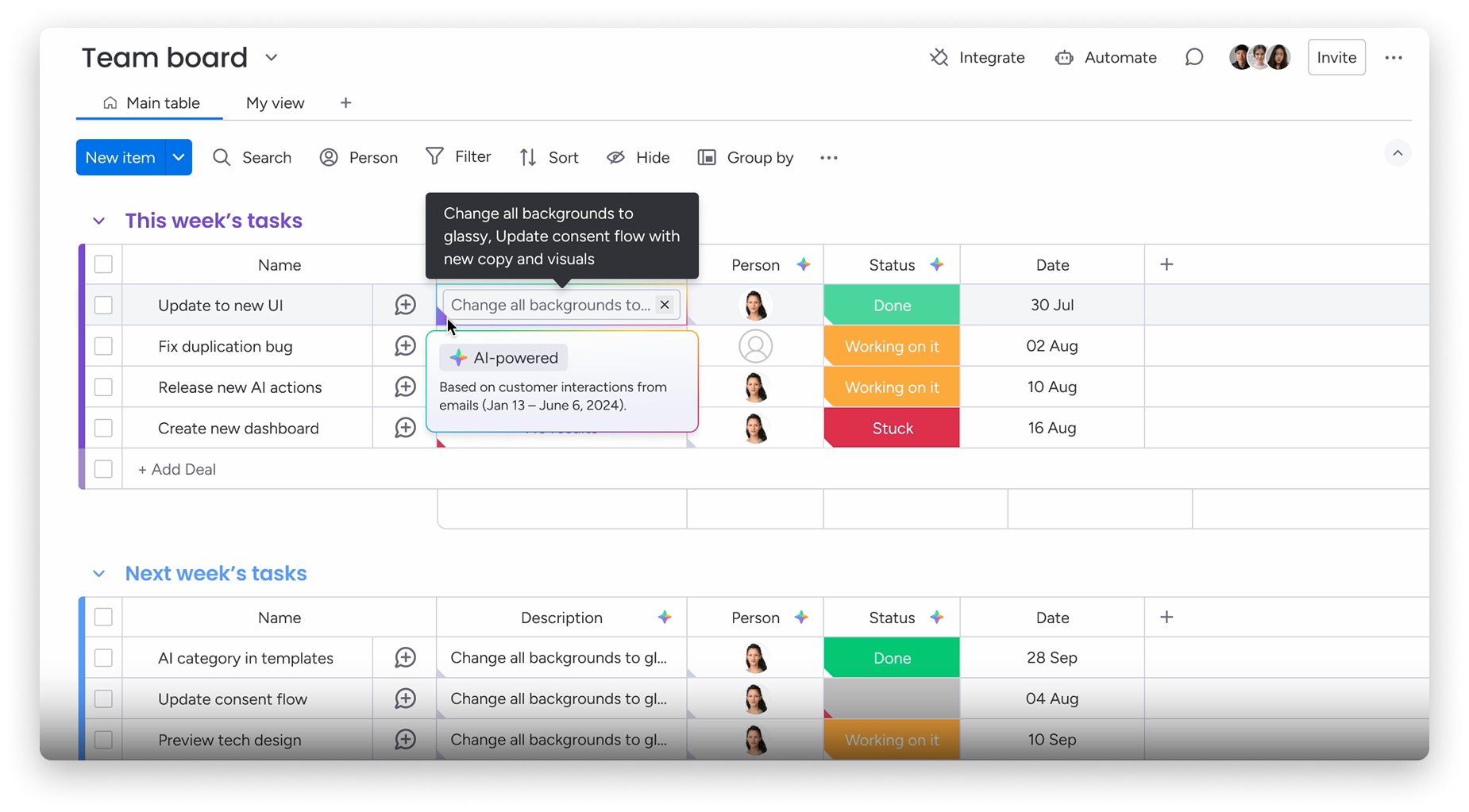
Monday.com, which has branded itself as a “Work OS,” revolves around completely customizable color-coded boards that can mimic any workflow system — project management, CRM, resource allocation – without needing coding.
Best for: Companies that value visual simplicity and need a platform that works across multiple departments, such as engineering, marketing, and operations.
Key features:
- Portfolio snapshot view for tracking dependencies, milestones, and risk across hundreds of projects at once.
- Over 200 native integrations, plus automation recipes that require no coding knowledge.
- Multiple project views: Gantt, Kanban, calendar, and workload heatmaps.
- Onboarding typically takes one to two hours, according to user-reported data on G2 — among the fastest of any tool on this list.
Pitfalls:
- Seating comes in standard groups instead of precise headcounts, potentially leading to higher costs for those falling in between the tiers.
- The Basic package does not have any automations or integration at all; thus, it would be ideal only for Standard and above.
- Reporting is not as robust as in a pure PPM tool after a few dozen projects are active in the portfolio.
Pricing: Free (2 users); Basic from roughly $12/user/month; Standard from roughly $17/user/month; Pro from roughly $26/user/month; Enterprise custom (annual billing, minimum 3 seats).
User reviews:
- G2: 4.7/5 based on over 16,000 reviews.
I like that it makes messy cross-department work visible and trackable without forcing everything into a rigid project-management format. — Source
monday.com user on G2.com
- Capterra: 4.6/5 in accordance with more than 6,000 user feedbacks.
- Gartner Peer Insights: 4.5/5 from more than 1,300 responses.
The interface is clean, but enterprise-level features come at a high cost, which can be a downside for smaller teams or solo users. — Source
monday.com User on Gartner Peer Insights
Reviewers consistently rank it above Asana on ease of use and interface quality, while flagging seat-bucket billing and the Basic plan’s lack of automations as the most common sources of pricing confusion.
Verdict: monday.com is one of the best Jira alternatives for project management when the priority is department-wide adoption and visual clarity over deep, engineering-specific configurability.
Read more: ClickUp vs Monday vs Wrike: Which Tool Fits You in 2026?
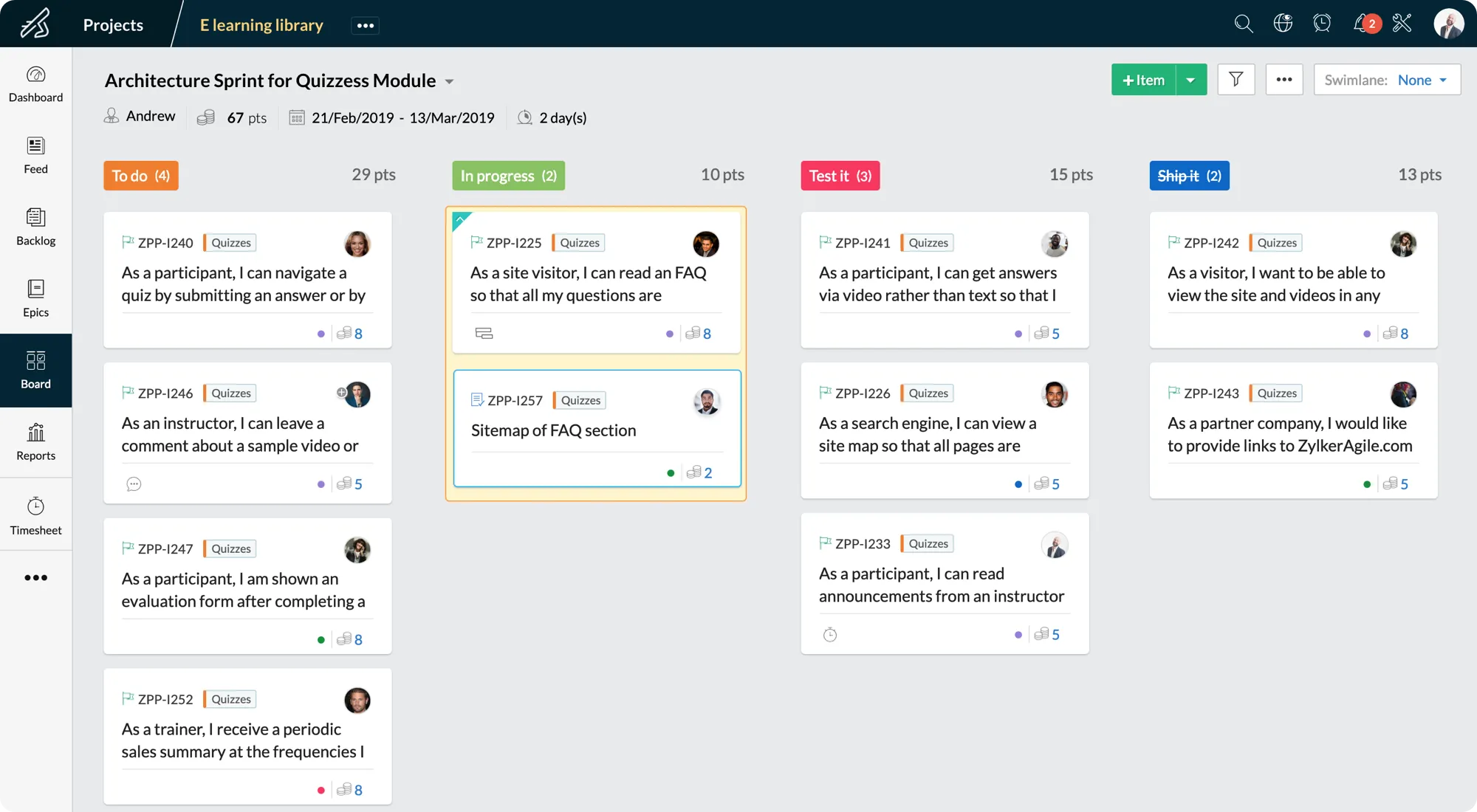
6. Zoho Sprints — Best Free Jira Alternative for Budget-Conscious Agile Teams

Zoho Sprints is an agile project management solution based on the concepts of Scrum and Kanban boards, backlog management, and sprint planning, closely interconnected with the other Zoho applications.
Best for: Agile projects with budget constraints, particularly those using other Zoho solutions, that need Scrum capabilities comparable to Jira but at lower prices.
Key features:
- Scrum kit: backlogs, sprint boards, burn-down and burn-up charts, and velocity management.
- Built-in timesheet and global timer for tracking billable and non-billable hours per work item.
- Budget and expense management module alongside a risk and opportunity tracker.
- Native integrations with Jira, Microsoft SharePoint, and Azure DevOps for hybrid teams mid-migration.
Pitfalls:
- Automation capabilities are limited compared with ClickUp or monday.com — basic conditional notifications aren’t always possible.
- The interface can feel dense for teams coming from a simpler tool like Trello.
- Smaller third-party integration ecosystem than the mainstream platforms on this list.
Pricing: Free (up to 3–5 users); paid tiers start at $1/user/month, rising to roughly $5–6/user/month for the Premier tier (annual billing).
User reviews:
- G2: 4.5/5 based on more than 180 user reviews.
Zoho Sprints’ organizational structure makes it easy to visualize our tasks, which helps our team stay focused and keep moving forward quickly and efficiently. — Source
Zoho Sprints user in G2.com
- Capterra: 4.5/5 in accordance with almost 300 user responses.
- Gartner Peer Insights: 4.4/5 from more than 100 feedbacks.
Features available in the free version are very limited. Even though the product is not very costly, but we would have liked to have additional features in trial version before making the final purchase. — Source
Zoho Sprint User on Gartner Peer Insights
One reviewer, a former Jira user, described the switch as trading Jira’s admin-panel-on-admin-panel complexity for something that still kept the good parts of Jira’s scrum board flow — without the same operational overhead.
Verdict: Zoho Sprints is among the most recommended Jira alternatives for lean agile teams that want genuine Scrum depth at a fraction of Jira’s per-seat cost.
7. Teamwork.com — Best Jira Alternative for Client-Facing Agencies
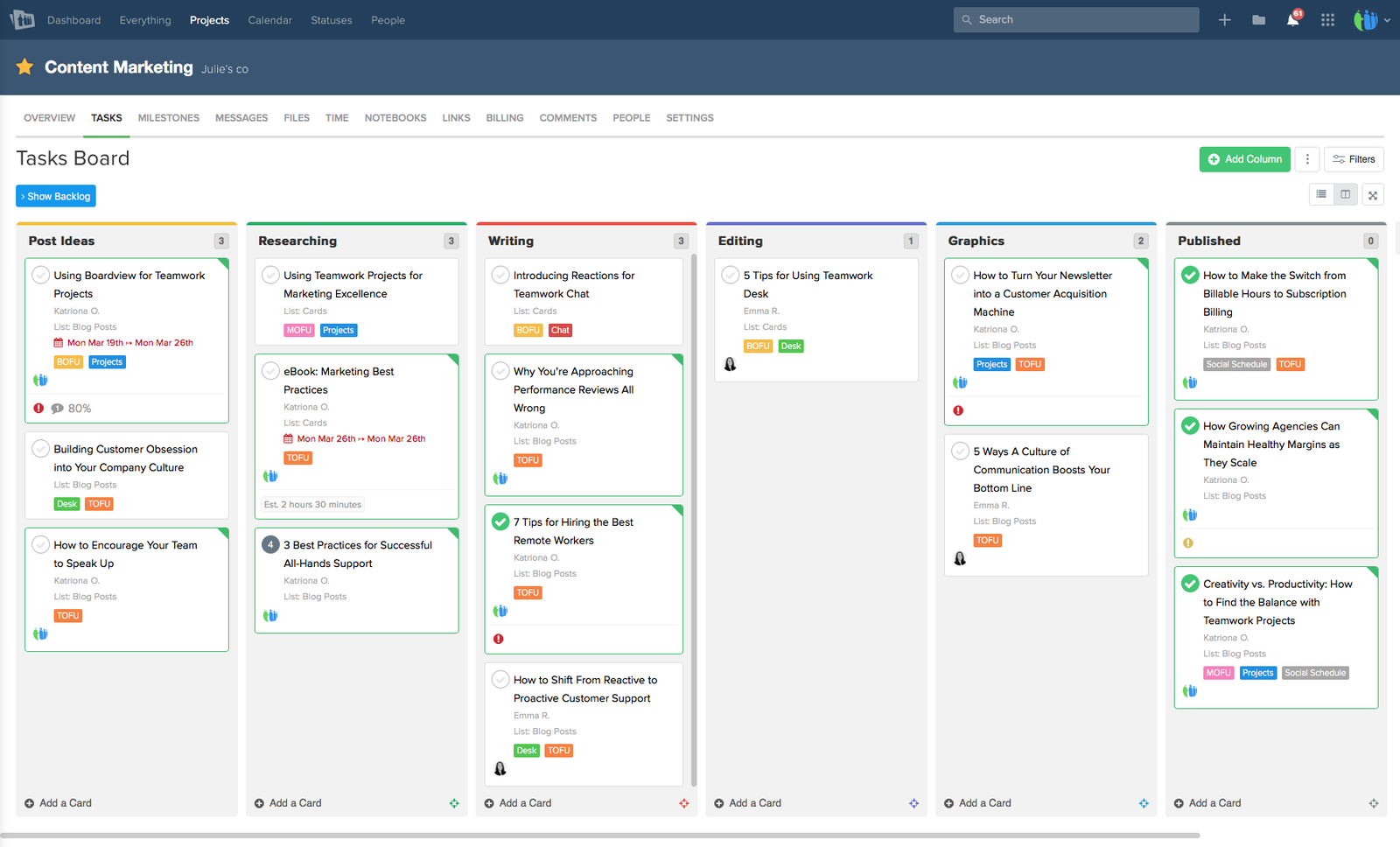
Teamwork.com is a project management software specifically designed for agencies and service organizations, which features task management, time tracking, and client invoicing capabilities.
Best for: Agencies, consulting firms, and all kinds of client-oriented teams that require time tracking and analysis of project profitability, along with task management.
Key features:
- Native time tracking system integrated with the project budget, hence providing profitability insights in real time, not through retrospective calculations.
- Client/user access with fine-grained permissions allows external parties to see the progress without viewing team communications.
Pitfalls:
- More complex learning process compared to other generalist PMs regarding such functions as budgeting and custom reporting.
- Poor mobile app performance on large projects: several G2 reviews state this.
- Expensive pricing plans starting from the Grow plan are available when your team needs advanced budgeting and resource planning.
Pricing: Free (up to 5 users); Deliver from $10.99/user/month; Grow from $19.99/user/month; Scale from $54.99/user/month; Enterprise custom (annual billing).
User reviews:
- G2: 4.4/5 from more than 1,300 reviews.
It helps me keep projects, tasks, and ongoing activities organized without making things complicated. — Source
Teamwork user on G2.com
- Capterra: 4.5/5 based on 940 user reviews.
- Gartner Peer Insights: 4.3/5 based on over 200 ratings.
Generally its a great product and has so many capabilities that we don’t use. — Source
Teamwork user on Gartner Peer Insights
Users consistently praise the combination of project tracking, time tracking, and client billing in one platform, with the most common criticism centered on a real learning curve for teams new to structured task management.
Verdict: Teamwork is a strong alternative to Jira specifically for agencies and service firms where “project success” is inseparable from “billable hours and margin” — a use case Jira was never built to serve.
8. Linear — Best Jira Alternative for Fast Software Engineering Teams

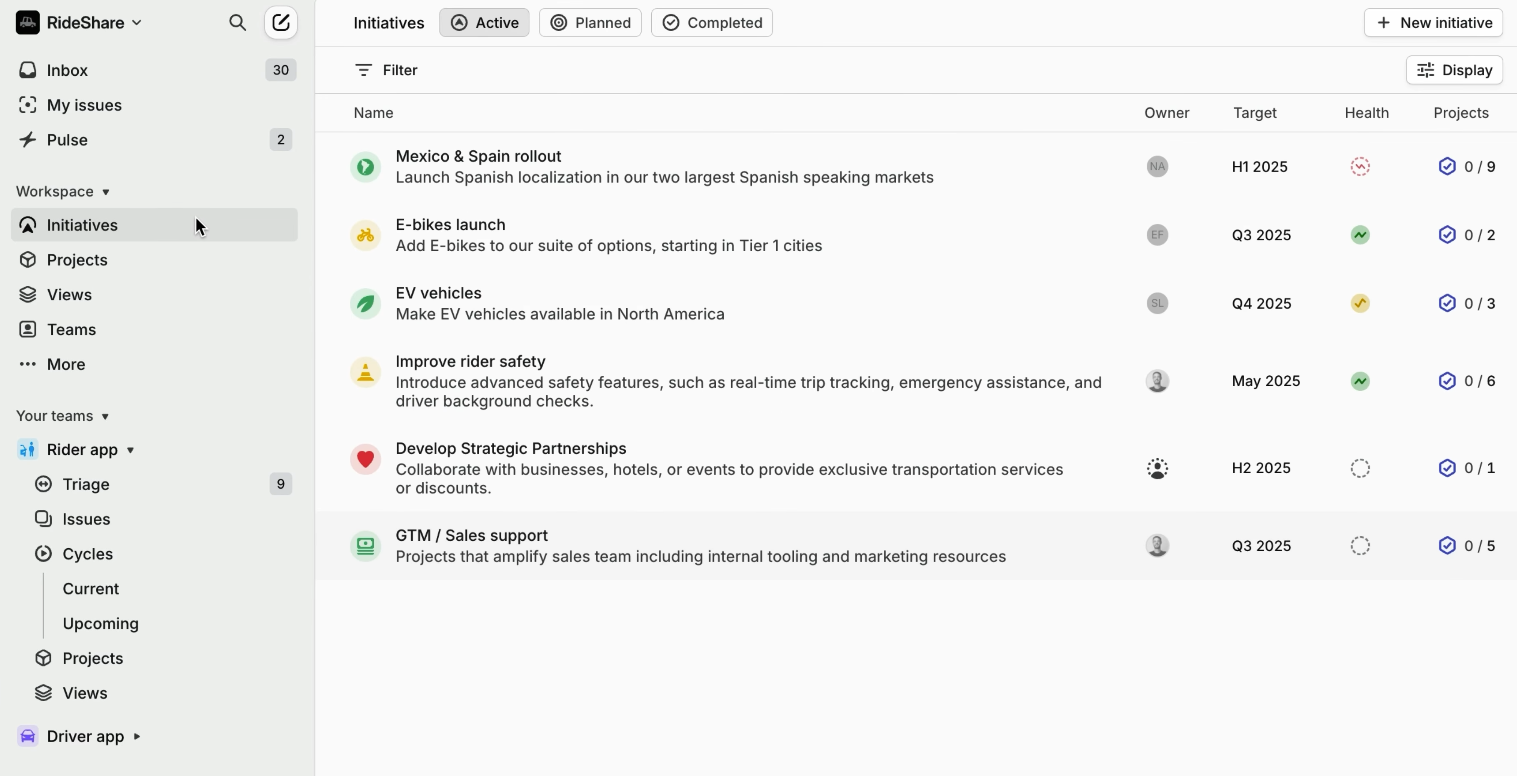
Linear is an agile issue tracking platform built for quick software teams that focuses on issues, projects, and time-bound cycles (the equivalent of sprints in other platforms).
Best for: Startups and engineering teams that require quick work but find Jira too slow and overengineered.
Key features:
- Keyboard-first, command-palette navigation that lets engineers create, assign, and move issues without touching the mouse.
- Deep native GitHub and GitLab integration that auto-links pull requests and updates issue status on merge.
Pitfalls:
- Deliberately opinionated structure offers little flexibility for non-technical teams or complex cross-departmental workflows.
- No native time tracking or design-file previews.
- Free plan caps out at 250 issues across 2 teams — fine for evaluation, tight for an active team.
Pricing: Free (250 issues, 2 teams); Basic ($10/user/month); Business ($16/user/month); Enterprise custom (annual billing).
User reviews:
- G2: 4.5/5 based on more than 90 reviews.
It really helps me organise my projects, and it’s an easy way to interact with my team, especially on issues that need some back-and-forth. — Source
Linear User on G2.com
- Capterra: 4.3/5 in accordance with 4 user responses
The speed and product opinion alone justified leaving Jira’s configuration sprawl behind
Linear User in Capterra
Other users consistently praise the speed and clean interface, with the most common concern being a worry that as Linear adds enterprise features, it risks the same bloat that pushed teams away from Jira in the first place.
Verdict: Linear is the one of the best Jira alternatives for engineering teams specifically — not a fit for marketing, operations, or any team that isn’t writing code.
Comparisons like this take real testing time to get right. If you’ve found this breakdown useful, subscribe to Digest.Pro to get you the next PPM software comparison the moment it’s published, instead of searching for it later.
How did we select the best Jira alternatives? (Our methodology)
This guide breaks down the best Jira alternatives for exactly that situation — portfolio managers, PMOs, and engineering leaders who need cross-project visibility, predictable resourcing, and a tool that doesn’t buckle once you’re running more than a handful of concurrent projects. We reviewed demos, analyzed over 500 trusted G2, Capterra and Reddit reviews, and compared pricing sheets with vendor websites rather than using outdated comparisons of Jira alternatives based on comparison charts.
Every product listed here was benchmarked based on six weighted factors that we believe are truly important for portfolio project management, not just superficial list of features:
- Efficiency (25%) — how quickly is a new team able to get up to speed, and how much administration is required to keep using the product?
- Portfolio and resources transparency (20%) — does the product allow visualizing cross-project load and capacity natively, or only within a single project?
- AI functionality (15%) — does the product offer truly valuable AI features, or simply have them for marketing reasons?
- Scalability (15%) — Does the tool hold up as project count and team size grow, or does it require a platform switch at scale?
- Total cost of ownership (15%) — the real cost, including add-ons, not just the advertised starting price.
- Independent user sentiment (10%) — authenticated ratings and written reviews by G2, Capterra, TrustRadius, and Reddit, where weight was given to more statistically significant numbers of reviews.
We intentionally did not include vendor-supplied case studies in our assessment but used them as contextual information.
This same methodology is what we use across Digest.Pro’s broader coverage of project management tools, so the scores here are directly comparable to our other software comparisons rather than being scored on a one-off scale.
What are the best open-source and self-hosted Jira alternatives?
For teams that need full data sovereignty — or simply want to avoid repeating this exact evaluation the next time a SaaS vendor changes its pricing — open-source Jira alternatives remain the most durable option after Data Center sunsets.
- Plane is the most actively developed open-source alternative, with a modern, linear-like interface covering issues, sprints (called Cycles), and built-in documentation. The Community Edition is free and self-hostable, with a paid Pro tier for teams that want managed hosting.
- OpenProject is the most mature traditional PM tool in the open-source space, with the strongest Gantt chart and scheduling implementation of any tool on this list. The Community Edition (GPL-3.0 licensed) is genuinely free with no user limits; Enterprise self-hosted tiers start around €5.95 per user per month for teams that want two-factor authentication, LDAP sync, and professional support.
- Taiga is perfect for teams that need a lightweight Scrum and Kanban framework—without any additional features such as Gantt charts and budgeting tools. Jira alternative free self-hosting is available for unlimited number of users; the monthly price of the cloud-based managed service is about $7 per user.
All three tools have the ability to seamlessly integrate with the current Git-based development workflow and import data from Jira.
How to choose the right Jira alternative for your business needs?
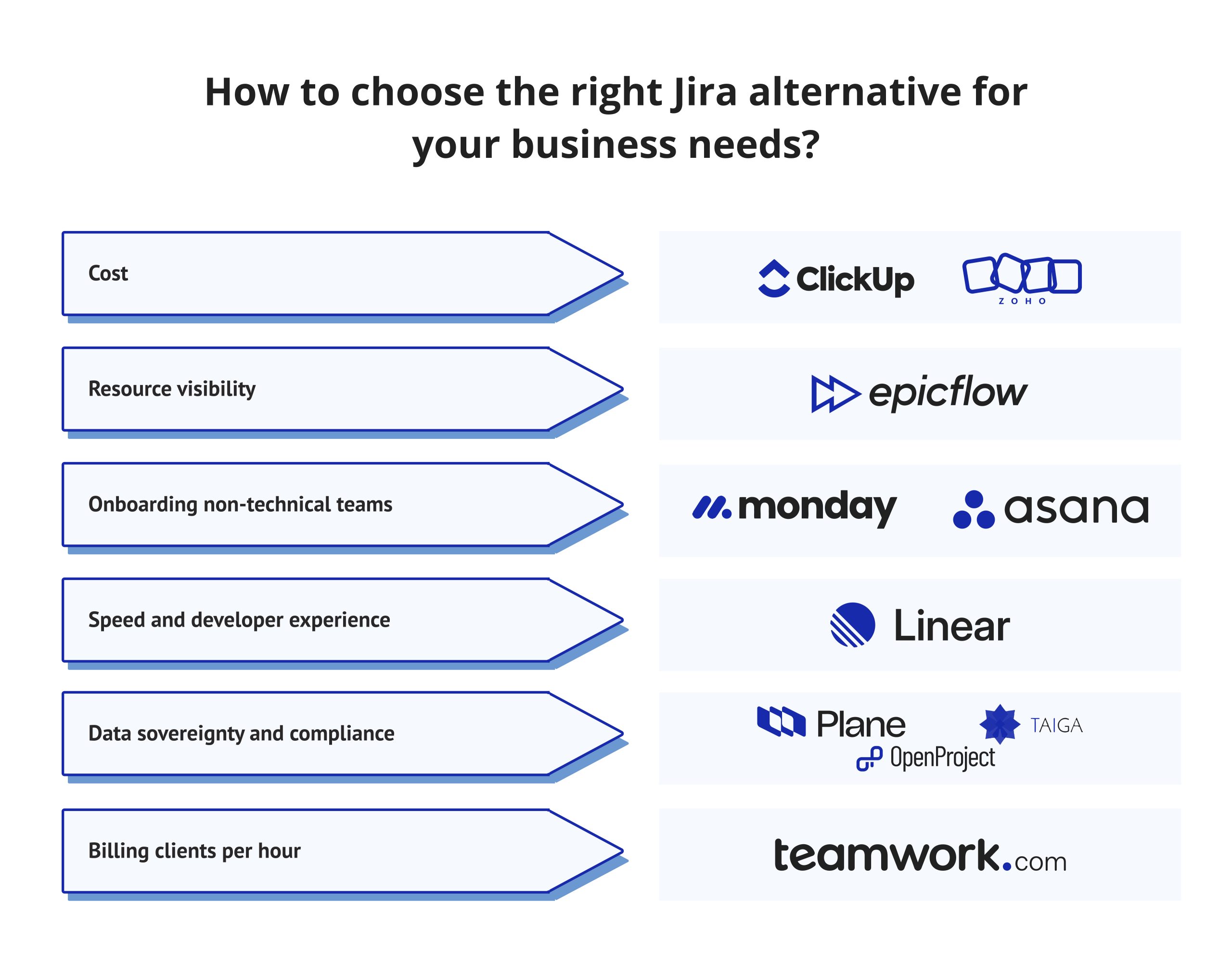
There’s no single best Jira alternative — only the best fit for your specific constraints. A good Jira alternative for a 10-person startup looks nothing like a good Jira alternative for a 200-person aerospace PMO, and the Jira software alternatives that top generic “best of” lists aren’t necessarily the ones that solve your team’s actual bottleneck. Use this quick framework:
- If your biggest pain point is cost, start with ClickUp or Zoho Sprints — both deliver strong functionality well below Jira’s effective total cost of ownership.
- If resource visibility is your primary pain point, Epicflow addresses a specific pain point that none of the generic project management tools on this list are designed to address, and Epicflow can work in conjunction with Jira rather than as a replacement for it.
- If onboarding non-technical teams is your primary pain point, monday.com and Asana both have faster onboarding processes than Jira in external tests.
- If speed and developer experience are your primary pain points, Linear was created specifically for that complaint.
- If data sovereignty and compliance are a priority for you, look at Plane, OpenProject, and Taiga first.
- If you are billing clients per hour, Teamwork.com includes its own time and budget tracking capabilities.
How to switch from Jira without losing data or disrupting sprints?
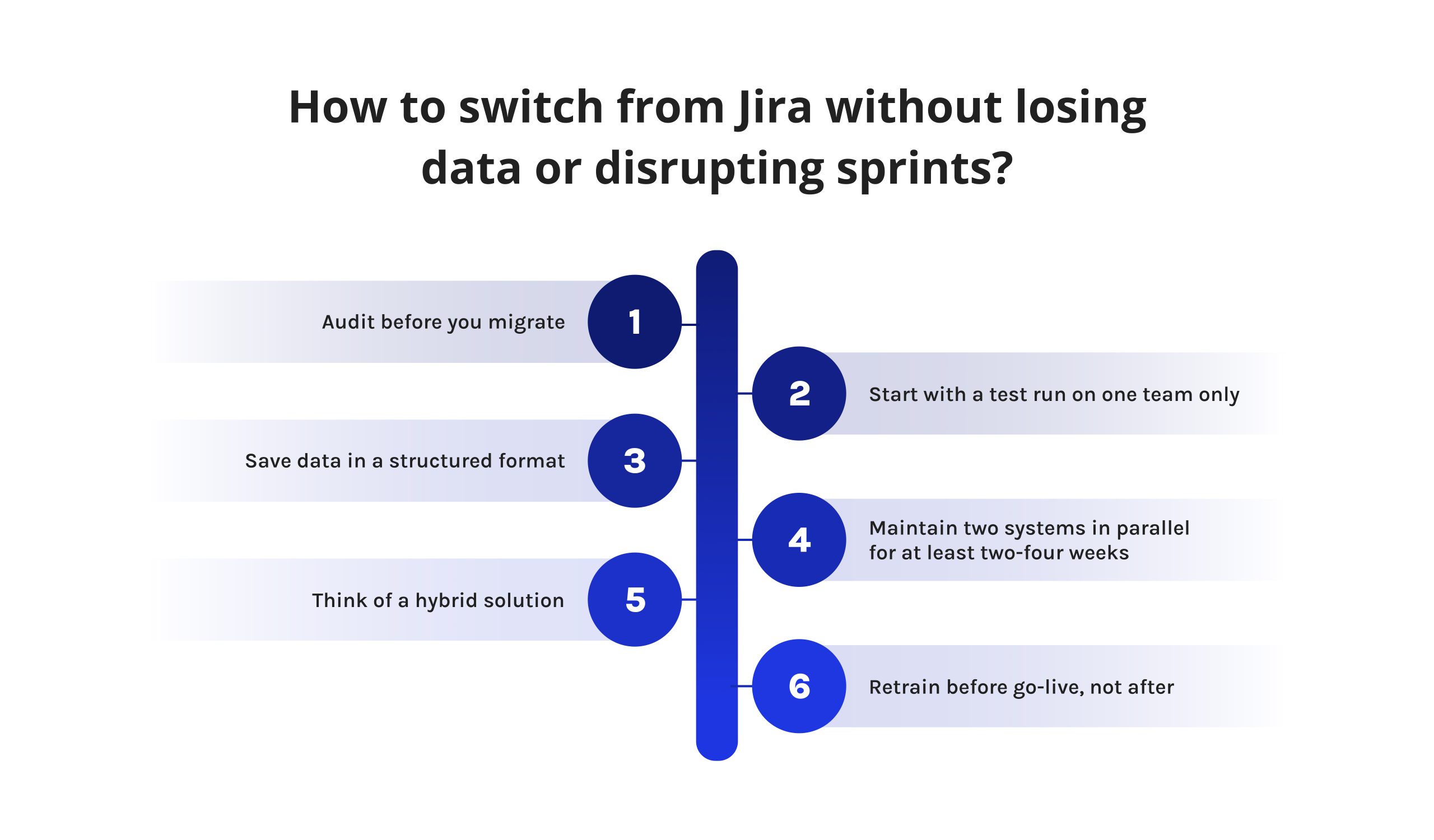
Migrating away from Jira doesn’t have to mean stopping active sprints. A phased approach reduces risk substantially:
- Audit before you migrate. Inventory every custom workflow, field, automation rule, and Marketplace app your team actually depends on — not just the ones you remember.
- Start with a test run on one team only. Transfer just one non-critical project to the new platform first, in order not to rush and miss out on any issues.
- Save data in a structured format. All alternative software tools mentioned above, such as ClickUp, Asana, or Jira alternative free solutions, allow exporting data from Jira directly using CSV or API without losing any information about the tasks and comments.
- Maintain two systems in parallel for at least two-four weeks. It will be enough to get acquainted with the new workflow and confirm its effectiveness before making the full transfer to it.
- Think of a hybrid solution. When the real problem with Jira is the lack of visibility of resources across the portfolio, but not issues themselves, then software like Epicflow will help you integrate the new functionality with the existing Jira instance.
- Retrain before go-live, not after. Teams that budget for structured onboarding — even a single half-day workshop — report meaningfully smoother adoption than teams that expect the new tool to be self-explanatory.
Final words
Jira’s Data Center shutdown is a forcing function, but it’s also a legitimate opportunity to fix a mismatch that’s existed for years: a tool built for single-team issue tracking, stretched to cover portfolio-level PMO work it was never designed for. The eight Jira alternatives in this guide cover every realistic scenario — from ClickUp’s all-in-one value to Epicflow’s AI-driven resource optimization to Linear’s speed-first developer experience. The right move isn’t finding the single “best” tool in the abstract. It’s matching the alternative to the specific limitation that’s actually costing your team time and money today.
Read more: Program Management in 2026: What It Is and Why It Matters
FAQs
There is no one-size-fits-all best alternative to Jira — it is highly subjective and depends on what the key needs of your team are. ClickUp is the best alternative overall in terms of the functionality you get for the money; Epicflow is the best solution for AI portfolio & resource management; and Linear is the best alternative for fast-paced software engineering teams.
Yes. Microsoft Planner and Azure DevOps Boards are the most popular Microsoft tools that are close alternatives to Jira. Azure DevOps Boards focuses on software developers providing sprint planning & backlog management, while Planner provides task management within the Microsoft 365 environment.
Jira is still the most popular tool used in agile software development, but for people looking for alternatives to Jira, Linear and Zoho Sprints will be good picks, providing similar functionality with a much simpler setup and lower price.
According to market data, Monday.com and Asana are among the strongest competitors of Atlassian. They entered the list of Leaders in Gartner’s Magic Quadrant for Collaborative Work Management, along with Atlassian.
There are mainly two products of Jira, which include Jira Software and Jira Service Management. Jira Software is meant for development teams to track issues, while Jira Service Management is meant for ITSM and IT service desks.
Among Jira alternatives, Epicflow provides the strongest AI capabilities at the portfolio level, with the help of AI Assistant, What-If analysis, and Future Load Graph that can predict potential resource constraints. The other two Jira alternatives are ClickUp Brain, and Asana AI Studio.
ClickUp and monday.com deliver better outcomes than Jira for cross-departmental teams because they target non-technical users after proper consideration. By providing faster set-up time and much easier interfaces, ClickUp and Monday.com solve many problems that Jira cannot solve because of its focus on technical users and its complex set-up process.
Jira is a versatile issue-tracking and agile planning solution aimed specifically at software development, while Trello is a straightforward and visual Kanban solution meant for simple task management. While Trello is easy to grasp and economical compared to Jira, it lacks the intelligence inherent to Jira’s software, including idea dependency management, comprehensive analytics, and tools for developers’ integration.
Linear is regarded as the most suitable alternative to Jira for small startup companies that wish to use a fast, developer-friendly tool, which does not require undue configuration like Jira. In the case of teams that do not consist of engineers, free plans offered by Trello or ClickUp are considered to be effective entry points.
Migrating data from Jira can be a relatively easy task, while in other scenarios the task might become really complicated, based on the types of complex workflows, fields, and the number of Marketplace apps your company is using. Most modern applications provide a service that allows direct import from CSV or API while carrying out a phased migration, which means trying to implement one project first and a full migration later, should help to minimize the number of troubles met during the process.
References
Atlassian. (2025). Data Center end of life. Atlassian. Data Center end of life. Atlassian. 2025. Accessed July 01, 2026. https://www.atlassian.com/licensing/data-center-end-of-life
Atlassian. Atlassian Ascend. Atlassian Blog. Accessed July 02, 2026. https://www.atlassian.com/blog/announcements/atlassian-ascend
Jira pricing calculator. JiraPricing. Accessed July 01, 2026. https://jirapricing.com/
Compare Jira vs. monday.com. G2. Accessed July 01, 2026. https://www.g2.com/compare/jira-vs-monday-com
Compare Jira vs. Trello. G2. Accessed July 01, 2026. https://www.g2.com/compare/jira-vs-trello
Project Management Institute. Pulse of the Profession 2025. Project Management Institute; 2025. Accessed July 01, 2026. https://www.pmi.org/-/media/pmi/documents/public/pdf/learning/thought-leadership/pulse/pulse_of_the_profession_2025-1.pdf