
Among 2026’s top search queries appears the matchup of ClickUp, Monday, and Wrike — justified by their strong presence. Their reach spans similar user groups despite distinct paths in design. Pricing stays close enough to invite comparison across the board. One leans into feature richness, another favors clean visuals, and the third builds around structured control frameworks. Though numbers show overlap, intent separates them clearly.
Wrong choices bring hidden expenses beyond monthly payments. Time spent setting up systems slows progress immediately. Staff adjustment periods reduce early efficiency. Switching platforms months afterward creates extra workloads unexpectedly. Comparisons of ClickUp, Monday, and Wrike reveal differences in cost structures, tool capabilities, artificial intelligence tools, connected apps, and practical applications. Insights into these areas support informed decisions prior to agreement commitments.
Key Takeaways
- Among available choices in 2026, ClickUp stands out due to its broad functionality at a low price point. For groups requiring high adaptability, strong time monitoring capabilities, and a unified system, it proves fitting. Although artificial intelligence components function well, access comes through an extra purchase.
- Beginning with simplicity, Monday.com offers a smoother user experience than the others. For teams without tech backgrounds, its layout makes tasks clearer. Marketing units often find that it fits their workflow well.
- Despite its premium cost, Wrike supports large-scale organizational needs through structured oversight. Approval processes function alongside intake mechanisms, while reporting across project groups shows a clear advantage over similar tools. That said, adoption may slow due to complexity in setup and extended onboarding periods. Highest pricing tiers apply by default.
TL;DR: ClickUp vs Monday.com vs Wrike Quick Comparison
|
Criteria |
ClickUp |
Monday.com |
Wrike |
|
Free plan |
Yes — unlimited members |
Yes — unlimited members |
Yes — unlimited members |
|
Starting price (paid) |
$7/user/month |
€9/user/month |
$10/user/month |
|
Time tracking |
From Unlimited plan ($7) |
From Pro plan (€19) |
From Business plan ($25) |
|
AI is included in the base plan |
No (add-on: $5-7/user/mo) |
Partially (Sidekick on paid plans) |
Yes (Copilot on Business+) |
|
Best for |
Agencies, dev teams, startups |
Marketing, HR, non-technical teams |
Enterprise PMOs, regulated industries |
|
Integrations |
1,000+ |
200+ native |
400+ |
|
Learning curve |
Moderate to steep |
Low |
Steep |
|
Gartner recognition |
Mentioned in market analyses |
Mentioned in market analyses |
Named Leader in Collaborative Work Management |
Read more: 11 Best AI Agents for Project Management: Tools, Trends & Examples (2026)
Why You Can Trust Us: Our Methodology
Our editorial team spent three weeks hands-on testing each platform using real project scenarios: a 12-person marketing campaign, a software sprint cycle, and a cross-departmental operations workflow. We evaluated ClickUp vs. Monday vs. Wrike across eight criteria.
- Feature depth and task management capabilities — tested against real project scenarios, not just feature checklists.
- AI and automation capabilities — measured by what teams can operationalize today, not what the product roadmap promises.
- Pricing transparency — we modeled costs for 5, 15, and 50-person teams on equivalent tiers to surface real cost differences.
- User interface and learning curve — assessed by onboarding three non-technical team members on each platform without guidance.
- Integration breadth — counted native connectors and tested key workflows with Slack, Google Workspace, and Salesforce.
- Security and compliance — reviewed published certifications and governance controls per plan tier.
- Scalability — evaluated how each platform handles seat growth, permission models, and multi-project visibility.
- Value for money — compare feature sets per dollar at equivalent price points.
We did not accept paid placements or sponsored rankings. All conclusions reflect direct platform testing and verified third-party data.
Covering all notable project management and AI tools every quarter takes a dedicated editorial team. Follow Digest.Pro to get structured tool breakdowns, this one delivered directly to your feed.
What is ClickUp?

ClickUp is an all-in-one work management platform founded in 2017, built around a single premise: replace every other productivity app with one. It combines task management, docs, goals, whiteboards, time tracking, and dashboards in a single workspace — and serves over 10 million users across more than 100,000 teams as of 2026.
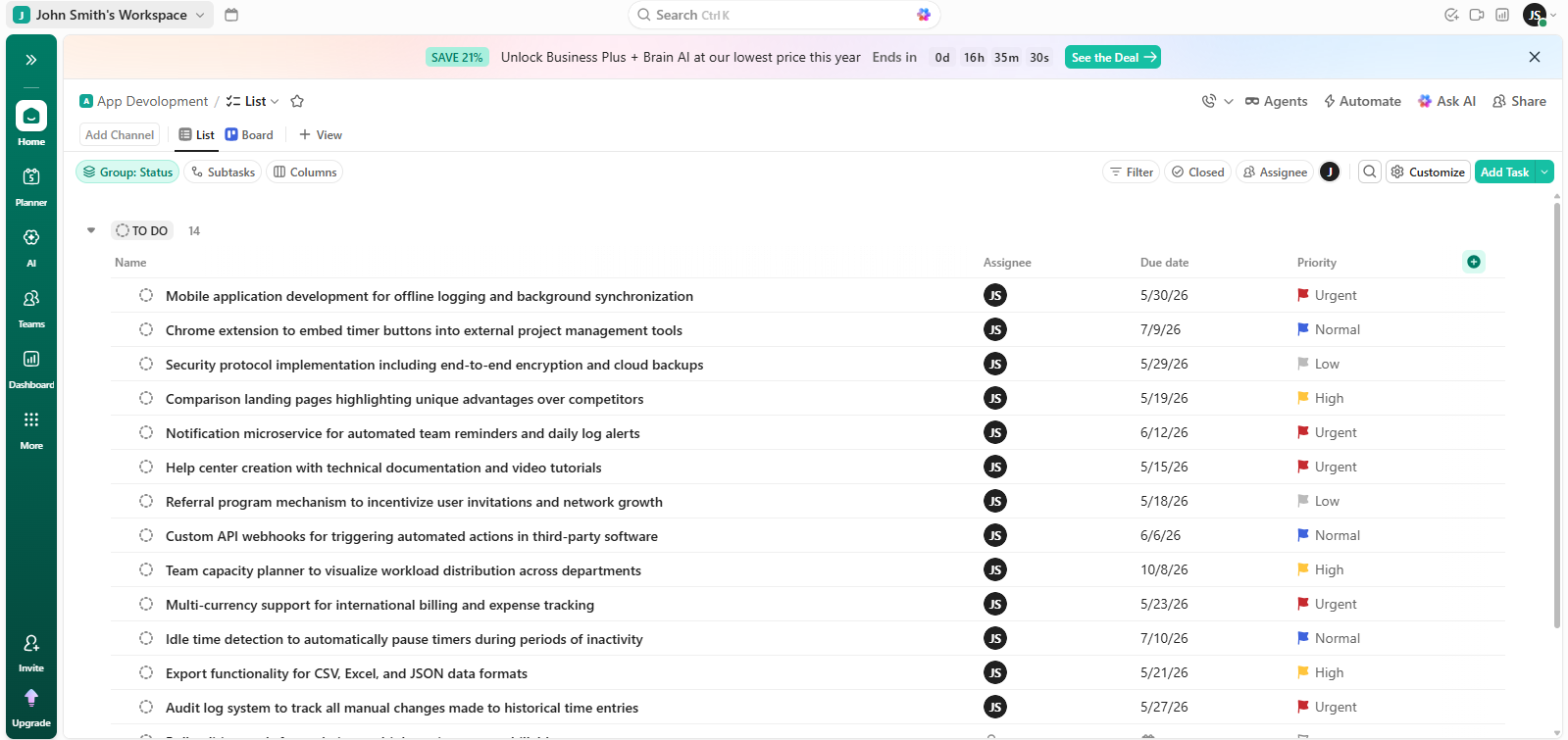
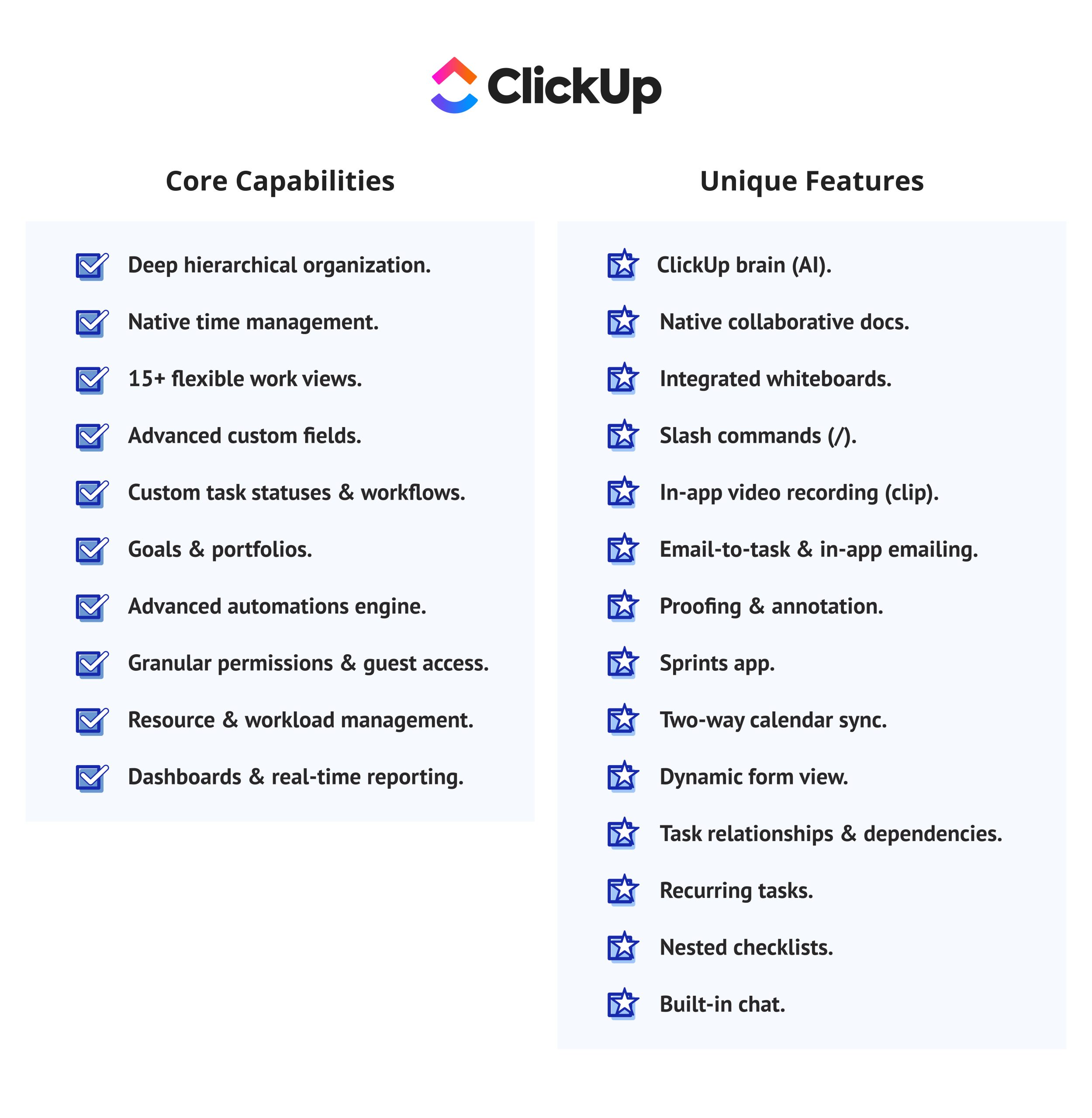
Core Capabilities & Unique Features
Core capabilities:
- Hierarchical Structure: The five levels of organizational architecture (Spaces, Folders, Lists, Tasks, and Subtasks) allow for an adaptable framework that can grow from one person working independently to a full-scale 200-employee complex.
- Native Timing Capability: Manual entry and built-in clocking mean teams can document time worked directly to the task without the use of a third-party application. This feature is available for $7 per month (unlimited use).
- 15 Different Work Views: Choose from 15 different views of your work in order to meet the different needs of your team. In addition to being able to switch between views quickly, all of the views have the same underlying data, so nothing needs to be re-entered/replicated.
- Advanced Custom Fielding: Ability to create and manage all types of data (numbers, dropdown lists, formulas/ratings/progress bars, etc.) directly on the task itself — providing users with a single location to enter and track their project documentation, eliminating the need for multiple spreadsheets, etc.
- Permissions and Guest Access: You can control permission visibility and edit permission levels at the space, folder, or list level of your workspace. External collaborators can be added to your workspace as guests and won’t require full-price seats.
- Resources and workload management: View the resources’ availability throughout all projects, detect potential overloads to prevent delays, and balance resource assignments in one place.
- Dashboards and real-time reporting: Create your own dashboards based on 50+ widgets — velocity graph, summarized information with time tracking, burndown chart — and see project statuses at once.
Unique Features:
- ClickUp Brain: An AI layer within ClickUp that can write task descriptions, condense long comment conversations into a summary, create subtasks based on a short description, and answer questions regarding data in your workspace as a paid feature.
- Native Collaborative Docs: You can have rich-text-type documents (like all other files in ClickUp) in your workspace that link to tasks, allow for concurrent viewing/editing by multiple users, and ultimately replace other tools (like Notion or Confluence) for many teams.
- Integrated Whiteboard: A limitless canvas (that connects nodes in your whiteboard to your ClickUp tasks) that will be used to brainstorm, diagram, and process before and after the ideation phase.
- Slash Commands (/): You can type a “/” anywhere in ClickUp in order to do any of the following: Create a task, apply a template, and trigger an activity — this allows for faster data entry for people who use a keyboard first.
- Clip: Capture video of your screen while you’re working on a task. Send these clips to your collaborators as a quick and easy way to explain something instead of having to send back-and-forth messages.
- Email to task and email in-app: Communicate via email while you work in ClickUp. Incoming emails can be automatically converted into tracked tasks — beneficial to client service teams who manage and fulfill requests on behalf of their clients.
- Proofing/Annotating: Instead of using outside tools to make comments on an image/PDF, now you can make comments directly on those files attached to your current task to speed up the feedback loop and keep it organized with version control.
- Sprint’s application: Native sprint planning, velocity tracking, sprint-specific dashboards, and backlog management functionality for engineering teams running Agile without dependence on Jira.
- Two-way sync for calendars remains in sync with Google Calendar or Outlook when due dates of assigned tasks are amended on either platform.
- Dynamic Form Views: Create intake forms that will flow to specific lists as tasks based upon the answers you receive using conditional logic.
- Blockage, waiting on it, and related tasks are linked to each other. When a task is not dependent on another partially completed task, you will receive an alert when that occurs while you are in the process of finishing the downstream task.
- You can create recurring tasks using any custom timeframe; these can include days and weeks, and upon being completed, you will not need to create them all again at a later date.
- ClickUp has a feature to create checklists within task items so that each step can have its own individual assignee with its own due date.
- Real-time chat messaging will be available within ClickUp so that you do not have to switch between Slack and your assigned tasks to communicate with team members quickly and easily.
These project management features make ClickUp one of the most complete task management tools available at its price point. One distinctive capability: the Dynamic Form view lets teams collect requests and automatically convert them into tracked tasks — reducing manual entry significantly in request-heavy workflows.
What are the main AI and automation capabilities of ClickUp?
ClickUp’s AI layer — ClickUp Brain — includes an AI writing assistant, task summarization, automated task creation from meeting notes, and an AI Notetaker that transcribes calls and generates action items. In 2025–2026, ClickUp also expanded Brain MAX, which introduces autonomous AI agents capable of triggering multi-step workflows.
Important caveat: ClickUp Brain is not included in any base plan. It costs an additional $5/user/month (annual) or $7/user/month (monthly) on top of any paid plan, for a 10-person team on Business, which adds $600/year to the annual bill.
Automation in ClickUp supports up to 250 actions/month on the free plan and scales to unlimited on paid plans. Triggers include status changes, date conditions, task assignments, and custom field updates.
Pricing & Free Tier
ClickUp’s pricing as of May 2026:
- Free Forever — $0, unlimited members, 60MB storage, 1 form
- Unlimited — $7/user/month (annual), unlimited storage, integrations, Gantt charts, native time tracking
- Business — $12/user/month (annual), workload management, advanced automations, sprint reporting
- Enterprise — custom pricing, SSO, HIPAA, white-labeling, dedicated support, live onboarding training
ClickUp Brain (AI) is an add-on at $5/user/month (annual).
The free plan is genuinely useful for small teams. It allows unlimited members and unlimited tasks — a rarity among free-tier project management tools. The Unlimited plan at $7 is the best-value entry point in this comparison.
User Experience & Interface
The ClickUp user interface is a robust but cumbersome user experience (UX) for new users due to the large number of settings, views, and customizations available. Many new users have reported that they felt somewhat lost at first due to the large number of options after they joined ClickUp, and while the ClickUp team continuously improves the user experience (UX) since around 2023 or so, the user interface is not as easy to use (even though it is easier than it was), and it will take new users a fair bit of time to learn how to navigate it comfortably on their own.
During the User Acceptance Testing (UAT), we found that non-technical users needed at least 2 to 3 days of onboarding training before they could navigate the ClickUp user interface independently, while power users find value in the level of depth that they can find in ClickUp.
User Ratings (up to June 2026):
- G2: 4.6/5 (12,440 reviews)
- Capterra: 4.6/5 (4585 reviews)
- Gartner Peer Insights: 4.5/5 (710 Ratings)
- TrustRadius: 8.7 out of 10 (1,546 Reviews and Ratings)
Integrations
ClickUp has over 1,000 native integrations, which include Slack, Google Workspace, Zoom, GitHub, Figma, HubSpot, Salesforce, and Zapier, to name a few. Also, ClickUp has a publicly accessible API that is well-documented. For most teams, ClickUp’s integration breadth means you will find a native connector for any tool already in your stack.
Security & Compliance
ClickUp holds SOC 2 Type I and Type II, GDPR, CCPA, and HIPAA certifications. HIPAA compliance and data residency options are available on the Enterprise plan. Two-factor authentication is available on all plans.
Pros & Cons
Pros:
- Lowest price per feature in this comparison
- The most flexible task management features of the three
- Unlimited members on the free plan
- Strong time tracking tools are available from the $7 plan
- Excellent template library (1,000+ templates)
- Broad integration ecosystem
Cons:
- Steep learning curve for new users
- AI features require an additional paid add-on
- The mobile app is less capable than the desktop version
- Notification volume can overwhelm users without configuration
- Bug fixes are slower than those of some competitors’
Best For
ClickUp provides flexibility to a maximum extent, has no large software budget restrictions, and is best suited to software developers, agencies, startups, and many other organizations that require maximum flexibility. Teams wanting to consolidate all their separate product management tools into one tool will find it to be the optimal choice.
Want more in-depth comparisons of project management tools, AI software, and startup ecosystems? Follow Digest.Pro — we publish expert analysis for teams that need to move fast and decide well.
Read more: AI Agent Orchestration for Complex Workflows: Everything You Need to Know
What is Monday.com?
Monday.com is a “work operating system” — a visual, board-based method of managing projects, customers, employees, and other working processes across a single account. Founded in 2012, it is based on a platform that allows every work process to be managed using the same visual methodology.
Core Capabilities & Unique Features
Core capabilities:
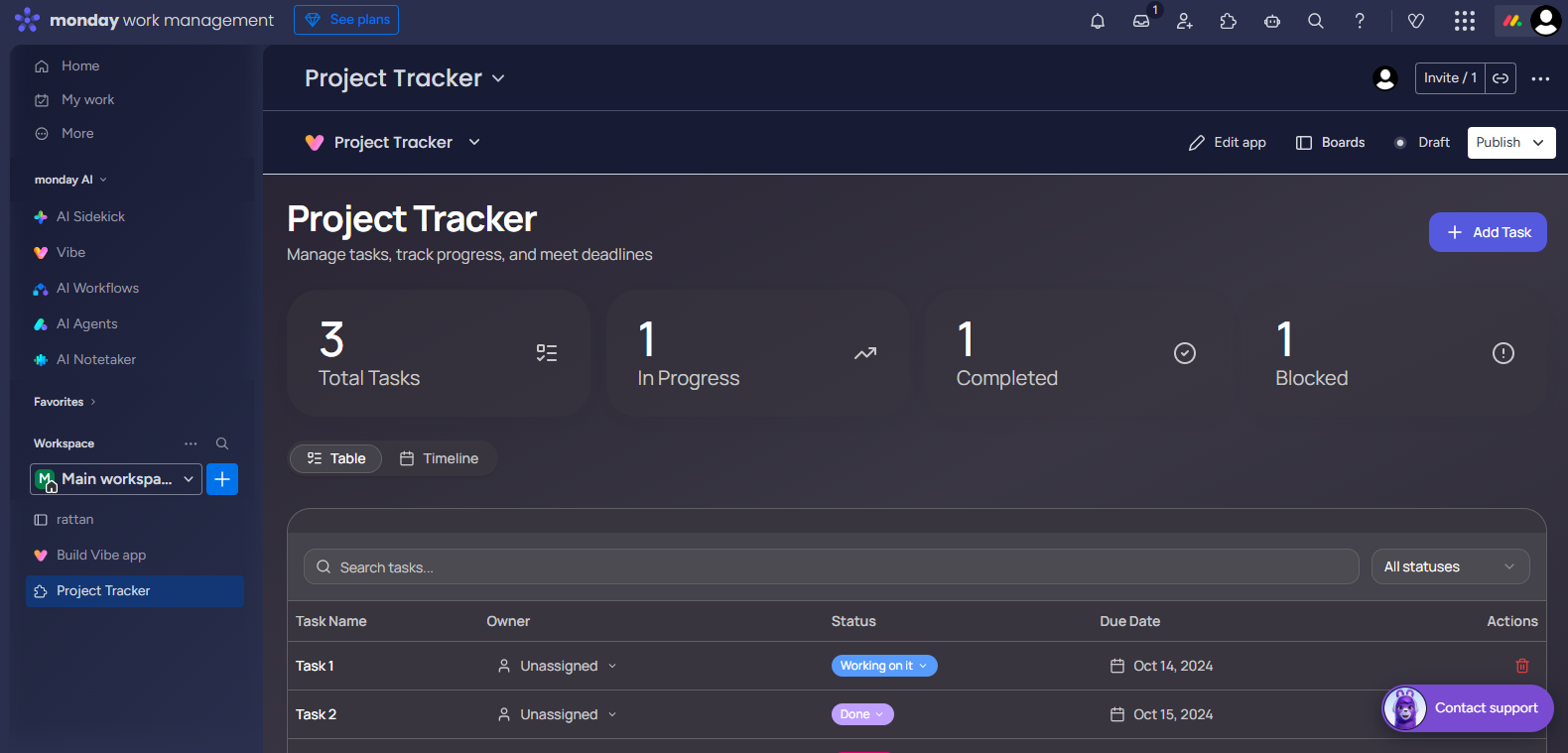
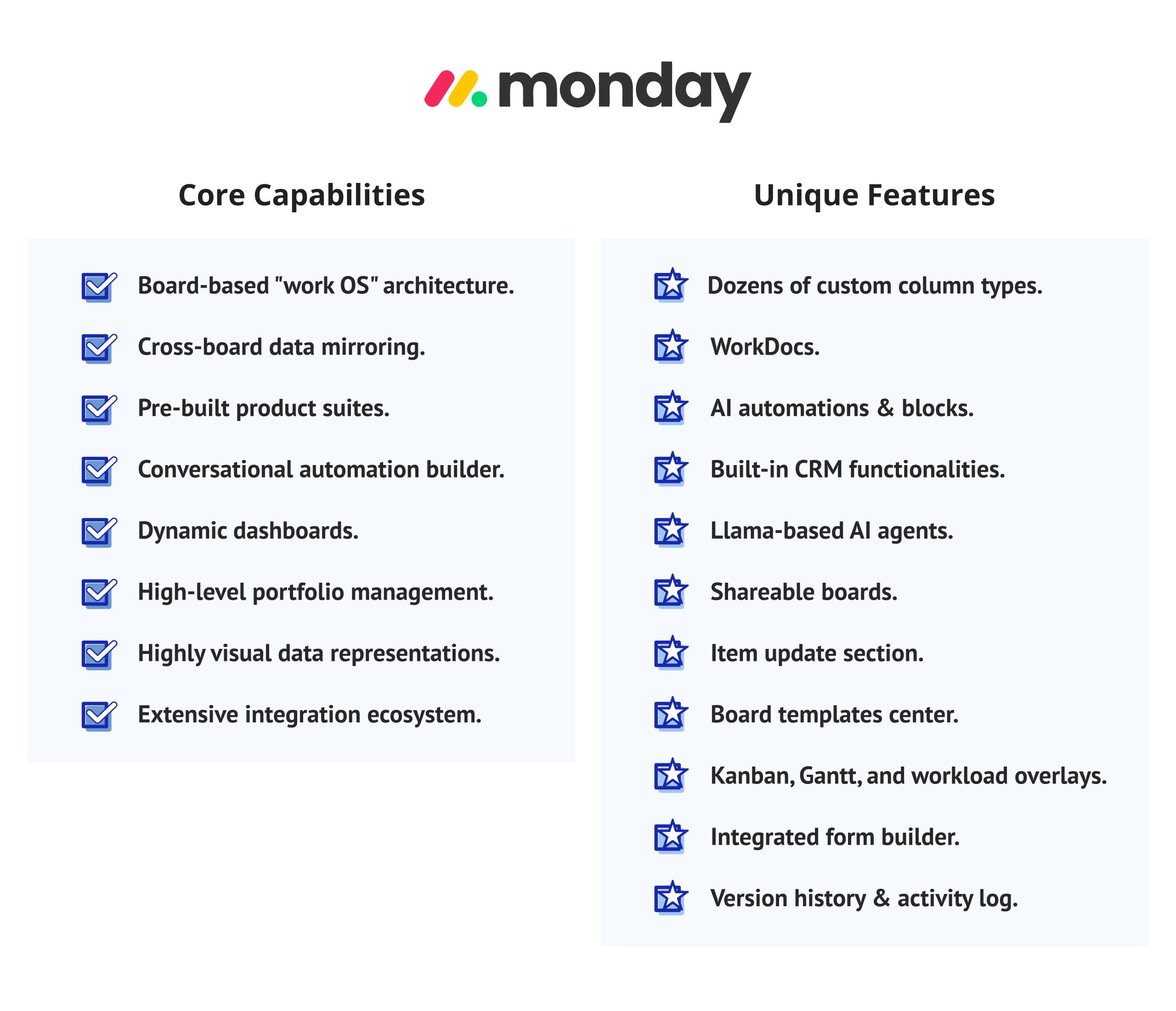
- Board-Based “Work Operating System” Architecture: All workflows (Projects, CRM pipelines, onboarding new employees, and Sprint boards) are based on the same foundations, therefore giving all non-technical users the same consistent mental model of each workflow.
- Cross-Board Data Mirroring: You can pull a column from one board into another board In real time. For example, you could pull the deal status from a sales board into a project board without having to manually enter any duplicate data.
- Three Unique Products: Monday has three different products (Monday Work Management, Monday CRM, and Monday Dev) that can be bundled together into one account. This eliminates the need for multiple systems to accomplish your organization’s goals.
- User-Friendly Automation Builder: The automation builder provides plain-language recipe editor functionality (for example, “Notify owner when status changes to Done and move record to next board”) so that users with little or no technical expertise can create their automations without any coding experience.
- Aggregated/Consolidated Dashboards: Dashboards can aggregate data from multiple boards in real time into one dashboard, so you have an instant summary of the status and progress of all related activities. (For example, you can see charts, battery charts, progress bars, and summary widgets all in one place.) Excellent for reports to senior executives or for project managers who work with multiple teams.
- Portfolio Management at a High Level: You can combine related projects together into a single portfolio and report on their combined status in real time by providing a health snapshot, risk indicators, and overall status for all related activities at the portfolio level via the Enterprise edition.
- Highly visual data representations: Color-coded statuses, heatmaps, timeline overlays, and chart views make complex project data digestible at a glance for stakeholders who do not live inside the tool.
- Extensive integration ecosystem: 200+ native integrations cover Slack, Google Workspace, Salesforce, HubSpot, Jira, Zoom, and more, with Zapier and Make extending connectivity further.
Unique features:
- Custom Column Types: Monday offers a wide variety of custom column types beyond just text and numbers, including, but not limited to, ratings, color pickers, dependency, vote, tag, world clock, and formula column types. Therefore, no matter what type of data a team requires, Monday can support that requirement.
- WorkDocs: WorkDocs are collaborative documents that are housed within a board in Monday. Teams can use WorkDocs to write up meeting notes, document briefs, and create wikis that link back to tasks and update in real-time.
- AI Automations & Blocks: By leveraging the AI capabilities of the Monday platform, users can generate summaries based on tasks, get automatic suggestions for various statuses based on previous status updates, fill in smart columns without having to manually enter repetitive data, and gather insights from board activity without having to manually analyze the data.
- CRM Functionality Built-in: The platform provides contact management, deal tracking, and pipeline visualization natively within monday CRM. Therefore, teams with simple sales workflows do not require any third-party CRM solution.
- LLaMA-based AI Agents: The AI agents from Monday’s platform are built on Meta’s LLaMA models. These agents can automate multi-step workflows, provide answers to questions about data that resides in boards, and create content based on task context.
- Shareable Boards allows you to create either a read-only or editable link to share one of your boards with external partners, clients, or contractors without them having to set up an account.
- Items Updates – Each task will have its own comment feed broken down into 3 distinct areas: updates, files, and an activity log. A structured area for keeping task communication organized instead of being buried in one thread.
- Templates Center has over 200 pre-built board templates for teams to start using common workflows like sprint planning, content calendars, event management, and recruitment pipelines. We make it easy for teams to set up and customize these templates in just minutes.
- Boards can be viewed as a Kanban board, Timeline (a Gantt chart), or a Workload via our overlays — using the same board but with a different view of the same data.
- Integrated Form Builder — Create an embeddable intake form using conditional logic to route your form submissions directly into the appropriate board as a new item. This can be for client requests, support tickets, or job applications.
- Complete Version History & Activity Log captures every change made to a board, its items, or columns. You will see who made changes to your boards, when they were made, and what was changed, therefore providing a complete audit trail. This functionality is extremely important in the event of compliance audits, debugging issues, and accountability for actions that were taken on your boards.
Monday.com’s integrated form builder deserves specific mention. It lets teams build branded intake forms that automatically populate boards — a feature that competes directly with dedicated tools like Typeform.
What are the main AI and automation capabilities of Monday.com?
Monday.com’s AI assistant, called Sidekick, provides contextual help, automated summaries, meeting recaps, formula generation, and workflow suggestions. Sidekick is available on paid plans, but with feature depth that scales with the plan tier.
Automation is where the pricing structure creates real friction. The basic plan includes no automations. Standard unlocks 250 actions/month. Pro unlocks 25,000 actions/month — a 100x jump that often forces teams to upgrade solely to avoid hitting automation ceilings. Enterprise unlocks 250,000 actions/month.
Monday.com added AI-powered workflow suggestions and predictive forecasting in 2025, which help managers identify timeline risks earlier. These are available from the Pro plan.
Pricing & Free Tier
Monday.com’s pricing as of May 2026:
- Free — $0, up to 2 users, 3 boards
- Basic — $9/user/month (annual), unlimited boards, 5GB storage, no automations
- Standard — $12/user/month (annual), Gantt view, 250 automations/month, guest access
- Pro — $19/user/month (annual), time tracking, private boards, 25,000 automations/month
- Enterprise — custom pricing, advanced governance, 250,000 automations/month
Critical note: all paid plans require a minimum of 3 seats.
Time tracking is locked behind the Pro plan at $19/user/month. For teams that need time-tracking tools on a tight budget, this is a significant disadvantage compared to ClickUp’s $7 offering.
User Experience & Interface
Of the three products we tested, Monday.com has the friendliest user interface. Throughout our test, users with no technical background were able to start using the interface independently within just half a day. The board concept is intuitive, and the various column types are easy to understand due to consistent color coding throughout.
The price paid for this user-friendliness is limited configurability. Teams that require complex hierarchies or granular permissions will not find Monday.com to be as flexible as ClickUp or Wrike in this respect.
User Ratings (up to June 2026):
- G2: 4.7/5 (18,111 reviews)
- Capterra: 4.6/5 (6037 reviews)
- Gartner Peer Insights: 4.5/5 (1309 Ratings)
- TrustRadius: 8.3 out of 10 (4,997 Reviews and Ratings)
Integrations
Monday.com offers over 200 native integrations with a number of different applications, including Slack, Google Workspace, Microsoft Teams, Salesforce, HubSpot, Jira, GitHub, and Zoom. It also supports using Zapier and Make for extended connectivity. Integration actions are limited by plan type (automations, for example), which means users who require a lot of integrations will need to subscribe to at least the Pro plan.
Security & Compliance
Monday.com holds SOC 2 Type II, ISO 27001, GDPR, and HIPAA certifications. Enterprise-grade security controls — including custom user roles, audit logs, and IP restrictions — require the Enterprise plan. Two-factor authentication is available on all paid plans.
Pros & Cons
Pros:
- Easiest learning curve of the three
- Visually intuitive interface loved by non-technical teams
- Strong WorkForms for intake management
- Flexible “Work OS” — can serve as a CRM, HR tool, and PM system simultaneously
- Reliable uptime and strong customer support
Cons:
- Time tracking is only available from the $19/month Pro plan
- No automations on the Basic plan
- Minimum 3-seat requirement inflates costs for small teams
- Limited storage on lower tiers
- Becomes expensive at scale compared to ClickUp
Best For
Monday.com is ideal for marketing teams, the HR department, Sales Ops, and companies that have non-technical workers who want to manage their own work. It’s also a great option if you want to have one platform supporting multiple business functions beyond just project management.
Read more: 10 Best Risk Management Tools: Features, Reviews & Comparison
What is Wrike?

Wrike is a collaborative work management platform designed for enterprises, with a focus on allowing for better collaboration across teams. Founded in 2006 and recognized as a leader in the Gartner Magic Quadrant for Collaborative Work Management, Wrike provides its service to over 20,000 organizations worldwide, including more than half of the Fortune 500. The emphasis of the application’s development was to allow users to create a formal governance structure by implementing approval workflows and controls from a compliance perspective in the execution of their projects.
Core Capabilities & Unique Features
Core capabilities:
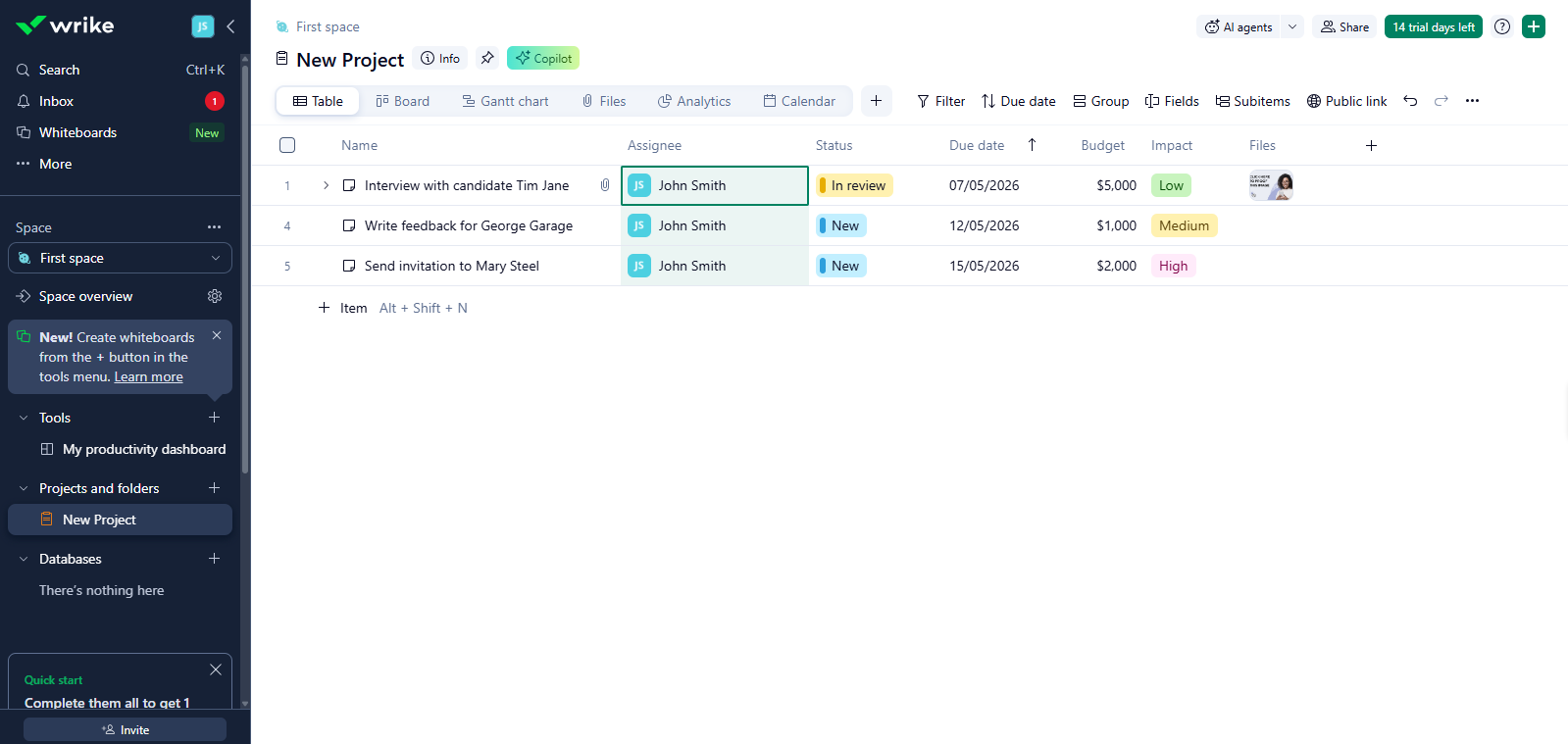
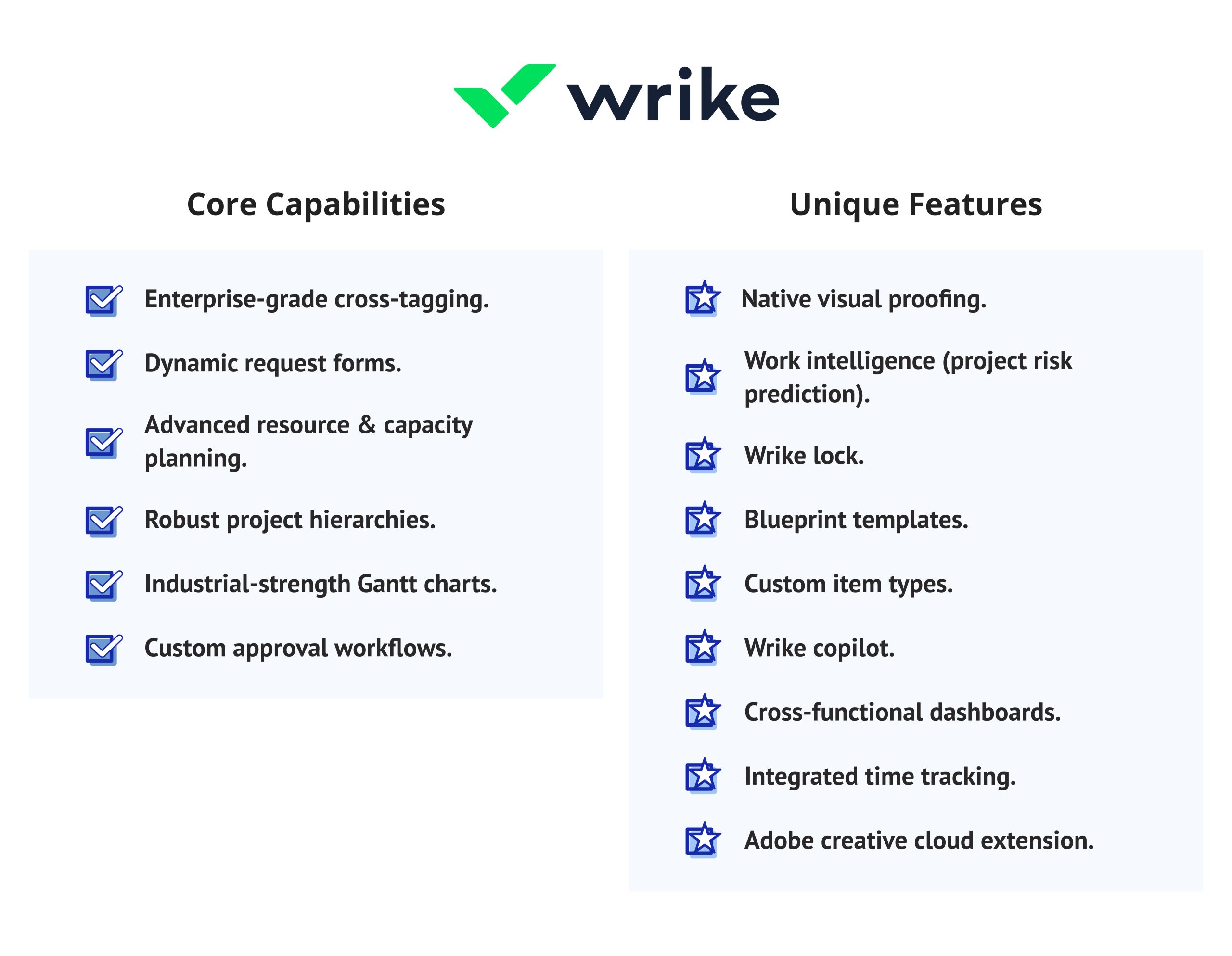
- Enterprise-Level Cross Tagging: A single task can exist simultaneously in several different project folders and allow different teams to see the task without creating duplicate work or a data silo.
- Dynamic Request Forms: Request forms change in real-time based on previous answers; they route requests to the proper teams, start the proper procedure, and pre-fill fields of the new task without anyone having to manually route them.
- Resource and Capacity Management: You can see how busy your resources are and what other projects they will be assigned to now and over the next few months (model future volume) and reassign work before they become overwhelmed — with live updates if your priorities change.
- Hierarchical organization of projects (Accounts -> Spaces -> Folders -> Projects -> Tasks -> Subtasks) provides a level of detail to support complex, multi-tiered program management without the need for workarounds.
- Industrial-strength Gantt Charts — Full-interactive Gantt charts allow tasks to have a dependent relationship with one another through critical path highlighting, baseline comparisons, and drag-to-reschedule, making them more capable than Gantt views in ClickUp or Monday.com.
- Custom Approval Workflows — create a sequence or parallel approval chain and define the approvers, escalation rules, and automatic rejection handling process, which is critical for regulated industries and agencies that manage client sign-off.
Unique features:
- Native Visual Proofing — Best-in-class markup tools enable users to click and leave comments directly on ALL HTML files, videos, images, and PDFs, all linked directly to approval workflows. This eliminates the need for standalone review tools such as Frame.io and Filestage.
- Work Intelligence uses AI-powered prediction of risk by analyzing task patterns, deadlines, trajectories, and workload signals (e.g., task timesheets) to identify projects that are likely to miss targets prior to actually missing them.
- Wrike Lock — A bring your own encryption key (BYOK) feature allowing enterprise customers to encrypt their Wrike data with keys that they manage, which helps meet the strictest data sovereignty compliance requirements in highly regulated industries.
- Reusable Blueprint Templates: Capture a project’s entire structure, including tasks, subtasks, assignments, custom fields, and dependencies, into a blueprint so it can be reused as an entire structure in a single action for repeatable project types.
- Custom Item Types: Create new work item types (beyond just tasks and milestones), such as incidents, approvals, briefs, and change requests; each will have its own fields, statuses, and workflows.
- Wrike Copilot: An AI agent built into the Wrike platform that creates task descriptions, builds status summaries, provides “next steps,” and answers questions based on project data at no additional charge (for Business and above).
- Cross-Functional and Wrike’s Productivity Dashboard: Real-time dashboards that combine workload, completion rates, and bottlenecks across many teams/projects, providing PMO leadership with a single source of operational truth.
- Integrated Time Tracking: Track your hours directly against tasks by logging in via timer or manual entry; create time sheets, lock time for approval, and report on billable hours — all only available to Business plan customers.
- Adobe Creative Cloud Extension: Connect Wrike directly to your design programs (Photoshop, Illustrator, and InDesign) so that designers can accept briefs, upload files/assets, and initiate review processes without leaving their creative applications.
Wrike’s Blueprints system is particularly valuable for operations teams that run repeatable project types. A single blueprint deploys all 40+ tasks of a standard campaign — with correct assignments and dependencies — in one action.
What are the main AI and automation capabilities of Wrike?
Wrike expanded its AI capabilities significantly in early 2026. Wrike Copilot (available on Business and above) provides AI-assisted task creation, automated status summaries, risk prediction, and content generation. Wrike AI Agents — a standout feature — can trigger on status changes, read custom field values, route tasks based on workload, and chain together so one agent’s output activates the next.
A key competitive advantage: Wrike includes AI features in all paid plans at no extra cost. This contrasts with ClickUp’s separate AI add-on and Monday.com’s tiered AI access. For budget-conscious enterprise teams, this bundled approach delivers real value.
Automation is governed by a usage quota model. Business plan teams get 200 automation actions per user per month. Exceeding this quota in 2026 now triggers consumption-based overages — a change that caught some teams off guard in Q1 2026.
Pricing & Free Tier
Wrike restructured its pricing in January 2026. The new tier structure:
- Free — $0, unlimited number of users, 200 active tasks, basic Gantt and board views, 2GB storage space/account
- Team — $10/user/month (annual), up to 15 users, unlimited projects, custom workflows
- Business — $25/user/month (annual), 200 users is max, time tracking, approval workflows, resource management, Wrike Copilot AI, 50GB storage/user
- Pinnacle — custom pricing, advanced analytics, budgeting
- Apex — custom pricing, highest AI quotas, Wrike integration, advanced enterprise tooling
One structural quirk: Wrike sells business seats in fixed bands. A six-person team pays for 10 seats. A 101-person team must buy 125 seats. This band-based model can significantly inflate the effective cost per user for teams that fall awkwardly between bands.
The business plan at $25 is the most expensive mid-tier in this comparison — roughly twice ClickUp’s business plan and over 30% more than Monday.com’s Pro plan.
User Experience & Interface
Overall, Wrike offers the best usability and workflow of the three platforms. While available improvements to the user experience and interface have aided in making the interface easier to navigate in 2024, new users find that navigating around various spaces, folders, and projects can be difficult and not very intuitive. During our testing, new users took three to four days to navigate independently — longer than either ClickUp or Monday.com. That said, teams that invest in onboarding consistently report high satisfaction once past the initial learning curve.
User Ratings (up to June 2026):
- G2: 4.2/5 (4,530 reviews)
- Capterra: 4.4/5 (2,995 reviews)
- Gartner Peer Insights: 4.4/5 (1751 Ratings)
- TrustRadius: 8.6 out of 10 (1,825 Reviews and Ratings)
Integrations
With over 400 integrations, Wrike is particularly strong regarding creative agencies and design-oriented organizations using Adobe Creative Cloud. Wrike also integrates well with Salesforce, Microsoft Teams, and Jira. Additionally, Wrike Integrate (included as an add-on or included within the Apex tier) allows for enterprise-level API-based connections.
Security & Compliance
Wrike is certified to be SOC 2 Type II compliant, ISO 27001 certified (every year), compliant with the European Union’s General Data Protection Regulation, HIPAA compliant, and has FedRAMP certification. Advanced security features, including SSO (single sign-on), custom roles for users, IP whitelisting, and audit records, are part of the business tier. Wrike Lock (a bring your own encryption key feature) is available on the Enterprise and Apex tiers. For those businesses considered regulated entities, Wrike has the highest compliance rating of these three providers.
Pros & Cons
Pros:
- Best-in-class approval workflows and governance
- AI features included in paid plans at no extra cost
- Strongest security and compliance posture
- Blueprints enable rapid deployment of repeatable project structures
- Deep Adobe Creative Cloud and Salesforce integrations
- Named in the Gartner Magic Quadrant
Cons:
- Most expensive mid-tier plan ($25 vs $12 for ClickUp)
- Band-based seat pricing creates hidden costs
- Steepest learning curve of the three
- The mobile app is significantly weaker than the desktop experience
- Sprint and backlog management less mature than ClickUp for engineering teams
Best For
Wrike is the right project management tool for enterprise PMOs, regulated industries (healthcare, finance, government), professional services firms, and creative agencies that rely heavily on the Adobe suite. It is also the strongest choice for organizations that require formal approval processes and audit trails.
Comparing project management tools is complex. Digest.Pro publishes in-depth comparisons, tool reviews, and AI software breakdowns every week. Subscribe to stay informed when the landscape shifts.
Read more: Best AI Project Management Tools in 2026: Benefits, Key Features, and How to Choose
ClickUp vs Monday.com vs Wrike: Head-to-Head Comparison
With the individual evaluations nestled behind us, it’s time for a thorough head-to-head comparison on the factors that matter most for those who make decisions. The following comparison of ClickUp vs. Monday vs. Wrike is based on the factors that really influence team and executive-level buying decisions.
Pricing Comparison
For a 10-person team on equivalent mid-tier plans:
- ClickUp Business: $120/month (annual)
- Monday.com Pro: $190/month (annual)
- Wrike Business: $250/month (annual)
ClickUp is 22% cheaper than Monday.com and over 50% cheaper than Wrike at this scale. For a 15-person team, ZenPilot’s April 2026 analysis found a $2,304/year difference between ClickUp Business and Wrike Business — with ClickUp delivering more features at that tier.
Monday.com’s 3-seat minimum inflates costs for smaller teams. Wrike’s band-based licensing creates unpredictable costs as teams grow.
Pricing changes faster than most comparison articles update. Digest.Pro tracks plan changes, new tiers, and feature additions across leading PM tools in real time — subscribe so you never make a decision on stale data.
Features Head-to-Head
|
Feature |
ClickUp |
Monday.com |
Wrike |
|
Time tracking |
From $7/mo |
From $19/mo |
From $25/mo |
|
Gantt chart |
All paid plans |
Standard+ |
All plans, including free |
|
Native docs |
Yes |
Yes (Workdocs) |
Yes |
|
Approval workflows |
Basic |
Basic |
Advanced (best-in-class) |
|
Portfolio view |
Business+ |
Enterprise |
Business+ |
|
Resource management |
Business+ |
Enterprise |
Business+ |
|
Whiteboards |
Yes |
Yes |
Add-on (Apex default) |
|
Sprint management |
Yes (strong) |
Limited |
Moderate |
Automation Capabilities
All three platforms support rule-based automation — triggers, conditions, and actions. The differences are in depth and cost.
ClickUp provides unlimited automations on paid plans with no extra charge. Conditions include custom field changes, date thresholds, and task status updates. Monday.com gates automation aggressively by plan — the jump from 250 to 25,000 actions/month forces most active teams onto the $19 Pro plan. Wrike’s automation is the most sophisticated structurally, with AI agents capable of chaining logic across multiple triggers and data sources. However, the April 2026 introduction of usage quotas for AI actions creates a new cost variable.
For teams that need automations and integrations without plan-tier surprises, ClickUp offers the most predictable cost model.
Integrations Compared
- ClickUp: 1,000+ integrations, best breadth
- Wrike: 400+ integrations, best depth for Adobe and Salesforce
- Monday.com: 200+ integrations, but integration actions are capped by plan
For most teams, ClickUp’s ecosystem breadth wins. For teams deeply embedded in the Adobe or Salesforce ecosystems, Wrike’s native depth is worth considering.
Security & Compliance Compared
|
Certification |
ClickUp |
Monday.com |
Wrike |
|
SOC 2 Type II |
Yes |
Yes |
Yes |
|
ISO 27001 |
Enterprise |
Yes |
Yes |
|
HIPAA |
Enterprise |
Enterprise |
Business+ |
|
FedRAMP |
No |
No |
Yes |
|
SSO |
Enterprise |
Enterprise |
Business+ |
Wrike’s compliance posture is the strongest. HIPAA and SSO are available from the business plan — a significant advantage for healthcare and finance teams that cannot wait for enterprise pricing.
Ease of Use & Learning Curve
Monday.com has the shortest learning curve. Non-technical users typically reach independent navigation within half a day. ClickUp requires two to three days. Wrike requires three to four days of dedicated onboarding sessions.
In our testing, the difference in adoption speed was the clearest differentiator: Monday.com users were navigating independently within hours, while ClickUp required two to three days of structured onboarding.
Similarities
All three platforms share a significant common foundation:
- Cloud-based SaaS delivery with web, desktop, and mobile access
- Task management with custom statuses and fields
- Multiple project views (Kanban, Gantt, List, Calendar)
- Native time tracking (at varying plan tiers)
- Automations and integrations with major productivity tools
- Free plan options for small teams
- AI features (at different inclusion levels and costs)
- Dashboard and reporting capabilities
Key Differences
The fundamental differences between these work management platforms come down to three axes:
Customization depth: ClickUp > Wrike > Monday.com
Ease of adoption: Monday.com > ClickUp > Wrike
Enterprise governance: Wrike > Monday.com > ClickUp
Price competitiveness: ClickUp > Monday.com > Wrike
Read more: 8 Best Open Source Product Management Software of 2026
Who Should Choose Which Tool
Choose ClickUp if:
- You need maximum features per dollar
- Your team is technical or willing to invest in onboarding
- Time tracking tools matter from day one at a low cost
- You want to replace multiple apps with a single platform
- You run an agency, software team, or cross-functional operations team
Choose Monday.com if:
- Non-technical adoption speed is your top priority
- Your team uses the platform across multiple business functions (CRM, HR, sales)
- You need a visually intuitive project management system that works for everyone
- Automation volume is moderate (under 25,000 actions/month)
Choose Wrike if:
- Your organization requires formal approval workflows and audit trails
- You operate in a regulated industry (healthcare, finance, government)
- You are deeply integrated with Adobe Creative Cloud or Salesforce
- Your team is large enough to absorb the higher per-seat cost
- PMO governance and portfolio reporting are non-negotiable
Summary
The answer to ClickUp vs. Monday vs. Wrike isn’t a “best option for all” solution. Tailored for its market, each product shines.
ClickUp is the perfect option for teams who want a robust project management system without enterprise-level pricing. Monday.com beats on UX and quick adoption — the fastest way to learn Monday is by its intuitive style, which still remains the best in this review. Wrike takes the cake for governance and compliance. It is the one to go for enterprise PMOs and regulated industries for whom process control matters as much as productivity.
The clearest signal for your choice: decide first for the team that will use the tool daily, not the executive who will sign the check. Map their workflow against the three platforms. You’ll know when you’ve found the right one.
When you reconsider the ClickUp vs Monday vs Wrike debate in six months from now, the answer had better remain the same. Select a platform that will grow with your team, rather than one you won’t be able to keep up with in your first year.
Need more data to make the call? Digest.Pro covers AI tools, project management software, and startup tech with the depth that decision-makers actually need. Follow us for weekly breakdowns.
Read more: 15 Best Product Roadmap Tools for Stakeholder Alignment in 2026
FAQs
In comparison with Monday vs. Wrike vs. ClickUp, ClickUp has better value for money and can be customized better than Monday.com. It has more powerful task management features, more integrations (1,000+ vs. 200+), and time tracking for $7/user/month vs. Monday.com’s $19. Monday.com, on the other hand, is more user-friendly and caters more to nontechnical users. The right answer depends on how technically comfortable your team is and how complex its workflow is.
No one app is better than ClickUp — it all depends on what you need. Wrike surpasses ClickUp when it comes to enterprise governance and approval workflows. Monday.com also scores better on ease of adoption. Better fits for regulated industries would be Asana or Wrike. If she were to consider pure value and feature density when ranking the top project management tools in 2026, then ClickUp would still be one.
The biggest cons of ClickUp are that it has a steep learning curve, the interface is a bit noisy for new users, and the AI features are an additional cost. Teams looking for quick enablement, a clean experience, or enterprise-grade governance right out of the gate may consider Monday.com or Wrike a better fit. Also, ClickUp’s mobile app is behind the desktop version.
ClickUp may be beneficial for people with ADHD, as it offers visual task views and reminders and has a flexible structure — but its abundance of features can be overwhelming to some users. The Board and List views work well for focus and prioritization. Those with ADHD tend on the whole to do better starting with a bare-bones configuration (one space, one list) and then building complexity over time rather than engaging all features at once.
ClickUp offers the best value for small businesses. Its free plan allows unlimited team members and unlimited tasks. The Unlimited plan at $7/user/month includes time tracking, Gantt charts, and unlimited integrations — features that Monday.com locks behind its $19 Pro plan. Monday.com’s 3-seat minimum also creates an unnecessary cost floor for solo users and very small teams.
ClickUp provides the most predictable automation model — unlimited automations on paid plans with no extra charge. Monday.com gates automations by plan tier (250/month on Standard, 25,000 on Pro), which often forces upgrades for active teams. Wrike offers the most sophisticated automation logic via AI agents, but introduced usage quotas in April 2026 that can generate unexpected costs at scale.
Monday.com has the lowest learning curve of the three. Non-technical users typically reach independent workflow management within a few hours. ClickUp requires 2-3 days of onboarding. Wrike requires the most time — typically 3-4 days or dedicated training sessions — due to its complex navigation and enterprise feature set.
ClickUp supports 1,000+ integrations — the broadest ecosystem in this comparison. Wrike offers 400+, with exceptional depth for Adobe Creative Cloud and Salesforce users. Monday.com provides 200+ native integrations, but caps integration actions by plan tier, which limits workflow automation for active users on lower plans. For most teams, ClickUp’s breadth delivers the highest practical connectivity.
Yes — all three platforms support native document creation. ClickUp Docs offers collaborative editing with rich text, embedded tasks, and linking. Monday.com’s Workdocs provides a similar experience with direct board integration. Wrike’s native documents are functional but less polished than the other two. For teams that need deep content collaboration, ClickUp Docs is the strongest native option.
ClickUp scales most predictably — per-seat pricing with no band minimums below Enterprise. Monday.com requires a 3-seat minimum on all paid plans and can become expensive quickly as feature needs push teams to the $19 Pro tier. Wrike’s band-based licensing (seats sold in groups of 5 or 25, depending on plan size) is the least predictable — a team growing from 25 to 26 users may suddenly pay for 30. Model the 12-month cost for your expected team size before committing to any platform.
References
- Grand View Research. (2024). Project management software market size, share & trends analysis report. Grand View Research. https://www.grandviewresearch.com/industry-analysis/project-management-software-market
- Gartner. (2024). Magic Quadrant for Collaborative Work Management. Gartner, Inc. https://www.gartner.com/en/documents/collaborative-work-management
- Aston, B. (2026, January). Wrike vs Monday.com: 2026 side-by-side comparison. The Digital Project Manager. https://thedigitalprojectmanager.com/tools/wrike-vs-monday/
- Aston, B. (2026, January). Wrike vs ClickUp: Comparison & expert reviews for 2026. The Digital Project Manager. https://thedigitalprojectmanager.com/tools/wrike-vs-clickup/
- MacKenzie, G. (2026, March). ClickUp vs Wrike: Which project management tool is better? ZenPilot. https://www.zenpilot.com/blog/clickup-vs-wrike/
- Plaky Editorial Team. (2026). ClickUp vs Monday.com: In-depth comparison. Plaky. https://plaky.com/blog/clickup-vs-monday/
- ClickUp. (2026). ClickUp pricing plans. ClickUp. https://clickup.com/pricing
- monday.com. (2026). Pricing and plans. monday.com. https://monday.com/pricing
- Wrike. (2026). Plans and pricing. Wrike. https://www.wrike.com/price/
- Forrester, D. (2025). GenAI content visibility guidance for content and SEO teams. Adapted guidance on AI retrieval optimization.
- Capterra. (2026, April). Wrike vs ClickUp: Features and cost comparison 2026. Capterra. https://www.capterra.com/compare/76113-158833/Wrike-vs-ClickUp