

A few names consistently appear on the lists generated by PMO executives and directors. It is hard to be wrong about choosing among Jira, Trello, and Asana. The mistakes in choosing these tools can be easily noticed — and they accumulate and pile up rather slowly as missed tasks and stalled budgets that nobody can hope to trace back to some specific place.
The present article indicates where the benefits of each particular tool lie: Jira is known for being the best for agile software development. Trello is the best tool for quick tracking, and Asana works best for collaboration across departments.
The project management tools for tech teams, marketers, and creative teams are seldom as straightforward as claimed by their producers. The selected tool should depend more on your own plans and objectives than on the writer’s opinion about the merits of some tool.
Key Takeaways: Jira vs Trello vs Asana
- Jira has an upper hand in project management through agile methodology, but hassles the non-technical teams with its complex setup.
- Trello is the quickest to master and is a perfect fit for personal task management and task management for small groups. However, it does not provide time tracking and dependency mapping.
- Asana is somewhere in between. It offers you more structure than Trello but less satisfaction than Jira, while being equipped with quite useful workload management features and time tracking in the upper-tier paid plans.
- As far as the final price is concerned, it varies from free plans for smaller teams to $24.99/user/month for the Asana Advanced plan.
Our Methodology
The editorial team generated live trial workspaces on Jira, Trello, and Asana and executed a unique test project on each platform: A six-week product release, a team of five, three departments, and a common deadline. Each platform was rated on the five best criteria relevant to users looking for project management software, instead of demoing it.
- Workflow depth — how well the tool supports agile, Kanban, and traditional project management approaches.
- Time tracking and resourcing — whether time tracking and workload visibility exist natively or require third-party add-ons.
- Onboarding speed — how long a non-technical user needs to get a working project off the ground.
- Price transparency — what price is quoted, and what is its final price with all extras (guest seats, security features included)?
- Verified user satisfaction levels — overall ratings of G2 and Capterra users, corroborated with roughly unfiltered user feedback on Reddit.
Setting up the first operational project in Jira took our reviewer about three hours of tweaking settings before the first ticket was submitted. On the contrary, both Trello and Asana were usable in 15 minutes. This fact has been one of the many aspects contributing to the debates about Jira vs. Asana vs. Trello among the people from non-technical teams, even before discussing the features of both items.
Side-by-Side Comparison: Jira vs Trello vs Asana
Here is how Jira vs. Asana vs. Trello stacks up across the factors C-level buyers and PMO leaders ask about first, verified directly against each vendor’s Jira, Trello, and Asana pricing pages.
|
Criteria |
Jira |
Trello |
Asana |
|
Best for |
Software development, agile teams |
Visual task tracking, small teams |
Cross-functional project management |
|
Free plan |
Up to 10 users, 2GB storage |
Up to 10 boards, 10 collaborators |
Up to 2 users |
|
Entry-paid tier |
$7.91/user/mo (Standard) |
$5/user/mo (Standard) |
$10.99/user/mo (Starter) |
|
Top paid tier |
$14.54/user/mo (Premium) |
$17.50/user/mo (Premium) |
$24.99/user/mo (Advanced) |
|
Time tracking |
Marketplace add-ons only |
Power-Up integrations only |
Native add-on |
|
Resource/workload view |
In Summary view (for all tiers) |
None native |
Workload view (Advanced and Enterprise) |
|
Agile/Scrum support |
Best-in-class |
Basic Kanban only |
Limited |
|
G2 rating |
4.3/5 (over 7,000 reviews) |
4.4/5 (over 14,000 reviews) |
4.4/5 (over 13,000 reviews) |
|
Capterra rating |
4.4/5 (over 15,000 reviews) |
4.5/5 (23,000 reviews) |
4.5/5 (over 13,000 reviews) |
Read more: What Is AI IVR, and Why Does Your Company Need It in 2026?
What Is Jira?

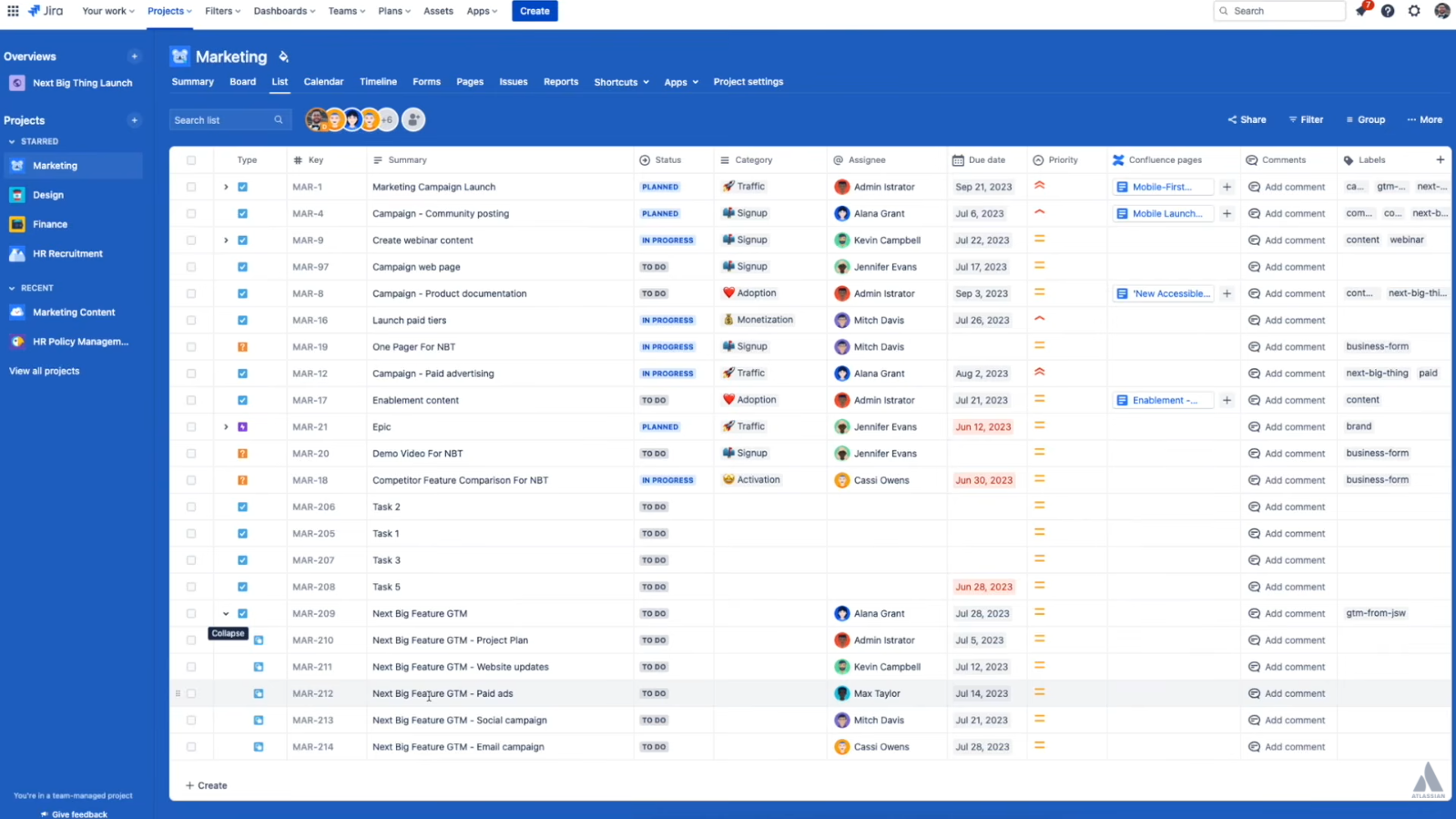
Jira is an Atlassian platform for project management, and it is designed to specifically support teams working within agile workflows (Scrum and Kanban). The company that created Jira, Confluence, and Trello originally developed Jira with the core idea that a project would be defined by its set of “issues”: these include tickets like bugs, tasks, user stories, and epics.
Engineering teams use Jira for sprint planning, measuring velocity, and linking code versions to tickets by using integrations with Bitbucket or GitHub. Jira remains one of the most popular engineering project management tools and is frequently utilized by companies that develop software, irrespective of the preferences that marketing or operations departments may have.
Why Choose Jira for Technical Projects?
- Jira excels through the power it packs behind a relatively simple interface.
- Technical project managers can ask a question of a backlog using the same power as a database administrator through its burndown charts, sprint boards, and JQL (Jira Query Language).
One reviewer on G2 draws attention to the high configuration abilities of the software, which can turn into a disadvantage of an overly complicated workflow if one does not properly manage their activities.
Pros:
- Outstanding Scrum and Kanban boards, along with native backlog management capabilities
- Accompanied by velocity reports, burndown charts, and JQL querying features
- Tightly integrated with Bitbucket, Confluence, and GitHub
- Access to more than 8,000 Marketplace applications fulfilling all possible workflows
- Enterprise-level certifications (ISO 27001, SOC 2 Type II, FedRAMP)
Cons:
- Steep learning curve — admins typically need 2-4 hours of setup before a team can start
- Interface and terminology built for developers, not marketing or design workflows
What is Jira’s pricing?
There are four different prices for Jira, which are noted on Atlassian’s pricing page (for a team of 300 users):
- Free — $0 per month with a maximum of 10 users. Unlimited tasks and projects, board/backlog/timeline/calendar view, reports and dashboards, 100 automations per month, 2GB in storage, and community support.
- Standard — $7.91 per user/month billed annually. Includes all features in “Free” + user permissions and roles, outside collaborations, multi-region data residency, 1,700 automations/month, and 250 GB in storage. Up to 100,000 users per site.
- Premium — $14.54 per user/month billed annually. Includes all features in “Standard” + dependency management, inter-team planning, customizable approval and onboarding processes, 1,000 automations per user/month, unlimited storage, 24/7 support for urgent issues, and an SLA of 99.9%.
- Enterprise — custom pricing, billed annually only. Everything in Premium, plus Atlassian Analytics, advanced admin controls and security, enterprise-grade identity management (SSO, SCIM), unlimited automation runs, up to 150 sites, and a 99.95% uptime SLA.
Confluence time tracking add-ons, such as Tempo, and SSO through Atlassian Guard, all cost extra on the free and standard tiers. Realistic budgets land closer to $15–$25 per user per month once a Jira deployment is fully equipped, not the $7.91 headline figure alone.
Read more: What is Knowledge Assist and How Does it Work?
What Is Trello?

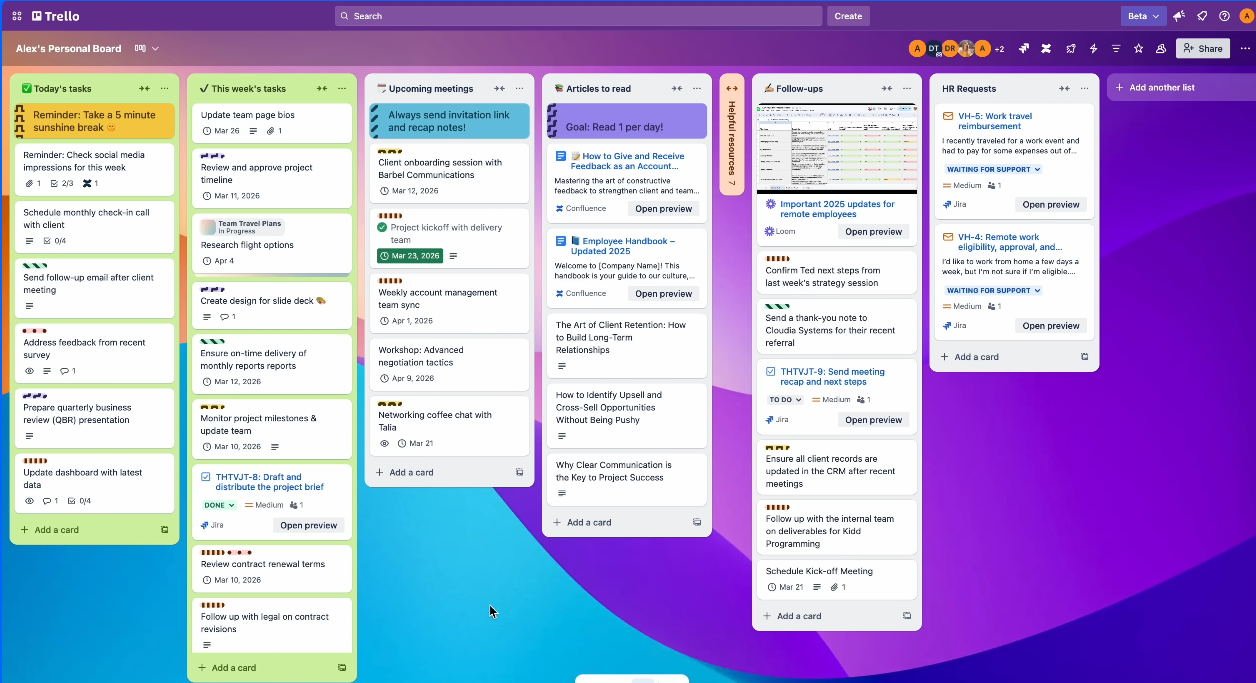
Atlassian’s Trello is a Kanban-based collaboration software, released in 2017, and is considered the best product to use for people new to the Atlassian software suite. Trello replaces the ticket hierarchy of Jira with boards, lists, and cards, making it the easiest of the three solutions to work with.
Trello naturally attracts small teams, entrepreneurs, and everyone who needs to perform personal tasks alongside commercial business activities, mainly because it is almost plug-and-play software. According to one of the Capterra users’ reviews, their team chose Trello simply because it was easier to implement and to use day-to-day.
Why Choose Trello for Visual Task Tracking?
The one-board Trello setup gives instant access to task status, owner, and any obstacles.
The power-ups imply that Trello has enhanced the basic version of the software by integrating calendar, custom fields, and other tools like dates and Google Drive. Instead of switching from Trello to another app, a vast number of users rely on the power-ups to perform extra project tracking capabilities.
Pros:
- Quickest setup of all three tools — working on a board in minutes
- Outstanding drag-and-drop experience
- Robust free plan, including unlimited cards and free Trello Power-Ups
- Lowest-cost paid tier on the market at $5/user/month
Cons:
- No native time tracking or task dependencies
- Limited native reporting beyond basic Dashcards
- Boards become cluttered once a project scales past a certain size
- No built-in resource capacity view across multiple boards
What is Trello’s Pricing?
Trello has four pricing tiers according to Trello’s official pricing strategy:
- The Free tier comes free of charge. In this tier, the user will be able to create 10 boards for each workspace and unlimited cards. The files can be uploaded up to 10 MB for free, and 250 automatic commands (per month) can be executed within this tier.
- The Standard tier prices at $5 when billed annually and $6 when billed monthly. The user is free to use 250 MB of file storage.
- The Premium tier will cost the user $10 and $12.50 when billed annually and billed monthly, respectively. This tier includes the features of both the Free and Standard tiers, along with the AI, Calendar, Timeline, Table, Dashboard, and Map views, templates at the workspace level, and unlimited automatic commands.
- The Enterprise tier starts at $17.50 for each user on a monthly basis (minimum of 50 users).
One of the more genuinely usable free project management tools on the market for solo users and very small teams, Trello’s free plan rarely needs an upgrade until a team passes ten boards. Power-Ups for advanced reporting or Gantt-style timelines often add another $5-$15 per user per month on top of any paid plan.
Comparing project management tools side by side — pricing, reviews, and real feature gaps — is exactly the kind of PM software comparison Digest.Pro publishes regularly. Subscribe to Digest.Pro for ongoing breakdowns across project management software, so your next platform decision does not start from zero.
Read more: AI Agent Assist: What It Is and Why You Need It in 2026?
What Is Asana?

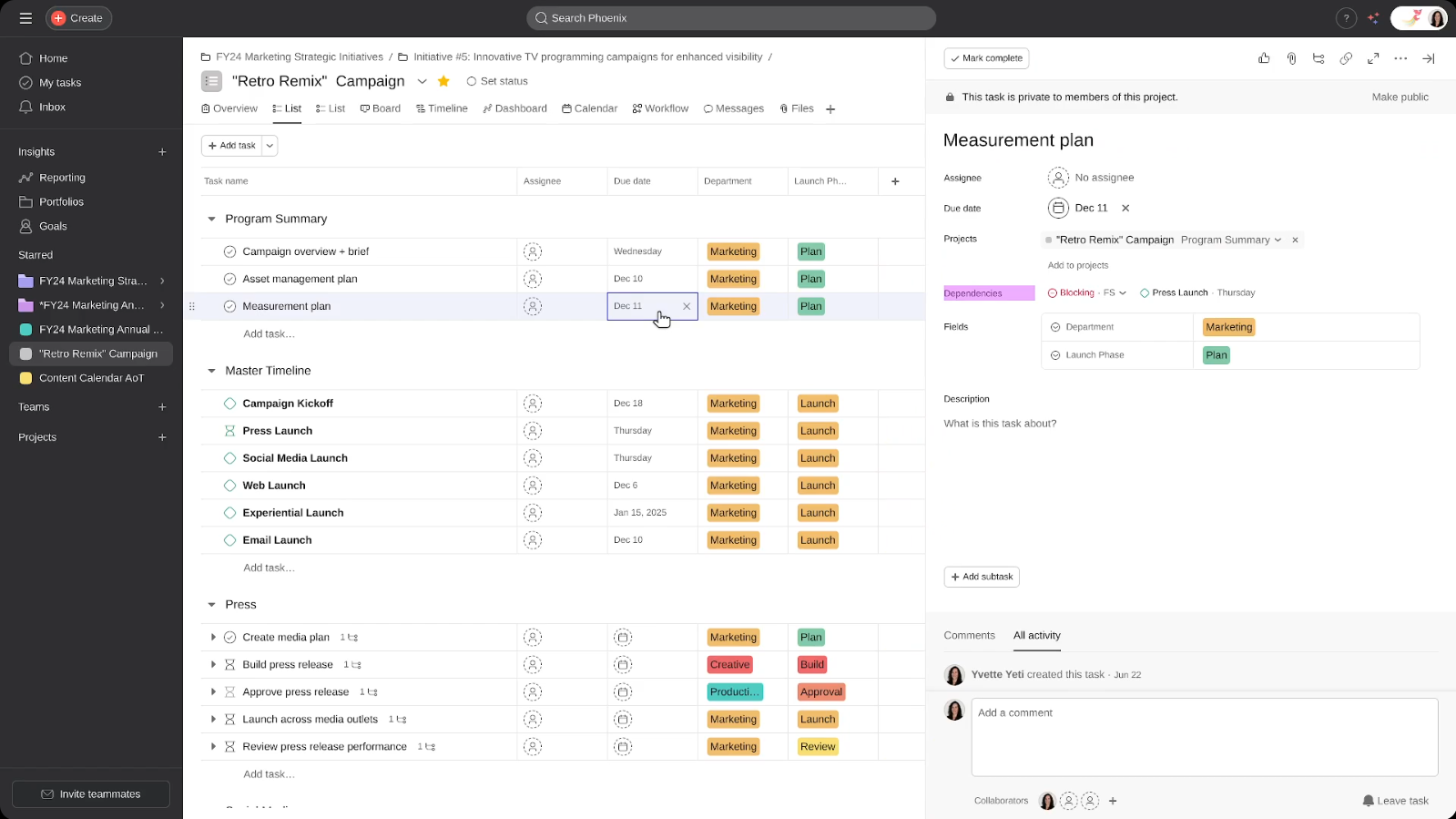
It’s an in-between: neither as stripped-down as Trello nor as complex and intimidating as Jira. Asana organizes tasks and projects into views available as a list, board, calendar, or timeline (Gantt chart) and then includes a “My Tasks” page to handle all of your to-dos across multiple projects.
Asana is a preferred option for marketers, operations managers, and PM audits when they require a level of structure between that offered by Trello and the ticket-based hierarchy of Jira. According to Capterra, Asana has a rating of 4.5 out of 5, based on slightly more than 13,000 reviews, with the software being notably appreciated for its user-friendly interface.
Why Choose Asana for Cross-Functional Teams?
Asana’s Workflow Builder takes care of the usual tedious back-and-forth to move work through different departments. For example, when design finishes work on a task, the marketing review task is automatically triggered without anyone having to follow up.
If you choose the Starter plan, you will get unlimited automations, custom fields, and timeline views of project data, while the Advanced plan enables you to access goals and unlimited portfolios and see a workload breakdown to estimate workload for different teams.
According to the results of our experiment, Asana is faster than Trello, but it makes a trade-off between speed and proper structure, while offering better opportunities for data-driven decision-making.
Pros:
- Workflow Builder automates cross-department handoffs without manual chasing
- Native time tracking through the Timesheets & Budgets add-on
- Strong reporting with Goals, Portfolios, and dashboards on Advanced
Cons:
- Significant price jump from Starter to Advanced (a 127% increase)
- No Portfolios or Goals capability below the Advanced tier
- Limited budget tracking capabilities and financial integration without a third-party ERP tool
- AI Studio credit pricing remains only partially published
What is Asana’s pricing?
Asana runs four (effectively five) tiers, all confirmed on Asana’s official pricing page:
- Personal — $0/month, up to 2 users. Unlimited tasks and projects, list/board/calendar views, 100+ integrations, 100MB file storage. No Timeline view, custom fields, or automations.
- Starter — $10.99/user/month (billed annually) with an unlimited number of sits. Adds a timeline/Gantt view, workflow builder, unlimited automations, project dashboards, forms, custom fields, private projects, and Asana AI features such as Smart Projects and Smart Status.
- Advanced — $24.99/user/month (billed annually). Adds goals, unlimited portfolios, workload view, approvals and proofing, custom field locking, and integrations with Salesforce, Tableau, and Power BI. AI Studio Basic with 75K credits per billing account per month is also available.
- Enterprise — custom pricing. Adds SAML SSO, SCIM provisioning, advanced admin controls, and a dedicated customer success manager.
- Enterprise+ — custom pricing. Adds SIEM integration, data residency, audit logs, eDiscovery, DLP, and HIPAA-eligible compliance controls.
Timesheets & Budgets, Asana’s native time-tracking add-on, costs $5.99/user/month on top of Starter, Advanced, Enterprise, or Enterprise+. Both paid base tiers require a two-seat minimum, and Asana does not sell single seats above a certain headcount — a detail that catches smaller teams off guard when budgeting.
Read more: AI Agent Orchestration for Complex Workflows: Everything You Need to Know
Final Verdict: Which Tool Should Your Team Buy?
There is no ultimate victor in the battle between Jira vs. Asana vs. Trello since each of these platforms caters to a different type of team.
- If your team is a developer team that works in Scrum or Kanban on a day-to-day basis, consider using Jira because the expenses of its installation and acquisition will be compensated by the benefits of having velocity tracking and managing releases.
- Pick Trello if you need a simple and inexpensive solution that is easy to use for personal task management, such as creating content calendars or organizing work for small creative teams.
- Choose Asana if you need to organize your cross-departmental processes in a more structured manner, since this approach will let you track time and have visibility of your workload.
For teams evaluating Asana competitors with deeper financial and resourcing features — or weighing an all-in-one agency management software approach as their primary management system for agencies instead of three separate point solutions — that comparison deserves its own evaluation before signing another annual contract.
Want more verified PM software comparison content like this? Subscribe to Digest.Pro and get new project management breakdowns delivered as soon as pricing or features change.
FAQs
Yes, Trello is much easier. Trello’s layout with its boards and cards is simple and easy to use, while Jira demands a fair amount of setup before it will work.
If you’re in an engineering department and do sprints, then Jira will likely go very far for your needs. Marketers, Ops, or anyone on a cross-functional team might find that Asana is a fit for their needs without a full-fledged engineer-centric issue ticketing system.
All three products help teams manage work. Jira’s sweet spot is agile software development (often using Scrum or Kanban). Trello is popular because it is extremely intuitive with a simple visual Kanban board. And Asana is geared toward marketing, operations, and any cross-functional, non-developer team’s workflow.
If we talk about general project management, Asana and Monday.com come into play here very often. But if we specifically speak about engineering teams, Linear and Azure DevOps are the main competitors of Jira.
The three of them start with zero price. Hence, they are very affordable for small teams. Trello offers fairly low prices at $5 per user, while the price for Jira is $7.91 per user, and for Asana it is $10.99 per user.
Think of it this way: Jira for engineers and DevOps, Trello for simple to-do lists or very small, personal teams’ projects, and Asana for operations, marketing, and PMOs that handle the bulk of cross-functional work.
In situations when speed is more important than depth. If you need just to know who is doing what and when with no need to worry about time tracking, constraints, or other reports, go for Trello.
Jira. Sprint boards, backlog management, burndown charts, and velocity reports are all built in natively — functionality that Trello and Asana simply don’t replicate at the same depth.
The answer is affirmative. The user interface and terminology were designed for developers; this is why it causes friction in marketing and operations. Asana and Trello will be more appropriate for such teams.
Jira Free allows for 10 users and 2GB of storage. Trello Free allows for an unlimited number of cards on 10 boards. Asana‘s Personal plan includes 2 users, but Timeline view, automations, and custom fields will not be available until the upgrade.
References
-
Project Management Institute.
Pulse of the Profession® 2025: Spotlight on Business Acumen.
PMI, 2025. https://www.pmi.org/-/media/pmi/documents/public/pdf/learning/thought-leadership/pulse/pulse_of_the_profession_2025-1.pdf -
McKinsey & Company.
The State of Organizations 2025 (Productivity and Technology Trends).
McKinsey Global Institute, 2025. https://www.mckinsey.com/capabilities/people-and-organizational-performance/our-insights/the-state-of-organizations -
Forrester Research.
The Forrester Wave™: Collaborative Work Management Tools, Q2 2025.
Forrester, 2025. https://www.forrester.com/blogs/announcing-the-forrester-wave-collaborative-work-management-tools-q2-2025/ -
IDC.
Worldwide Collaborative Applications Forecast, 2025–2029: Thriving in an AI-Enabled Workspace.
International Data Corporation, 2025. https://my.idc.com/getdoc.jsp?containerId=US52100625 -
PwC.
Global Workforce Hopes and Fears Survey 2025: Rewiring the Future of Work.
PricewaterhouseCoopers, 2025. https://www.pwc.com/gx/en/issues/workforce/hopes-and-fears.html