
When it comes to the world of project management software, two platforms that are based on different approaches are at the forefront of the market. The high demand for Smartsheet vs Jira in the realm of project management software online should not really surprise us. Smartsheet is made for spreadsheet methods of running a business, while Jira operates on software engineering method.
Key Takeaways:
- Smartsheet is a comprehensive work management software that is constructed similarly to a spreadsheet with a built-in cost assessment tool, dashboard, and automation.
- Jira is a software solution that works on the basis of Scrum and Kanban boards and issue tracking system.
- As for the large business environment, pricing is more favorable towards Smartsheet, while Jira pricing is more beneficial for small companies (there is a free version for teams no bigger than 10 people).
Why can you trust our review?
Our methodology: We compared Smartsheet and Jira against five criteria of comparison:
- value for money and total cost of ownership,
- simplicity and duration of learning,
- capabilities of built-in functions vs reliance on third-party solutions,
- degree of integrations available, and
- scalability to meet enterprise governance needs.
The evaluation scores and prices below come from trustworthy sources including G2, Capterra, Gartner Peer Insights, and the respective vendors’ pricing pages, with the latest updates from July 2026.
Smartsheet vs Jira: At Lightning Speed
The table below summarizes how the two platforms stack up before you dive into the details.
|
Category |
Smartsheet |
Jira |
|
Primary use case |
Work management platform for cross-functional business teams |
Software development tool for agile engineering teams |
|
Starting price |
$9/user/month (Pro, billed annually) |
Free for up to 10 users; $7.91/user/month (Standard, annual) |
|
Free plan |
No — 30-day free trial only |
Yes, up to 10 users |
|
Core interface |
Spreadsheet grid, Gantt, card, and calendar views |
Scrum and Kanban boards, backlog, list view |
|
Automation |
No-code workflow automation |
Rule-based automation, capped by plan tier |
|
Integrations |
100+ native integrations |
3,000+ apps via Atlassian Marketplace |
|
Time tracking |
Native time tracking on Business and Enterprise plans |
Native tracking plus marketplace time-tracking apps |
|
Budget tracking |
Yes, built-in |
No — requires third-party add-ons |
|
AI capabilities |
Smartsheet AI (Business and Enterprise) |
Atlassian Intelligence / Rovo (Premium and up only) |
|
G2 rating |
4.4/5 (24,262 reviews) |
4.3/5 (7,916 reviews) |
|
Best for |
PMOs, marketing, operations, healthcare, construction |
Software development, IT, Agile, and Scrum teams |
Sources: Official Jira and Smartsheet sites, G2 (2026)
Detailed Review: Smartsheet
Smartsheet positions itself as the Enterprise Work Management Platform. A good number of customers tend to call it the Smartsheet enterprise work platform, as it has been developed to help achieve governance and reporting in organizations that are larger than a single project team.
For a traditional issue tracker, Smartsheet provides teams with a simple spreadsheet grid before constructing the Gantt chart, automation, dashboards, and different types of forms to keep track of workflows.
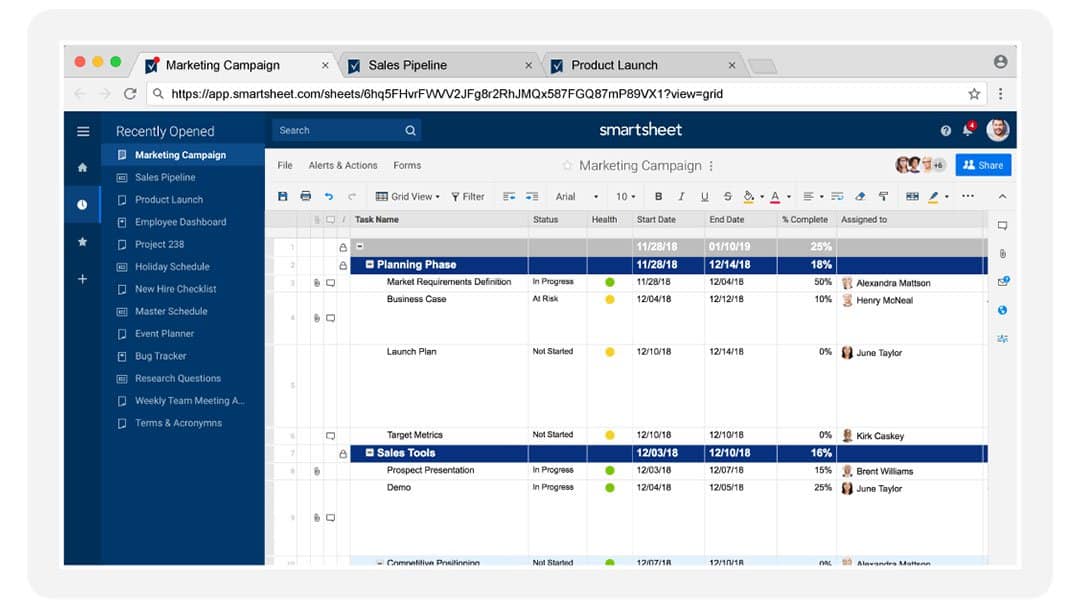
Best for: Marketing teams, PMOs, operations, healthcare compliance, and construction project tracking — essentially any business team that needs project tracking and reporting without a developer-style interface.
Key features:
- Grid, Gantt, card, and calendar views for the same underlying data
- No-code workflow automation for approvals, reminders, and status updates
- Native budget tracking and cost-to-completion reporting
- Control Center for standardizing and scaling project templates across an organization
- Digital asset and content review solutions for creative and marketing teams
- Built-in integration with Microsoft 365, Google Workspace, Slack, Salesforce, and Jira.
Reviews:
- G2: 4.4/5 (24,262 reviews)
- Gartner Peer Insights: 4.5/5 (2,816 reviews)
- Capterra: 4.5/5 (3,531 reviews)
“I can’t imagine working without this software, it helps make processes more efficient, allows for better tracking, internal submissions and approvals, and team summaries.” — Smartsheet user on Gartner Peer Insights.
Editorial note: The team has found that when Smartsheet’s grid was compared to other software, it felt familiar to those who have created project plans in Excel. Creating an easy approval process took a few clicks, while doing this in Jira required some knowledge of their automation rules and how to set issue types.
Pricing: Smartsheet has no permanent free plan — it discontinued its limited free tier in 2025, leaving only a 30-day trial. Paid plans run $9/user/month for Pro and $19/user/month for Business, both billed annually, with a custom-quoted Enterprise tier.
When Is Smartsheet the Better Choice?
Smartsheet is ideal for projects where tracking progress, budgeting, and generating high-level reports are needed without requiring everyone on the team to understand advanced software.
It works very well in large organizations with PMO departments, marketing teams with campaign calendars, and operational teams that are already accustomed to spreadsheets. If the organization’s needs include a tool that can be utilized by finance, marketing, and operations without having to train its users, Smartsheet is a good choice.
Detailed Review: Jira

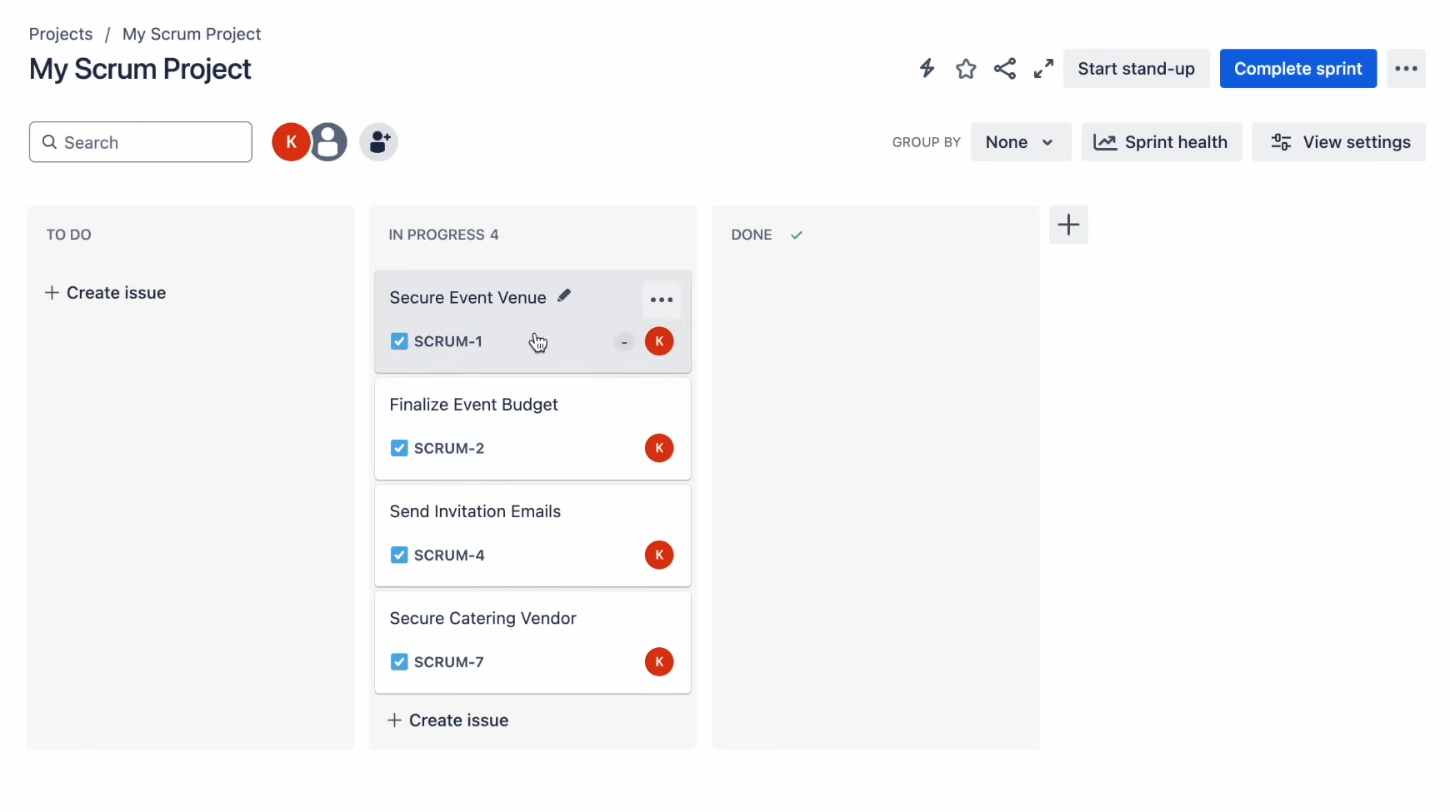
Jira, developed by Atlassian, is a software development solution. The software started out as a bug tracker, and this legacy can be seen in everything about Jira – all of the processes in Jira revolve around issues, regardless of whether these issues are bugs, stories, epics, or tasks that are being managed on a Scrum or Kanban board.
Best for: IT departments, software development teams, Agile practitioners, working on sprint planning, bug tracking, and backlog management.
Key features:
- Scrum and roadmapsoards with customizable workflows
- Backlog management and sprint planning built for Agile teams
- Advanced Roadmaps for cross-project, cross-team planning
- Automation rules for repetitive workflow steps
- Access to more than 3,000 apps through the Atlassian Marketplace, including deep GitHub, Bitbucket, and Slack integrations
- Atlassian Intelligence and Rovo AI features, available on Premium and Enterprise plans only.
Reviews:
- G2: 4.3/5 (7,916 reviews)
- Gartner Peer Insights: 4.4/5 (7,862 Ratings)
- Capterra: 4.4 (15,438 reviews)
“Jira is a valuable project management tool that helps teams track progress, manage priorities, and stay aligned on key deliverables. ” — Jira user on Capterra.
Editorial note: during our review, Jira’s board setup asked us to choose between Scrum, Kanban, or bug-tracking templates before creating a single task — a decision point that shapes the whole project structure. That’s powerful for engineering teams who know what they need and disorienting for anyone coming from a spreadsheet-first tool like Smartsheet.
Pricing: Unlike Smartsheet, Jira delivers a genuinely good free plan for 10 users. The paid tiers start at around $7.91/user/month in price for the Standard plan and $14.54/user/month for Premium, both charged on the annual billing method. Besides the Enterprise plan, pricing for Atlassian Guard (SSO and audit-control level) is billed differently.
When Is Jira the Better Choice?
Jira wins decisively for software development teams running Agile methodologies. Its issue hierarchy — projects, epics, stories, sub-tasks — maps directly onto how engineering teams actually plan and ship work, and its integration depth with GitHub, Bitbucket, and CI/CD tools has no real equivalent in Smartsheet.
For teams comparing Smartsheet vs. Jira for Scrum, Jira is purpose-built for sprint ceremonies in a way Smartsheet simply is not.
Who Should Choose Smartsheet, and Who Should Choose Jira?
The use cases where Smartsheet outshines Jira and vice versa fall into either the technical side or non-technical side, but the number of companies using both platforms increases every day.
Choose Smartsheet if you are:
- A PMO or business operations department looking to manage projects across departments
- A marketing or creative department managing campaigns, reviews, and content calendar
- Construction, healthcare, or compliance-based department seeking audit-ready reports and budget management
- A team that wants a project management tool any employee can pick up without training
Choose Jira if you are:
- A software development or engineering team running Scrum or Kanban
- An IT department managing bug tracking, incidents, or technical backlogs
- A team that needs deep integration with GitHub, Bitbucket, or other developer tools
- An organization that wants to start free and scale a project management platform as headcount grows
Many enterprises don’t have to choose at all. Smartsheet’s Advanced Package includes a native Jira connector, syncing issues and statuses between the two systems so engineering data feeds directly into business-side dashboards.
Differences Between Jira and Smartsheet
| Feature / Category | Smartsheet | Jira |
| Functionality | General work management tool | Project management platform specifically designed for software development |
| User Interface | Spreadsheet-like interface | Ticket-based tracking system |
| Financial Management | Built-in cost tracking features | Requires third-party plugins for cost tracking |
| Pricing | Paid models only (no free tier) | Free tier available for teams up to 10 users |
| Integration | ~100 available integrations | ~3,000 available integrations |
| Accessibility | Online access required | Supports offline work |
| Roadmaps | Standard project tracking views | Dedicated, specialized roadmap features |
Though both Jira and Smartsheet are considered project management platforms, there are quite a few distinctions between Jira and Smartsheet when it comes to practical uses:
- Functionality: Smartsheet is a work management tool, while Jira can be specifically used in software development as a project management platform.
- User Interface: Smartsheet functions like a spreadsheet app, and Jira provides a ticket system interface for work.
- Financial Management: Smartsheet provides a built-in cost tracking feature, while requires plugins for similar purposes for Jira.
- Pricing: Jira has a free version for teams of no more than ten users, while Smartsheet does not have a free model.
- Integration: It is easier to find compatible software for other programs as there are approximately 3000 applications available for Jira and only around 100 services for Smartsheet.
- Accessibility: Jira allows a user to work offline, which means that it can be used for work regardless of the internet connection; however, Smartsheet requires being online in order to use it.
- Roadmaps: There are special features of Jira developed especially for roadmapping.
Similarities Between Jira and Smartsheet
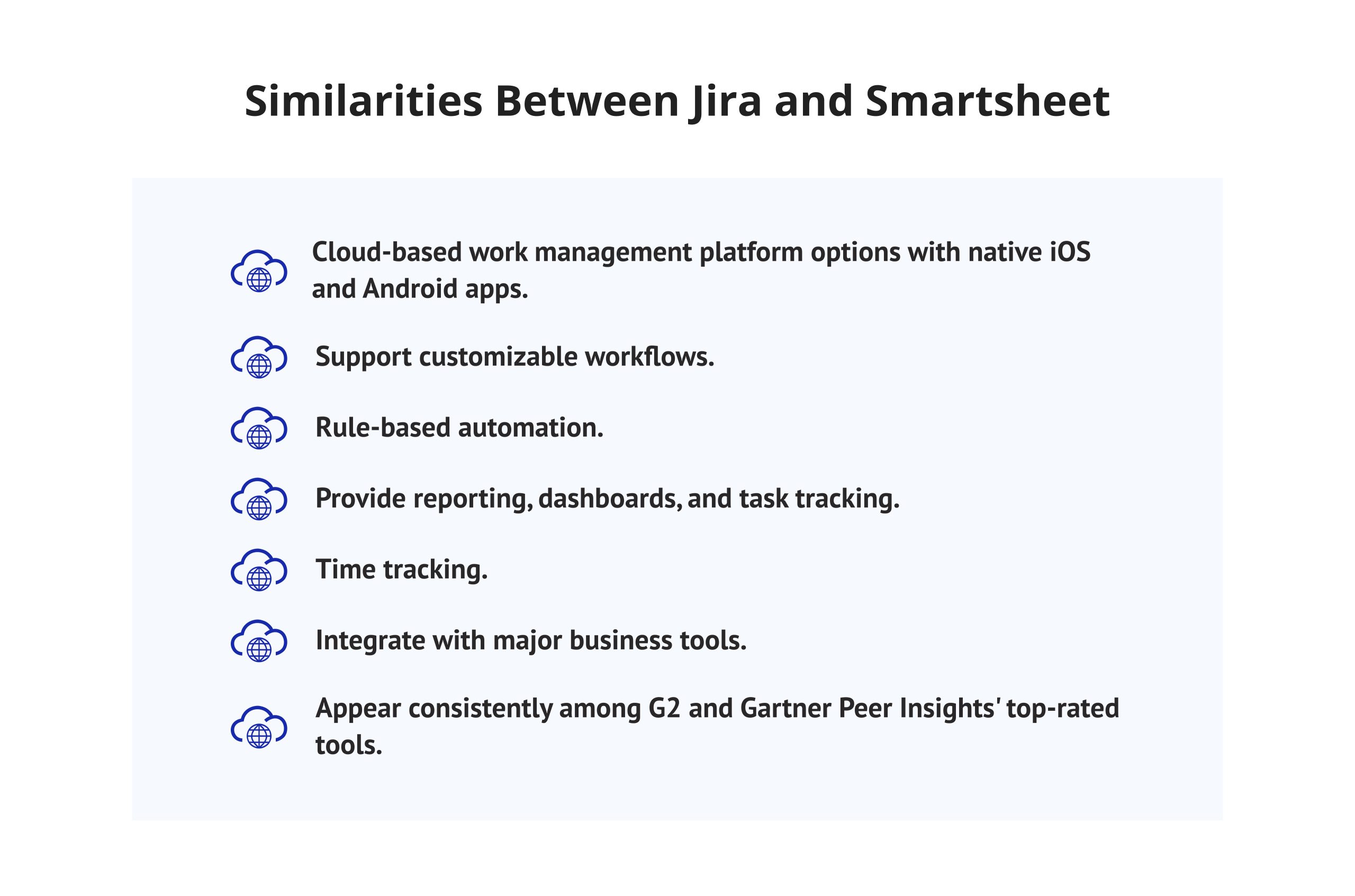
Despite their dissimilarities, the two platforms have a lot in common:
- Both come as a cloud service work management platform that has native applications for iOS and Android.
- Both have customizable workflows and rule-based automation, even if they use different underlying mechanisms.
- Both have reporting, dashboard features, and task tracking, and both have time tracking features. However, Jira uses marketplace apps for advanced timesheet functionalities while Smartsheet includes time tracking features in Business and Enterprise plans.
- Both integrate with the most popular tools on the market, including Slack, Microsoft 365, and each other, thanks to the Smartsheet connector.
- Both are on G2 and Gartner Peer Insights’ list of top-rated tools and have a rating of over 4.3 out of 5 according to thousands of reviews.
Final Words
There is no clear winner when comparing Jira and Smartsheet, and any articles that state otherwise miss the context that matters. The reason why the Smartsheet enterprise work platform achieved its popularity among big companies considering solutions for enterprise work management is that it provides tracking of custom workflow processes throughout many departments without pushing the teams to rely on a developer-oriented set of tools. Jira is the stronger software development tool for Agile engineering teams that live in sprints and backlogs. Smartsheet is the stronger work management platform for business teams that need spreadsheet familiarity, budget tracking, and reporting without a technical learning curve.
When evaluating Jira vs Smartsheet for project management at the organizational level, the honest answer is usually “both” — Jira for the engineering org, Smartsheet for the PMO and business units, connected through Smartsheet’s native Jira integration.
Enjoyed this comparison? Subscribe to Digest.Pro for more expert breakdowns of the project management tools shaping how enterprise teams work in 2026.
Asana and monday.com rank as Jira’s closest competitors in the broader project management space, while Linear has become the fastest-growing rival among pure software development teams. Asana and monday.com appeal to cross-functional teams that find Jira’s issue-tracking model too technical for non-engineering work. Linear targets engineering teams that want Jira’s Agile structure without its interface complexity.
Smartsheet’s main drawbacks are the lack of a permanent free plan, premium add-ons that raise total cost, and a learning curve around advanced automation. Features like Control Center, WorkApps, and Dynamic View are priced separately and can add 20-50% to a contract’s total value.
monday.com, Asana, and Wrike. Airtable is a good alternative for those who need more database capabilities and less spreadsheet experience. ClickUp will be great for companies that want an all-in-one tool with project management, documentation, and time tracking features.
Yes, Smartsheet connects to Jira through the Smartsheet for Jira Connector, bundled into the Enterprise plan’s Advanced Package. The connector syncs issues, statuses, and custom fields between the two systems, so business teams can report on engineering data inside Smartsheet dashboards. This setup is common among organizations that run development in Jira and operations in Smartsheet.
Smartsheet proves to be much better than Jira for companies that are in need of user-friendly spreadsheet interface, integrated budget tracking, and cross-departmental project management without technical onboarding, which may be complicated. Users may create reports and dashboards in Smartsheet without IT’s involvement, while it is not possible with Jira, as Microsoft does not support reporting and dashboard creation without using special plug-ins.
Certainly, Smartsheet stays on top as one of the best work management platforms in the market. It has received a 4.4-star rating from over 24,000 users who reviewed the software in G2, while obtaining a 4.5-star rating on the Gartner Peer Insights platform from more than 2,800 users. The company keeps adding several new AI features and enterprise-grade admin capabilities in the software to remain competitive.
Smartsheet is more expensive from the outset for small businesses, as it does not offer a free plan, starting at $9 per user per month in its Pro plan. In contrast, Jira has a free plan available for up to 10 users, making it the cheaper option when starting out as a small software team. However, once a small business exceeds ten users, the cost of Jira’s Standard and Premium plans, along with its add-ons, can reach a comparable level quite quickly.
Sprint and Kanban dashboards, backlog management, sprint planning, and workflow personalization with tracking issues and problems. The product also has Advanced Roadmaps for cross-project planning, as well as automation rules for over 3 thousand integrations through the Atlassian Marketplace. The Premium and Enterprise offers add Advanced Atlassian AI options.
Work with spreadsheets, including Gantt charts, automated workflows, dashboards and forms for filing work orders. Additionally, it has resource management capabilities and Control Center which allows the use of standardized templates throughout the organization. There are integrations with Microsoft 365, Google Workspace, Slack, Salesforce, and Jira.
Software development teams, IT departments and agile professionals. Product managers and Scrum masters are also using this solution for planification of sprints. According to our findings, the best implementation of Jira occurs in application development lifecycle management and enterprise-level planning.