
When it comes to resource management tools, their role consists of assigning personnel to their project tasks appropriately and on time. This process becomes increasingly difficult every year. The Pulse of the Profession report by the PMI shows that in 2020 alone, 97% of specialists were engaged in some complicated project. 1/3 of those projects were unsuccessful, which shows approximately 2 times higher failure rate compared with the average rate (13%) [1]. According to Gartner, more than 80% of the organizations evaluate their own resource management practices as ineffective [2].
Key Takeaways
- If you deal with projects employing specialists across the board, consider using Epicflow or EG Silverbucket.
- If your IT team uses Jira, take a closer look at Jira Premium.
- If you work in the consulting industry, prioritize Float, Runn, Parallax, and Productive.
- If your company is small and books equipment, Resource Guru is the best tool for you.
- If you are short on money, use Paymo, which is free.
Resource Management Tools Compared at a Glance
The table compares all 15 tools on the same five points. Where a vendor does not publish a figure, we write “not disclosed” or “quote”.
| Tool | Strong fit | Useful capabilities | Main caveat | Price/basis |
| Float | Agencies, studios | Visual scheduling, capacity, time off, margin tracking | No built-in task management | $7 Starter / $12 Pro per scheduled person per month; Enterprise quote |
| Epicflow | Multi-project PMOs, engineering | Future load graph, bottleneck analysis, due-date prediction | Skills matching and What-if need Enterprise (50-user minimum) | €22.50 Growth / from €45 Enterprise per user per month, billed annually; modules extra |
| Jira Premium | Jira-centric IT teams | Cross-project Plans, sprint capacity | Capacity view stays tied to Jira work | $19.60 per user per month at 100 users; Enterprise quote |
| Runn | Agencies, consultancies, software teams | Capacity and utilization charts, skills, financials | 20-seat minimum | $7 Lite / $11 Standard per resource seat per month; Advanced quote |
| Celoxis | PPM-style teams | Gantt, workload, resource conflicts, dashboards | 5 full-access user minimum; paid integration add-ons | $10-45 per full-access user per month, prepaid annually |
| Resource Guru | Small teams, bookable assets | Clash management, leave, skill search | Charges per person added, logged in or not | $5 / $8 / $12 per person per month; equipment extra |
| Parallax | Agencies, consultancies | Capacity-to-revenue forecasting, utilization | No public price list | Quote; |
| Productive | Agencies needing billing and profit data | Resource planning, budgets, time tracking | Seat-block pricing; steep learning curve | From $10 per user per month, annual |
| Microsoft Project Professional 2024 | Solo planners on Windows | Dependency scheduling, timelines | One-PC license; locked-in-time version | $1,129.99 one-time |
| Mosaic | Teams planning hiring and workload | Resource planning, portfolios, timesheets | API availability unconfirmed | Quote |
| EG Silverbucket | Engineering and consulting firms | Role requests, competencies, forecasting | No public price list | Quote per person in the resource pool |
| ProjectManager | Teams wanting PM plus resource views | Gantt, workload, time tracking | Resource tools start at Business plan | $15 / $28 per user per month, annual |
| Milient Resource Flow | Architecture, engineering, consulting | Visual scheduler, skills matching, timesheets | Mobile and timesheet complaints on G2 | Quote |
| Paymo | Freelancers, teams up to about 20 | Time tracking, invoicing, task views | Not built for portfolios | Free; $9.90/ $15.9 / $23.90 per user per month |
| Forecast (Accelo) | Professional services firms | AI capacity planning, financial forecasts | Price not disclosed; brand merged into Accelo | Not disclosed |
Resource Management Software for Different Project Environments
1. Float
It is a visual scheduling tool showing details about who is booked, who is available, and which margin has been exceeded. It covers the scope of the project, capacity, and absences.
- Best fit: advertising agencies, studios, and in-house creative teams.
- Key feature: drag-and-drop scheduling with margin monitoring.
- The biggest threat: there is no task management function, and actuals can be tracked only with the Pro version.
- Price: $7 for a Starter or $12 for Pro, charged per month per scheduled & supported employee. Enterprise pricing available upon inquiry. 30-day free trial; no free plan is available.
2. Epicflow
Epicflow is multi-project resource management software powered by AI, providing oversight of available specialists.
- Best fit: PMOs, engineering portfolios where one team offers its services to multiple projects.
- Key feature: future load diagram for overload months ahead.
- The biggest threat: skills matching and What-if scenarios can be implemented only with the help of the Enterprise package, which has a minimum cap of 50 users.
- Price: Growth costs €22.50/user/month with an annual payment (€25 paid monthly); Enterprise starts from €45 (€50 monthly). There is a 30-day trial offering Growth services for free.
For teams comparing this category, our guide to Top 12 PMO Tools Your Company Needs to Scale in 2026 shows where portfolio tools overlap.
3. Jira Premium
This is a product by Atlassian that connects various projects and teams. It includes planning across various projects and executing tasks based on sprints.
- Best fit: IT and product teams that are already using Jira for project delivery.
- Key feature: Plans including dependencies of projects.
- The biggest threat: This system is based on the work performed in Jira and does not consider skills across the organization. Atlassian charges for all of its users regardless of whether they are active or not.
- Pricing: $19.60 per user for a 100-user package. Free usage is available for up to 10 users but with no cross-project planning functionality.
Teams that outgrow Jira alone can read 8 Top Jira Alternatives for Complete Portfolio Visibility & Control in 2026.
4. Runn
Runn uses a resource seat pricing model and is meant primarily for technical project teams. It encompasses aspects such as capacity usage, staffing, resource skills, and budgets for realization.
- Best fit: Agencies, consultancy firms, and software teams operating with 20 or more resources.
- Key feature: Capacity and utilization diagrams with potential projects.
- The biggest threat: Starting price for Runn is based on 20 seats, and Lite and Advanced versions of the platform are not designed for self-service.
- Price: The price for either Lite or Standard version is $7 or $11, respectively, per resource monthly with monthly subscription. Advanced price is customizable. The trial period is 30 days, and the Standard version doesn’t require any payment details to subscribe.
5. Celoxis
Celoxis puts planning, workload, and reporting in one platform. It prices by full-access user, and read-only users are free.
- Best fit: Project-driven teams that want Gantt scheduling plus dashboards.
- Key feature: Resource conflict detection and workload views alongside analytics.
- Biggest threat: Cloud plans need at least five full-access users. Reviewers also report paid add-ons for Jira, Azure DevOps, and QuickBooks.
- Price: $10 Core, $25 Essential, $35 Professional, or $45 Business per full-access user per month, prepaid annually (Capterra and Software Advice listings). Enterprise is a quote.
6. Resource Guru
This resource management software is a booking tool designed for people, equipment, rooms, and vehicles. The tool signals clashes and helps to avoid double booking.
- Best fit: Small to medium-sized teams and agencies, equipment-heavy teams.
- Key feature: Clash management and providing skill, team, and role searches on each plan.
- The biggest threat: Each new team member requires extra charge even without using the tool. Only a limited number of substitutes are allowed based on your plan, without the option to use a free trial.
- Price: Three plans at $5, $8, or $12 for each user monthly. Enterprise is a quote.
7. Parallax
Parallax is a tool for resource planning that connects capacity with revenue projections. It displays capacity with pricing and utilization in one view.
- Best fit: digital agencies, development studios, and professional services companies.
- Key feature: Capacity-to-revenue forecasting.
- The biggest threat: There is no price list available to the public; there are differences in the prices paid by customers.
- Price: All plans are quote.
8. Productive
Productive is software that combines resource planning with budgets, billing, time tracking, and profitability. An AI assistant is part of it.
- Best fit: Agencies and consultants who require billing and profit-related data.
- Key feature: Resource allocations linked to budget. Ultimate adds revenue forecasting and a Scenario Builder (3rd-party evaluation).
- The biggest threat: Lieutenant pricing affects small teams; the capabilities can be overwhelming for newcomers.
- Price: Essential is from $10 per consumer annualy, and Professional costs $25 yearly (or $30 monthly). Ultimate tier has custom pricing.
9. Microsoft Project Professional 2024
Microsoft Project Professional 2024 is for one user on a Windows computer. It allows for scheduling and timing of tasks. The only requirement is a single purchase.
- Best fit: A single planner who is part of the Microsoft ecosystem.
- Key feature: Scheduling of tasks according to dependencies.
- The biggest threat: One-user and one-PC license, which means the software is a ‘locked-in’ version.
- Price: $1,129.99 only, with $679.99 for Project Standard 2024.
For alternatives, see 5 Best Microsoft Project Alternatives in 2026.
10. Mosaic
Mosaic brings together resource planning and project management along with timesheets. It allows for planning workforce requirements too. Available on mobile platforms.
- Best fit: Workforce management service teams.
- Key feature: One dashboard that shows energy requirements.
- The biggest threat: No public API is available, according to SaaSworthy.
- Price: Custom
11. EG Silverbucket
EG Silverbucket is a staffing tool that suggests the most suitable candidate for a vacant position.
- Best fit: Engineering, consulting, and architectural industries from 11 to over 10,000 employees.
- Key feature: Competency mapping technology with a detailed match score per candidate.
- The biggest threat: There is no publicly available price list, and it does not consider detailed end-to-end PPM.
- Price: The cost is quoted according to the volume of the resource pool.
12. ProjectManager
A standard project management product with Gantt charts, dashboards, and time tracking features. Resource management tools are available in the Business plan.
- Best fit: Mixed teams that need workload management in addition to project management.
- Key feature: Gantt chart that can be extracted with the Business package.
- The biggest threat: The Team plan does not include resource management.
- Price: $15 for Team tier or $28 for Business tier per user annually. 30-day trial is available.
13. Milient Resource Flow
The Milient Resource Flow is the name that replaces its previous name, Hub Planner. It is an application that provides visual scheduling in addition to timesheets, approval, and leave applications.
- Best fit: It is ideal for architecture, engineering, and consulting companies.
- Key feature: It provides skills matching and the capability to request resources
- The biggest threat: According to G2, the main unfavorable comment is the mobile limitations in their use and issues with timesheets.
- Price: Custom.
14. Paymo
Paymo is a light tool for freelancers and small teams. It handles time tracking, invoicing, and task views, and it has a published free plan.
- Best fit: Independent professionals and teams of up to about 20 people.
- Key feature: Unlimited time tracking and invoices, with project profitability on Plus.
- Biggest threat: It is not built for portfolios. Reviewers mention extra invoicing charges, and the free plan caps you at three clients.
- Price: Free. Solo $9.90, Plus $15.90, or Pro $23.90 per user per month on annual rates..
15. Forecast (Accelo)
Forecast now sits inside Accelo. It offers AI capacity planning with billing for services firms. Accelo bought it in July 2025.
- Best fit: Professional services firms that protect margin and utilization.
- Key feature: Predictive AI for resourcing and financial forecasting across the pipeline.
- Biggest threat: The price is not disclosed. Accelo finished the brand merger on 28 May 2026 but says the products stay distinct. Capterra also lists a separate Forecast app tied to Harvest, so check which product a review covers.
- Price: Not disclosed; sales quote.
Which Resource Management Tools Fit Your Team?
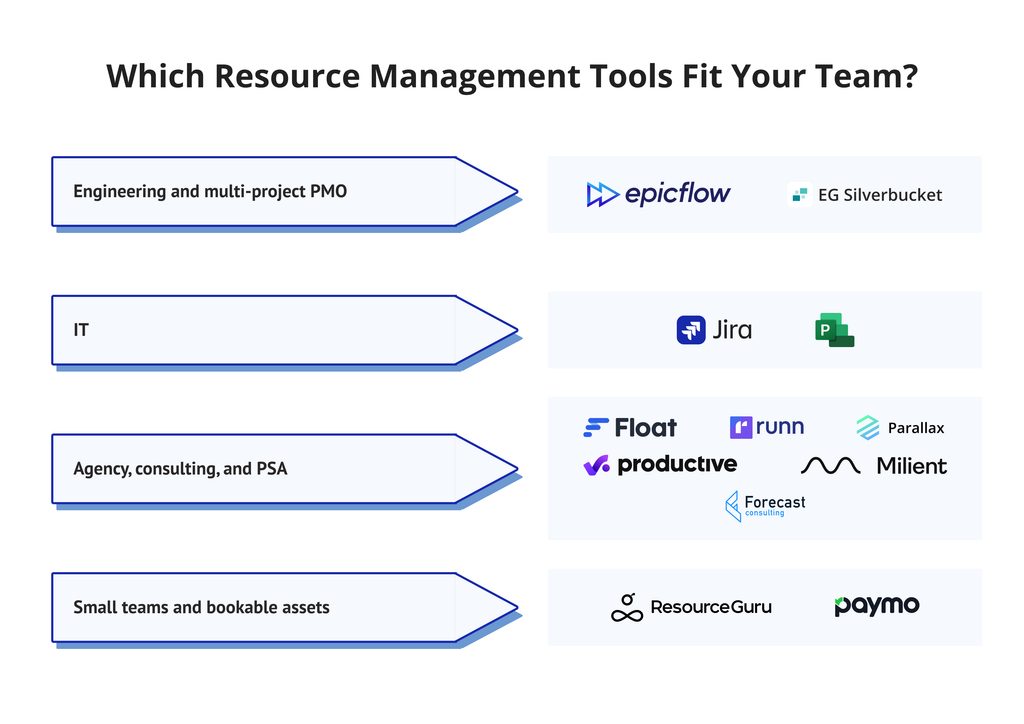
No product fits every team. We match tools to environments only where the sources support the claim.
- Engineering and multi-project PMO: Epicflow and EG Silverbucket suit resource management software for multi-project portfolios with shared specialists. Celoxis suits teams that want planning and workload in one tool.
- IT: Jira Premium fits teams already in Jira. Microsoft Project fits a solo planner who needs dependency scheduling.
- Agency, consulting, and PSA: Float, Runn, Parallax, Productive, Milient, and Forecast (Accelo) are resource management tools for professional services firms. Parallax, Productive, and Accelo also connect resource plans to revenue and billing.
- Small teams and bookable assets: Resource Guru books people, equipment, and rooms. Paymo suits freelancers and teams of up to about 20.
How to Choose Resource Management Software
Run one test in every demo: two projects that share one specialist. It exposes how each tool handles conflicts, and it takes under an hour.
| Step | Assumption | Evidence to capture | Effort to log |
| Set capacity | One QA engineer, 32 productive hours per week | Capacity view after leave and meetings | Minutes to enter leave |
| Add Project A | 40 hours: 20 in week 1, 20 in week 2 | Booking visible on the schedule | Clicks to create a booking |
| Add Project B | 40 hours: 20 in week 2, 20 in week 3 | Week 2 shows 40 of 32 hours (125%) | Same |
| Resolve the clash | Move 8 hours or change priority | Warning, new dates, scenario copy | Who must approve, and how long |
Score each tool on three questions. Did it flag week 2 without help? Did it show the effect on both finish dates? How many people must update data to keep the plan true?
Summary
Resource management tools differ less in features than in billing units, minimums, and fit. Match the tool to your environment, then run the two-project test. Verify every price on the vendor page before you buy.
Frequently Asked Questions
What is resource management software?
Resource management software plans, assigns, and tracks people, equipment, and budgets across projects. It shows who is available, who is overloaded, and what work is coming. Most tools add timesheets and reports, so teams can compare plans with actual hours.
What are the best resource management tools in 2026?
The best resource management software depends on your environment. Epicflow and EG Silverbucket target multi-project portfolios. Float, Runn and Parallax target agencies. Jira Premium fits Jira teams, and Resource Guru fits small teams with bookable assets.
How do I choose resource management software?
Test two projects that share one specialist. Check whether the tool flags the overload, shows both finish dates, and needs little manual updating. Then compare billing units, minimum seats, and integration costs.
Are there free resource management tools?
Few resource management tools are free. Jira Free covers up to 10 users but lacks cross-project planning. Paymo has a free plan with a three-client cap. Most others offer 14- or 30-day trials.
What is the difference between resource planning, scheduling, and allocation software?
Planning forecasts demand and capacity; scheduling sets dates, and allocation assigns named people. Most modern tools combine all three. Resource planning software looks months ahead, while resource scheduling software handles weekly bookings.
What is skills-based resource allocation?
Skills-based allocation matches people to tasks by competence and proficiency. Resource Guru searches by skill on every plan. Epicflow’s advisor ranks candidates by competence and capacity, and EG Silverbucket shows a match score.
Can resource management software forecast hiring needs?
Yes, some tools forecast hiring from demand and capacity. Runn supports placeholders for future hires, and its hiring requests need the Advanced plan. Mosaic lists forecasting and hiring views among its features.
How much does resource management software cost?
Published prices run from about $5 to $45 per user per month. Resource Guru starts at $5, and Celoxis Business reaches $45. Parallax, EG Silverbucket, and Forecast (Accelo) require a quote.
Which resource management tools integrate with Jira?
Jira Premium is native, and several other tools connect. Epicflow offers a paid Jira interface module. Parallax and Celoxis list Jira integrations, and Celoxis charges extra. Confirm field mappings and write-back before you buy.
Is Microsoft Project a resource management tool?
Microsoft Project is a scheduling tool with resource features. The 2024 Professional edition costs $1,129.99 as a one-time, one-PC license. Teams that need shared capacity views across many projects usually add a dedicated tool.
References
https://pages.eightfold.ai/Gartner-Update-Your-Approach-to-Resource-Management.html
Accelo. (2026). Accelo, now with Forecast. https://www.accelo.com/forecast
Atlassian Community. (2026, August). Jira pricing: How much does Jira cost in 2026? https://community.atlassian.com/forums/discussion/3284604/jira-pricing-how-much-does-jira-cost-in-2026/p1
Capterra. (2026). Celoxis pricing. https://www.capterra.com/p/5923/Celoxis/pricing/
Capterra. (2026). Parallax software pricing, alternatives and more. https://www.capterra.com/p/232466/Parallax/
Capterra. (2026). ProjectManager software (India). https://www.capterra.in/software/83313/projectmanagercom
Epicflow. (2026). Plans and pricing. https://www.epicflow.com/pricing-plans/
Float. (2026). Pricing. https://www.float.com/pricing
G2. (2026). Milient Resource Flow reviews. https://www.g2.com/products/hub-planner
Gartner. (2023, June 14). Update your approach to resource management for projects and products (S. Davies). https://pages.eightfold.ai/Gartner-Update-Your-Approach-to-Resource-Management.html
Gartner. (2026, June 27). Apply AI to overcome resource capacity planning challenges. https://www.gartner.com/en/documents/8065533
Microsoft. (2026). Microsoft Project. https://www.microsoft.com/project
Project Management Institute. (2026, May 12). Why complex projects fail: Best practices are not enough, systems thinking gives your team the edge. https://www.pmi.org/about/press-media/2026/pulse-why-complex-projects-fail-best-practices-are-not-enough-system-thinking
Resource Guru. (2026). Pricing. https://resourceguruapp.com/pricing
Runn. (2026). Pricing for better resource management. https://www.runn.io/pricing
Smartsheet. (n.d.). Resource management is people management: Principles, systems, and plans. https://www.smartsheet.com/content-center/product-news/resource-management
Software Advice. (2026). Paymo software reviews, demo and pricing. https://www.softwareadvice.com/accounting/paymo-profile/