
By managing workloads in your teams, you can understand the capacity of your teams and which work to reallocate in order to avoid missing deadlines. As workload increases, 47% of managers state that they have increased workload from last year (Gartner surveyed 2,947 staff members and managers). Manager engagement is also falling: in 2025 it fell to 22%, down from 27% in 2024 (Gallup 2026 State of the Global Workplace).
Project complexity is increasing. Within project management, 81% of project professionals state that projects are becoming more complex (PMI 2026 Pulse of the Profession). Almost 1 in 3 complex projects do not succeed (33%), compared to only 13% of all projects. Quickly understanding capacity within your teams is key.
Follow us on LinkedIn for expert advice on project management tools and enterprise tech.
In this guide, we break down 10 options and which teams they would be best suited to. After reading this article, you’ll understand the difference between workload and task management, which tool best suits your working model, and how to try one with a real example of a busy week.
Key takeaways
- Agencies that need capacity and profit in one view: Productive.
- Forward-looking capacity planning and hiring scenarios: Runn.
- Simple scheduling with leave and bookings: Float or Resource Guru.
- Client-service delivery with a workload planner: Teamwork.com.
- Cross-functional teams that already run on Asana: Asana Advanced or Enterprise.
- Visual, configurable boards: monday.com.
- Customizable all-in-one work management: ClickUp.
- Complex projects with enterprise reporting: Wrike.
- Agile software teams: Jira Premium.
Best workload management tools at a glance
The table below compares the ten tools on fit, workload capability, main limitation, and plan gate. Specialist schedulers lead on forecasting. Work management suites lead on task context.
| Tool | Best for | Workload and capacity capability | Main limitation | Plan note |
| Productive | Agencies and consultancies | Resource planning by person or project, time off, budgets, forecasting | A rich feature set can overwhelm new users | Resource planning in Essential (from $10/user/month). Scenario Builder only in Ultimate (custom) |
| Runn | Capacity planning and what-if scenarios | Capacity, availability and utilization charts, tentative projects, placeholders, saved scenarios | Plans start at 20 resource seats. Capacity Insights and resource requests need Advanced | Lite is $7 and Standard $11 per resource seat/month. Advanced is custom |
| Float | Team scheduling and availability | Visual schedule of who is booked, available, or overallocated | Specialist scheduler. Pair it with a task tool. | Starter is $7, Pro costs $12 per scheduled person/month |
| Resource Guru | Booking people and equipment with leave | Clash warnings, leave management, heatmap views from Blackbelt | Reports, Gantt, and heatmaps are missing from Grasshopper | $5, $8, and $12 per person/month (Grasshopper, Blackbelt, Master) and Enterprise (quote price) |
| Teamwork.com | Client-service delivery | Workload planning on Accelerate. Role and skill scheduling plus placeholders on Optimize | Resource scheduling needs the custom-priced Optimize the plan. | Accelerate $24.99/user/month billed yearly, minimum 5 users |
| Asana | Cross-functional teams | Resource management inside a portfolio (Advanced). Org-wide workload and capacity planning (Enterprise) | Org-wide view needs the custom-priced Enterprise plan | Resource management features are accessible from Advanced $24.99/user/month billed annually |
| monday.com | Visual boards and dashboards | Workload view and resource management on paid tiers | Third-party sources disagree on which tier holds which view. | Workload feature is available from Pro plan, $19/seat/month billed annually |
| ClickUp | Customizable all-in-one work management | Workload view for capacity and task distribution | The workload view sits above the free plan | Trial version of workflow function is available for Free, and Core plan ($12/user/month), and from Business plan ($17/user/month) has full access. |
| Wrike | Complex projects with enterprise reporting | Workload charts, resource, and capacity planning | Resource planning starts at Business. Advanced capacity planning sits in Pinnacle | From Business tier ($25 per user/month), and higher |
| Jira | Agile software teams | Team capacity in story points or hours on the plan timeline | Plans need Jira Premium or Enterprise | Premium ($19/user/month) or Enterprise required |
All prices are listed in the annual bill. The data retriever from the vendor’s official pricing pages on 26 November 2026.
What are workload management tools?
Workload management tools allow you to balance workloads depending on availability. You’ll be able to compare work needed (workload) against availability (hours remaining, accounting for time off and regular work). This ensures work is balanced to avoid being behind schedule.
Burnout is a major business issue. According to Gallup research, excessive workload is a key cause of burnout. Employees who regularly suffer burnout are 2.6x more likely to leave their employer.
‘Unfair treatment at work, unmanageable workload, lack of role clarity, lack of communication and support from one’s manager, and unreasonable time pressure’ are key predictors of employee burnout, according to Jim Harter, Chief Scientist for Workplace Management at Gallup. Source
Workload management vs. task management
Task management records what work exists. Workload management compares that work with capacity. A task board can show 40 open tasks for one person and still not reveal whether that person has 20 or 40 hours left. A workload view adds effort estimates and availability, so overload becomes visible on one screen.
Suites such as Asana, monday.com, and ClickUp add workload views on top of task management. To compare board-first tools, see our guide to the 20 Best Kanban Tools To Improve Workflow Efficiency In 2026.
Workload management vs. resource planning
Resource planning focuses on which people (and skills and budgets) are needed across months. Workload management helps in balancing workloads across weeks. Within specialist workload management solutions like Runn, Float, and Resource Guru, both can be managed. While resource allocation will tell you who should be working on a project, workload management will help determine if they can take on this project this week.
For further analysis into planning tools, check out our Top 8 Capacity Planning Tools (2026).
Follow Digest.Pro on LinkedIn to keep up to date with weekly insights on project management, PMO, and enterprise technology.
What a trustworthy workload view needs
A workload dashboard is only as accurate as its inputs. Five inputs decide whether the chart deserves trust:
- Planned demand: tasks and bookings with start and end dates.
- Effort estimates in hours or story points.
- A named owner for every item.
- Real availability, including leave, public holidays, and part-time schedules.
- Non-project commitments such as meetings, support rotations, and recurring work.
Capacity equals available hours minus leave and recurring commitments. Utilization equals planned hours divided by available hours. The example below shows how the inputs change the picture.
Example:
| Item | Hours per week |
| Contract hours | 40 |
| Leave (one day) | −8 |
| Recurring meetings and support | −4 |
| Available capacity | 28 |
| Planned work | 34 |
| Utilization | 121% |
There is more work than capacity here. The manager has redirected a 6-hour task to a free member of staff. Without including leave and meetings, usage would be 85% (34/40), and so the workload issue may go unnoticed.
Balanced workload does not necessarily mean a healthy workload. Usage does not reflect individual productivity. Think of this feature as a prompt for planning, using discussion within teams to understand workload pressures. To understand the human pressures associated with workload in projects, see ‘Project Management Challenges: 12 Problems PMs Face and How to Solve Them’.
How we evaluated the workload management tools
Each tool was assessed against 4 criteria. We checked pricing information and comparative plans on 26th November 2026.
Capacity and availability visibility
Is the number of available hours visible? We looked for charts showing capacity/usage, managing time off, and placeholders for uncertain work. If tasks can be seen but availability not, this criterion has not been met.
Reassignment, scheduling, and forecasting
How quickly can work be reassigned? We looked for alerts for double booking, drag-and-drop reassignment, and views for scenarios and forecasts. Using future-focused views means that there is a separation between planning and tracking.
Time tracking, reporting, and integrations
Are accurate estimates provided? We looked for time sheets, forecasts, and integration with calendar, HR, and accounting systems. Tracking times alone will not create a balanced workload. So it was considered an enabler and not evidence of capacity.
Ease of adoption, pricing, and plan limits
What is the cost of the product? We noted what the starting cost was, what plan is needed to get workload functionality, how many seats are required as a minimum in a plan, and what it is charged for. Many vendors charge per resource or person scheduled. This may change the total cost for teams with lots of infrequent contributors.
10 best workload management tools
Productive — agencies needing workload and financial visibility
Project management, resource planning, budgeting, and invoicing are combined for agencies and consultancies. You can see workload distribution per team member and manage capacity, leave, and bookings within the resource planner.
Best for: Agencies and consultancies that invoice clients. Allows resources and budgets to be viewed together.
- Create resource plans for individuals or projects. Partial bookings and placeholders can be added.
- If there are conflicting bookings, override them or ignore leave periods.
- Leave data can be integrated with HRIS systems such as Rippling, BambooHR, and Personio (Professional plan).
- Build and test scenarios for projects and deals (Ultimate plan).
- There are many features within Productive; this may be overwhelming for new users.
From $10 per user per month, you can access resource planning. Additionally, Productive offers Professional ($25/user/month) and Ultimate (custom pricing)
If your team does not invoice clients and just wants a basic capacity visualisation, then Productive may not be suitable for you.
Runn — forward-looking capacity planning and scenarios
With Runn, users can manage resource capacity and create scenarios for resource allocation across technical projects. For each scenario, view capacity, availability, and utilization. Add draft projects. Unlimited placeholder resources.
Best for: Consultancy, agencies, and IT teams who want to investigate different scenarios for resource allocation.
- Leave time off/public holidays to show availability.
- Financials for projects.
Pricing is based on the number of resources. Each user added within the planner will count towards your seat limit. You can create plans for 20+ resources. Lite: $7, Basic: $11 per resource (per month), and Advanced for custom pricing.
If you are planning for less than 20 people, or require a task board in the same product, skip this tool.
Float — team scheduling and availability
View resource availability in real time. Can be used for managing resources within projects by project managers, consultants, creative teams, and technical teams. See who is over/underutilized, and who is booked.
Best for: Easily seeing schedules and capacities in a team, without using full project management tools.
Float offers 3 tiers: Starter ($7/user/month), Pro ($12/user/month), and Enterprise (custom pricing).
Float cannot be used as a task tracker, so it should be used alongside one if your team uses task management and commenting in daily processes.
Resource Guru — resource booking and leave visibility
This workload management tool allows resource allocation of staff, meeting rooms, vehicles, and equipment. Features include alerts for conflicts, leave management, public holidays, and flexible working hours.
Best for: Teams looking to manage resource allocation of staff and shared resources within the same calendar.
- Utilization rates (overall and billable) can be viewed as a heatmap from Blackbelt.
- Timesheets and actual vs. forecast can be viewed from Blackbelt.
- Single sign-on and approvals can be set up in Master.
- Jira, Asana, monday.com, Trello, ClickUp, Google Calendar, Outlook Calendar, and Zapier can be integrated.
There is a charge for each user added to the account. For $5 (Grasshopper), $8 (Blackbelt), and $12 (Master) (per person per month, annually), and Enterprise (custom), you can add users. Grasshopper plan does not allow reports, Gantt charts, or heatmaps.
If tasks, comments, or documentation are required within this application, avoid Grasshopper.
Teamwork.com — client-service project delivery
This is designed for managing projects for clients. Workload planning, real-time resource availability, and role-based planning can be done in Accelerate.
Best for: Agencies, consultancies, and marketing teams who wish to manage client delivery and be paid for billable hours.
- Utilisation reports can be created, along with time budgets and retainer systems. Invoices can be generated based on times recorded.
- Role/skill-based allocation, placeholders, planning based upon availability, and targeted billable utilization can be done in Optimize.
- HubSpot and QuickBooks can be integrated in Accelerate. Salesforce and NetSuite can be integrated in Optimize.
Free tier (for teams) is available (up to 5 projects and 5 people). Accelerate costs $24.99 per user per year. A minimum of 5 users are required. Basics (for teams) is cheaper at $9.99; however, workload planning is not available. Resource scheduling requires a custom plan of Optimize. There is one more plan with custom pricing: Enterprise.
If no client work is performed by your team, avoid Teamwork.com.
Asana — cross-functional project workloads
Asana makes it easy to track workloads right within the project management structure your team is used to. With the advanced plan, you can check who’s overworked and who has capacity in one single view. Managers can change the workload from within this view.
Best for: teams that are already managing projects and portfolios using Asana
- Time management helps you analyze the difference between estimated and actual time spent on tasks.
- Enterprise version includes global resource management that displays work capacity for any project and portfolio.
- Previous times and rates are calculated separately in the Timesheets & Budgets add-on.
The advanced plan costs $24.99 per user (billed annually) and $30.49 per user (billed monthly). A starter plan ($10.99 annually, $13.49 monthly) does not include workload management. Enterprise tier for custom pricing.
You should avoid Asana if you would like to have availability information across the entire organization.
monday.com — visual, configurable workload views
monday.com offers a visual and customizable workload view for team workload management and task distribution. Capterra’s pricing guide lists resource allocation and workload management among its unique capabilities, which help with the allocation of tasks and immediate identification of the bottlenecks.
Best for: those looking for visual and flexible workload boards and dashboards.
Workload functionality is available from the Pro tier for $19/seat/month (annually).
If you need to do the scheduling by expertise on an hourly basis, you should skip monday.com, as scheduling is better provided by specialized tools.
ClickUp — customizable work management
ClickUp covers tasks, docs, goals, and a Workload view in one customizable workspace.
Best for: teams that want one customizable workspace and will configure it themselves.
- Workload view shows capacity and task distribution.
- The Business tier also adds time tracking with billable rates and timesheets.
- A lower-paid tier lacks a workload view, so the entry price understates the real cost for capacity planning.
For the Free and Core ($9 user/mo) tiers, there is a trial version of the workload feature, and full access is available on Business ($17 user/mo), Enterprise (custom), and Max ($100 user/mo) tiers.
Skip ClickUp if your team wants a tool that works well without configuration.
To compare three suites head-to-head, read our ClickUp vs Monday vs Wrike: Which Tool Fits You in 2026? guide.
Wrike — complex projects and enterprise reporting
Wrike is a work management suite built for complex projects and enterprise reporting. It gives large teams structure across many projects, but its capacity features sit in higher tiers.
Best for: projects that involve complexity and a number of stakeholders that require detailed reports.
- Availability of workload charts allows prioritization of tasks, resource allocation planning, etc.
- Tekpon presents the Pinnacle plan with a summary of advanced resource and workload planning.
- Do not consider Wrike if you need capacity planning without spending huge amounts of money.
Resource and capacity planning options are available from Business plan ($25 user/month), Pinnacle, and Apex tiers as well (both have custom pricing).
For a direct comparison with an engineering-led alternative, see Wrike vs Jira: Which Should You Choose For Project Management?
Jira — agile and software-team capacity planning
Jira software offers capacity management features for Agile teams through the Plans function, which Atlassian describes as a cross-team planning tool. Capacity is displayed directly on a timeline, which allows you to quickly identify whether your team is under- or over-allocated. Available for both Scrum and Kanban teams.
Best for: agile software teams that organize their work into sprints.
- Capacity refers to the number of story points or hours that a team can achieve in one iteration.
- Velocity is the average capacity of a team per iteration according to previous achievements.
- A green capacity bar turns red when the amount of work assigned to the team is larger than its capacity.
Workload planning in Jira is available on the Jira Premium (for $19.60/user/mo) and Enterprise (custom pricing) plans
It is better to avoid using Jira if your team is busy developing projects with multiple non-software team members.
Read the review 14 Top Scrum Tools Evaluated for 2026 to know more about the advantages of using this approach.
How to choose the right workload management tool
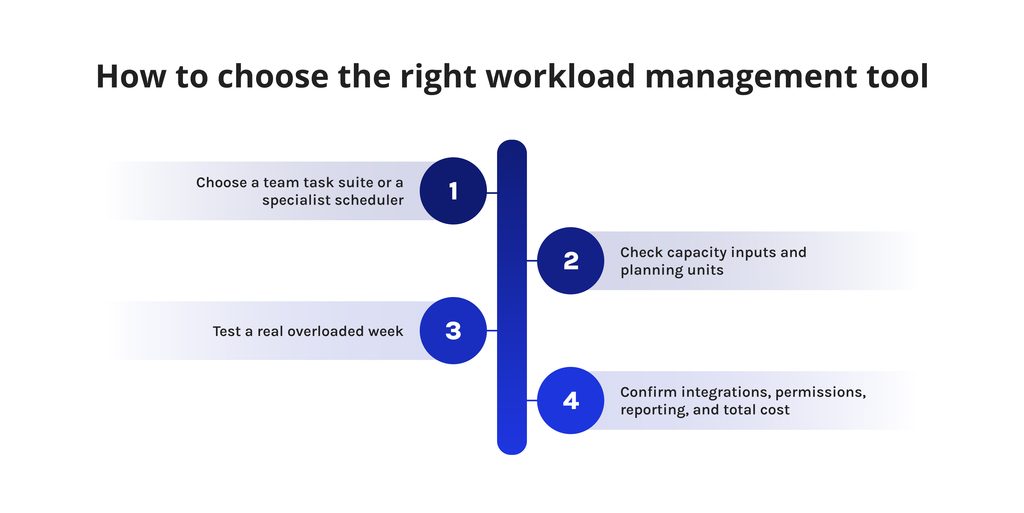
Choose based on the planning decision that you do weekly instead of the list of available features. The four simple checks can narrow the list of the ten possibilities easily.
Choose between task suites and specific schedulers
To get started, look at how the team manages the daily tasks. Task suites allow tracking tasks, comments, and workload performance. As for the specific schedulers, they forecast people across different projects and handle absence and booking more efficiently.
| Factor | Work management suite | Specialist scheduler |
| Examples | Asana, monday.com, ClickUp, Wrike, Jira | Runn, Float, Resource Guru |
| Strength | Tasks, comments, and workload in one tool | Forecasting, scenarios, leave, bookings |
| Typical gap | Capacity depth sits behind higher plans | No task board |
| Best fit | Teams that run daily work inside the tool | Agencies and PMOs that plan people across projects |
Agencies and PMOs that plan people across projects
Productive and Teamwork.com sit between the two groups. Both combine project delivery with resource planning for client work. PMOs that compare broader platforms can start with our guide to the Top 12 PMO Tools Your Company Needs to Scale in 2026.
Check capacity inputs and planning units
When determining planning, pick the device prior to the unit. Work is more accurate when dealing with multiple roles or billing clients, while story points work well with established agile teams. With both methods being available for sprint planning, if the tool does not support anyone’s planning method, conversion must be done manually.
Test a real overloaded week
Demoing without real data gives no information. Therefore, check your system with the following procedures for one week, on a weekly basis:
- Enter vacations, holidays, and regular meetings for each employee.
- Create tasks, providing estimates.
- Change one of the estimates and check if the utilization changed.
- Allocate the task to someone else and check if this person’s capacity changed.
- Check if the team has the same information being displayed by the tool.
A good tool passes all five steps without a spreadsheet side file.
Confirm integrations, permissions, reporting, and total cost
Finally, review the ecosystem. Concurrently with the system integration, do the integration of the calendar and HRIS, ensure that rights allocation is relevant to the function performed, and create reports that would show planned working hours against actual working hours. And the total cost of working should reflect your actual number of employees. Remember that work per person and per resource billing may vary substantially compared to login-based fees.
For the planning trends that shape these choices, read Project Management Trends 2027: AI, Hybrid Delivery and the Value-Driven PMO.
Workload management best practices
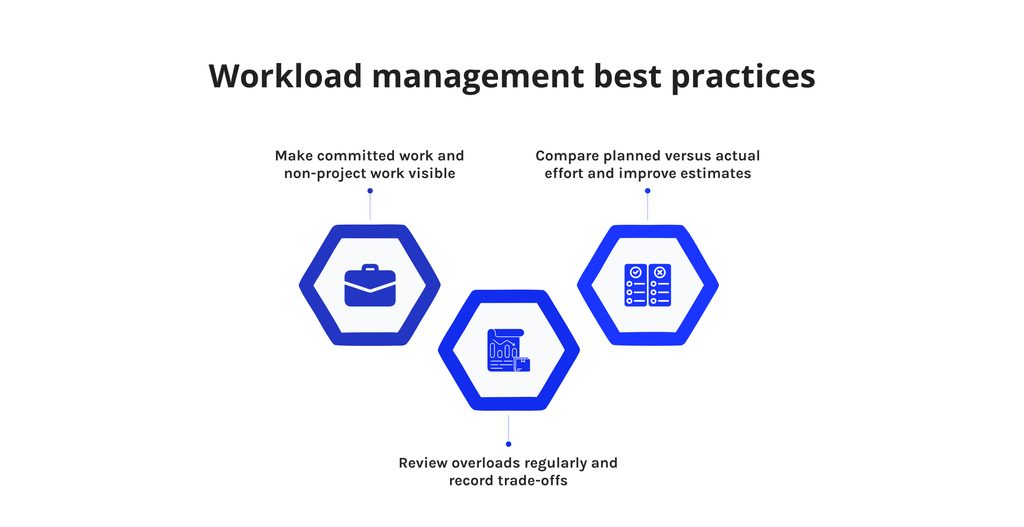
A tool is effective only if the team is committed to entering reliable data and monitoring it on a regular basis. Three habits are crucial.
Make committed work and non-project work visible
Employees tend to under-report maintenance services, internal meetings, and repetitive administrative tasks. Even though these hours do consume some capacity, they still must be accounted for.
Review overloads regularly and record trade-offs
Hold a short weekly review. Check anyone above 100% utilization, then decide what moves, what slips, and what stops. Write down the trade-off and the owner. Gartner’s 2026 manager survey found that only 41% of employees feel their manager helps them prioritize their work. A recorded decision closes that gap.
- Flag overloads above 100% of available hours.
- Reassign or reschedule one item per overload.
- Record the trade-off in the task or booking.
- Re-check the chart after the change.
Compare planned versus actual effort and improve estimates
Estimations can shift. Assess scheduled hours against actual hours each month and then adjust the estimation process. Software packages with time sheets and planned vs. actual reports, e.g., Runn, Teamwork.com, and Resource Guru (from Blackbelt), can facilitate this process. Improved estimates will ensure that all subsequent capacity charts are more accurate.
Conclusion
Select workload management tools that align with your weekly planning process. Niche planning tools, including Runn, Float, and Resource Guru, excel at predictive, holiday, and booking functionality. Suites such as Asana, monday.com, ClickUp, Wrike, and Jira situate workload in relation to daily tasking. Productive and Teamwork.com are appropriate for agencies providing client service provision.
After narrowing down options, trial a tool using a genuinely overcommitted week. Confirm plan levels on the relevant company website. Recall that utilization data should inform rather than judge people. Ideally, discussion of compromises begins with examining an even chart. However, this is not where such discussions conclude.
FAQs
People use workload management — a type of software — to analyse work and available time. Capacity, overcommitment, and which work to prioritize can then be identified. Teams often use workload management to effectively allocate work.
Whilst project management may involve setting out a project’s scope, timeframe, and deliverables, workload management specifically centers around the people who will undertake work on a number of projects. Someone can even appear to be working well within a project but simultaneously on 3 deliverables.
Resource planning is about defining the needs of the whole portfolio, while workload management is more about balancing work on a weekly basis. Some tools can serve both purposes.
Capacity and availability visibility matter most. Then check these features:
- Leave and public holiday handling
- Fast reassignment
- Forecasts or scenarios
- Planned-versus-actual reporting
- Calendar, HRIS, and task-tool integrations
An individual’s capacity is their contracted hours less time off and regular appointments. If someone works 40 hours a week, takes one day off, and attends 4 hours of regular appointments, they have a capacity of 28 hours. Utilization is then calculated by dividing planned hours by capacity.
Although workload management tools can highlight over-commitment, they are not foolproof at helping avoid burnout. Uncontrollable workload is stated by Gallup as one of the main contributors to this. Firstly, identify over-committed members of staff using a workload management tool, and then take steps to address this.
Generally, free versions of tools do not contain workload functionality. Asana Personal enables two people to use the platform but lacks resource functionality. Teamwork.com Free does not provide workload planning. According to Agiled, ClickUp’s free version also fails to provide Workload functionality. Therefore, if capacity functionality is required, pay for a premium version of a tool.
Both Resource Guru and Productive are good value for smaller teams. However, Runn is better for 20+ team members. Resource Guru costs $5.00 per member per month. Productive Essential is from $10.00 per person per month and contains resource functionality. Runn begins at 20 resource places.
For those project managers who use task boards, initial consideration should be given to Asana, monday.com, ClickUp, Wrike, and Jira. For project managers who allocate resources for numerous projects, initial consideration should be given to Runn, Float, and Resource Guru. Productive and Teamwork.com are suitable for service provision to clients.
Runn, Float, Resource Guru, Asana Enterprise, and Jira Premium all contain capacity functionality. This is central to the functionality of niche tools. Within suites, capacity functionality is restricted to specific plan levels.
Basic, time-allocating versions of Resource Guru and Runn begin at around $5.00-11.00 per person per month. Suites’ workload functionality is generally available at around $24.99 per user per month at Asana Advanced and Teamwork.com Accelerate. Figures sourced from companies’ websites on 26 November 2026.
Initially, consider your weekly planning process. Then trial a tool using a genuinely overcommitted week. Consider plan levels, planning building blocks, and minimum numbers of places and connections. Undertake the 5-step selection process detailed in the selection section. Only then should you decide upon a tool.
References
Agiled. (2026). ClickUp pricing 2026: Every plan, hidden cost & AI add-on explained. https://agiled.app/blog/clickup-pricing
Asana. (n.d.). Asana pricing: Personal, Starter, Advanced, & Enterprise plans. Retrieved November 19, 2026, from https://asana.com/pricing
Atlassian. (n.d.). Advanced planning in Jira: Overview of Jira Plans. https://www.atlassian.com/software/jira/guides/advanced-roadmaps/overview
Capterra. (n.d.-a). Float software pricing, alternatives & more 2026. https://www.capterra.com/p/136078/Float/reviews/2330330/
Capterra. (n.d.-b). monday.com pricing: A comprehensive guide. https://www.capterra.com/p/147657/monday-com/pricing
Delaney, K. J. (2021, November 22). How to combat manager burnout. Charter. https://time.com/partner-content/charter/6122534/how-to-combat-manager-burnout-jim-harter/
G2. (n.d.). Wrike pricing. https://www.g2.com/products/wrike/pricing
Gallup. (2022, July 20). Employee wellbeing starts at work. https://www.gallup.com/workplace/394871/employee-wellbeing-starts-work.aspx
Gallup. (2026). State of the global workplace: 2026 report. https://www.gallup.com/workplace/697904/state-of-the-global-workplace-2026.aspx
Gartner. (2026, April 29). Gartner HR survey finds 47% of managers say they are working harder than one year ago [Press release]. https://www.gartner.com/en/newsroom/press-releases/2026-04-29-gartner-hr-survey-finds-47-percent-of-managers-say-they-are-working-harder-than-1-year-ago
PM World 360. (n.d.). Monday.com pricing breakdown (2026): What you’ll actually pay. https://www.pmworld360.com/?p=40566
Productive. (n.d.). Pricing & plans. Retrieved November 19, 2026, from https://www.productive.io/pricing/
Project Management Institute. (2026). Why complex projects fail: Best practices are not enough, system thinking gives your team the edge [Press release]. https://www.pmi.org/about/press-media/2026/pulse-why-complex-projects-fail-best-practices-are-not-enough-system-thinking
Resource Guru. (n.d.). Resource Guru pricing. Retrieved November 19, 2026, from https://resourceguruapp.com/pricing
Runn. (n.d.). Pricing for better resource management. Retrieved November 19, 2026, from https://www.runn.io/pricing
Teamwork.com. (n.d.). Teamwork.com pricing. Retrieved November 19, 2026, from https://www.teamwork.com/pricing.md
Tekpon. (n.d.). Wrike pricing review: Comprehensive guide to Wrike’s plans and costs. https://tekpon.com/reviews/wrike/pricing